'!'ofo
t'lA 1L 1
t·iCi
LI
3T
EtHF.:'T' 1TEt'l "
.;
1
.:"
ofo'!'''
.~Ii!J"
.;:
1F
HO
t·10F.:E
EtHF:
1E:::;,
Et·JTEF.:
".:
CHF$'
(34)
.;
"Hm
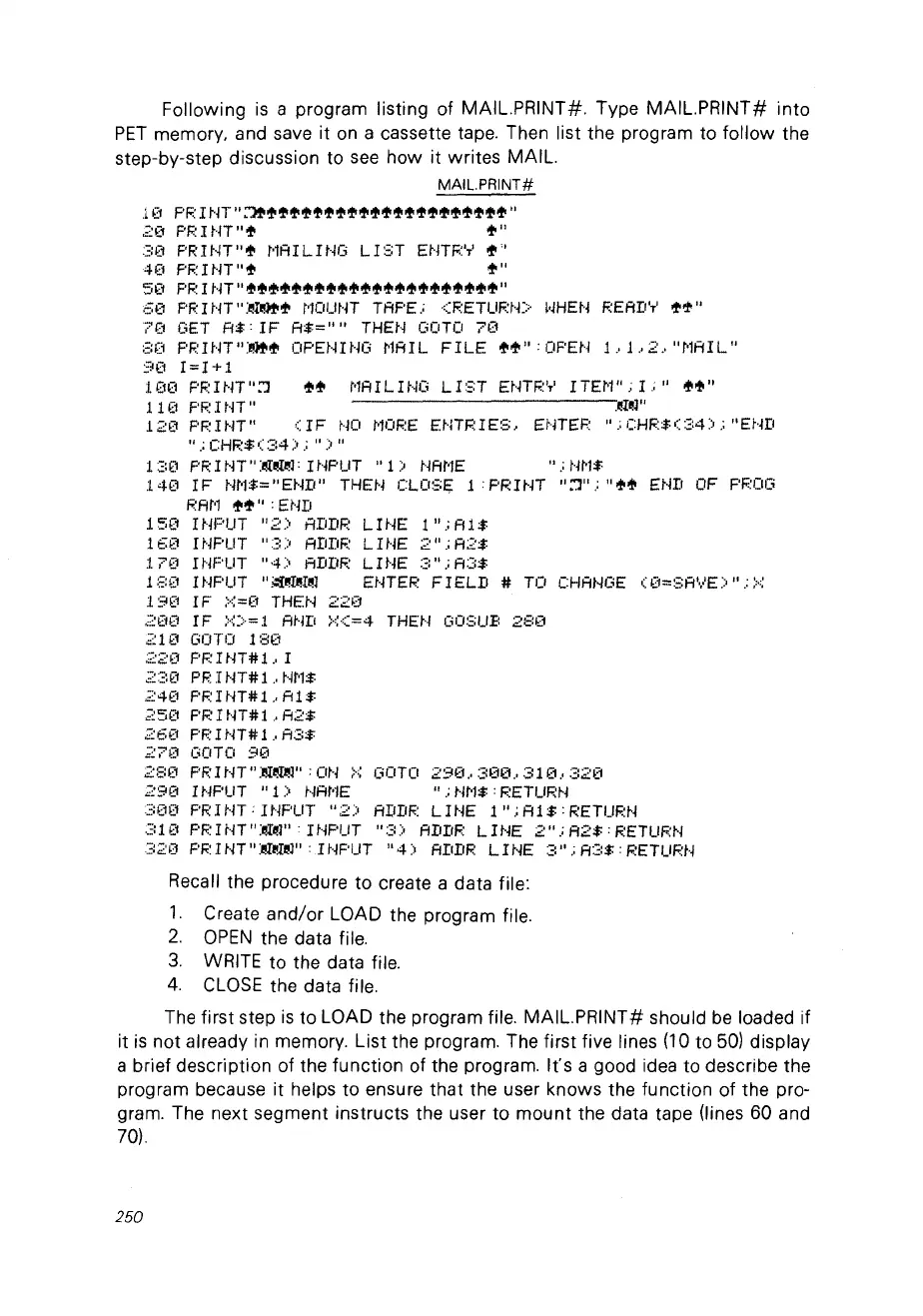
Following
is
a program listing of MAIL.PRINT#.
TypeMAIL.PRINT#
into
PET
memory, and save it
on
a cassette tape. Then list the program to follow the
step-by-step discussion to
see
how
it
writes MAIL.
MAIL.PRINT#
.1
0
PF:
1
HT"
::1+'!''!'ofltt'tt'tt'tt'oflofltt'ofloflofltt''!'tt''!''~''!''!'ofl''
,20
PF.:
1t·JT" '!' + "
3(1
PR!tH"
+ t'lA1L 1
HG
LIST
EtHF.:
'T'
'!'''
40
PF.:IHT"+
'!'''
50
pp
1
tH"
'!''!''!''!'+'!'tt''!''!'tt'tt''!''!''!'tt''!''!'oflofltt'+'!'''
6(1
F'F.:
1
tH"
:~rl!)!rofl
t'10UHT TAPE.;
<F.:ETUF.:t·D·
l'JHEH
F:EAD'T'
'!'1'''
?ü
GET
R$:IF
R$=""
THEH
GOTO
70
::::0
PF.:IHT":I!)!r'!'
OPENHjG
~1t1IL
FILE
ofo'!''': OF'Et·j
1.,1.,
2.,
"~lAIL"
90
1=1+1
:lüü
F'F.:INT"::J
1
:l!,:1
PF.:ltH"
120
PF.:HJT"
"
.:
CHF.:$
(::;:4;:'
.;
Il)
Il
130
PRItH":~~~l:It·jPUT
"1)
t·jAt'lE
".:W·1:$:
:l40
1F
t'/t'l$="
Et·m"
THEN
CLOSE;:
1:
PR
1
tH
"::J".;"
'!'+
Et~D
OF
F'F.:OCi
F.:At·l
,!,+": Et'iD
15(1
INPUT
"2)
FlDDF:
LIt·jE
1".:
Al
$
16~J
1t·jPUT
"3)
ADDF:
LI
HE
2".;
A2$
l.
70
1t'JF'UT
""")
ADDF:
LI
NE
3".:
A3$
1
:;::0
1HF'UT
";:rl!!~:r~l
EtHEF.:
FIELD
#
TC!
CHANGE
0::
ü=SA'·
...
E)
"
.:
;,.,;
:l90
IF
X=O
THEH
220
200
IF
X>=l
AHD
X<=4
THEN
G03UB
280
;:10
GOTO
180
220
PF:
HJT#
1
.'
1
,:;-:30
PF.:
1
tH#
1
.'
t·m$
24!,:1
PPHJT#l.,
AU
250
F'PHJT#l.,
A2$
260
F'F.:
1
tH#
1
.'
A::::$
;:70
GOTO
90
28(1
PF:HiT".l!l:~":
OH
;,.':
GOTO
290.,
;;:00
..
3H1
..
320
290
1NF'UT
"1)
t·jAt'lE "
.:
t·m$
:
RETURH
300
PRItH·INPUT
"2)
A!IDF.:
LIHE
l";Al$:RETUF.:H
31!,:1
PF.:
1
tH"
:~~l"
. 1
HPUT
";;::;'
ADDF.:
LI
NE
2".;
A2$
:
F.:ETUF:N
320
PF.:
1
NT"
:!!:r~1!!1"
:.1
t·iPUT
""")
ADIIR
LI
NE ::::".;
A::::$
: RETUF.:N
Recall the procedure to create a data file:
1.
Create
and/or
LOAD the program file.
2.
OPEN
the data file.
3.
WRITE to the data file.
4.
CLOSE
the data file.
The first step
is
to LOAD the program file. MAIL.PRINT# should
be
loaded if
it
is
not
already in memory. List the program. The first five lines
(10
to
50)
display
a brief description of the function of the program.
Ifs
a good idea to describe the
program because it helps to ensure that the user knows the function of the pro-
gram. The next segment instructs the user to
mount
the data tape (Ijnes 60 and
70).
250



 To Next Page