Byte:
3 4
5
6
7
Number Exponent
±MSB
Fraction
LSB
1E+38
255
22
118 153
83
1E+10
162
21
2
249
0
1000
138
122 0 0 0
1 129
0
0
00
.01
122
35
215
10
62
1E-4
115
81
183
23
90
lE
62
60
229
8
101
1E-39
0
32 0 0 0
0
0
0
0 0 0
-1
129
128 0 0 0
-1000
138
250 0
0
0
-lE+10
162
149
2
249
0
-1E+38
255
150
118 153
83
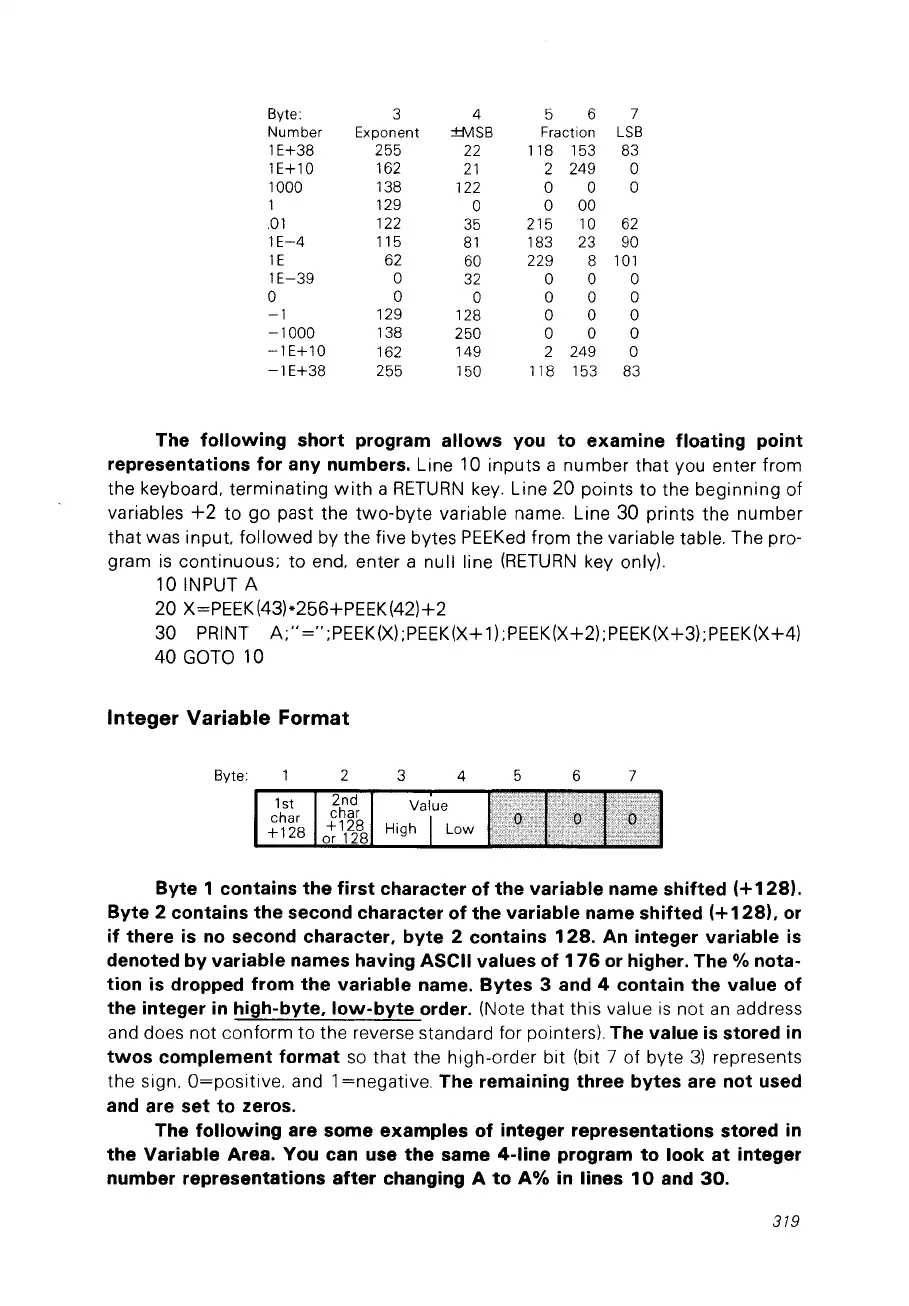
The following short program allows you to examine floating point
representations for any numbers.
Line 10 inputs a number
that
vou enter from
the keyboard. terminating
with
a
RETURN
key.
Line
20
points to the beginning of
variables
+2
to
go
pa
st the
two-byte
variable name. Line 30 prints the number
that
was input. followed by the five bytes
PEEKed
from the variable table. The pro-
gram
is
continuous;
to
end. enter a null line
(RETURN
key only).
10lNPUTA
20 X=PEEK(43)*256+PEEK(42)+2
30 PRINT
A;"
="
;PEEK(X)
;PEEK(X+l);PEEK(X+2) ;PEEK(X+3) ;PEEK(X+4)
40
GOTO
10
Integer
Variable
Format
76
5
4
32
2nd
char
+128
or
128
15t
char
+128
Byte:
r---"T"""':o:--:"-r--"""--
Byte 1 contains the first character of the variable name shifted
(+1281.
Byte 2 contains the second character of the variable name shifted
(+128),
or
if
there
is
no
second character, byte 2 contains
128.
An
integer variable
is
denoted by variable names having ASCII values of
176
or
higher. The % nota-
tion is dropped from the variable name. Bytes 3 and 4 contain the value of
the integer
in
high-byte,
low-byte
order. (Note
that
this value
is
not
an
address
and does not conform to the reverse standard for
pointers). The value
is
stored
in
twos
complement format
50
that the high-order bit (bit 7 of byte
3)
represents
the sign. O=positive. and 1=negative.
The remaining three bytes are not used
and are
set
to zeros.
The following are sorne examples
of
integer representations stored in
the Variable Area. You can use the same
4-line
program to look
at
integer
number representations
after
changing A to
A%
in Iines
10
and
30.
319



 To Next Page