. . . . . . . . . . . . . . . . . . . . . . . . . . . . . . . . . . . . .
ArmadaStation Removal and Replacement Procedures
5-47
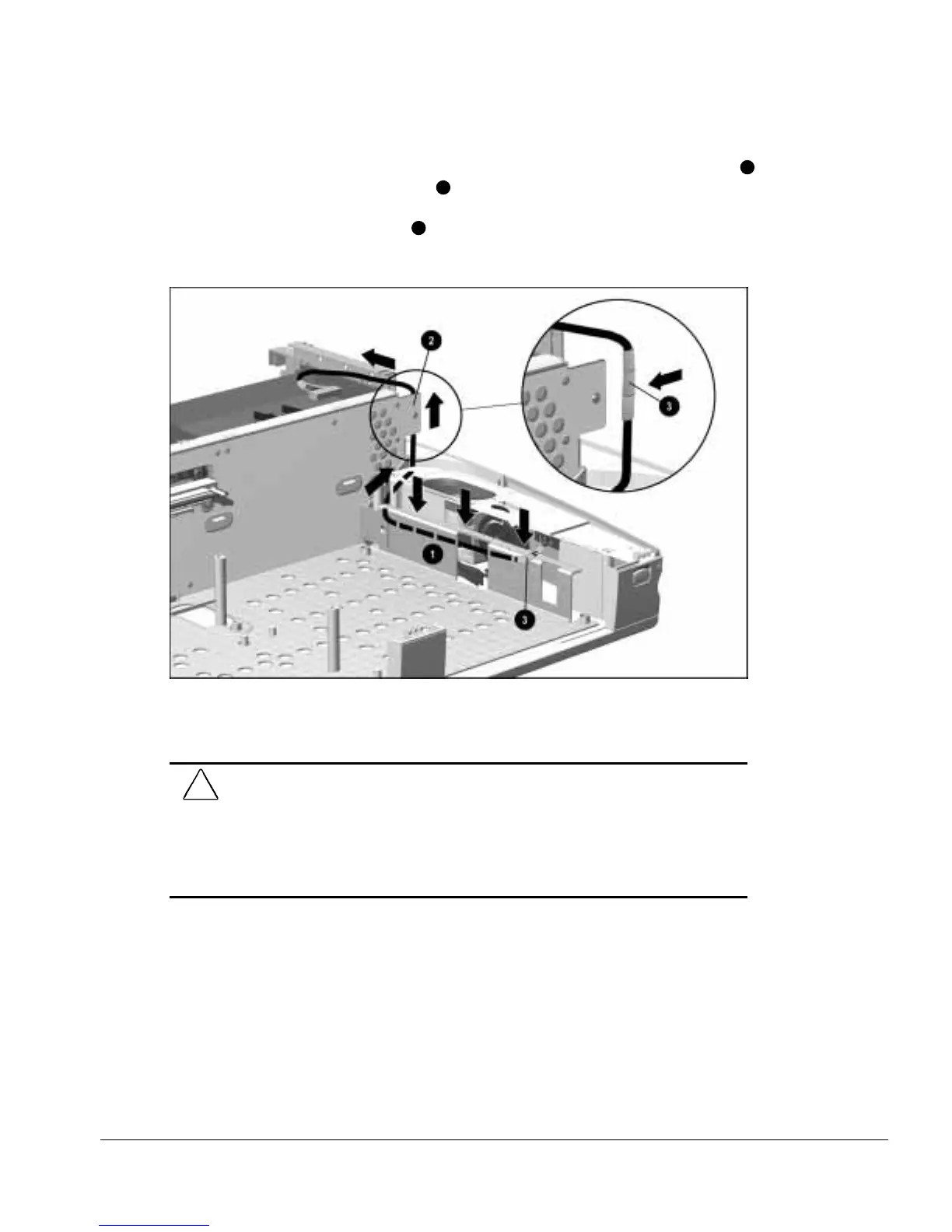
7. Route the control panel cable between the control panel and the base assemblies
1
and around the backplane assembly
2
(Figure 5-45). Make sure the protective
wrapping on the control panel cable protects the cable from the base assembly and
backplane assembly sheet metal
3
. The cable end with three pieces of protective
wrapping should be connected to the backplane assembly.
Figure 5-45.
Proper Position of the Control Panel Cable
8. Connect the control panel cable to the connector on the backplane assembly.
CAUTION:
Be careful when connecting the control panel cable to the backplane
assembly. The connectors only connect one way. Attempts to connect the cable the
wrong way can result in damage to the connectors on the control panel cable and
backplane assembly.
The connectors are properly seated and connected when the plastic connector housing
on the control panel cable fits flush in the plastic connector housing on the backplane
assembly.



 To Next Page