4-18 l Operation
(continued)
Control Function Descriptions - RW
Configuration
(continued)
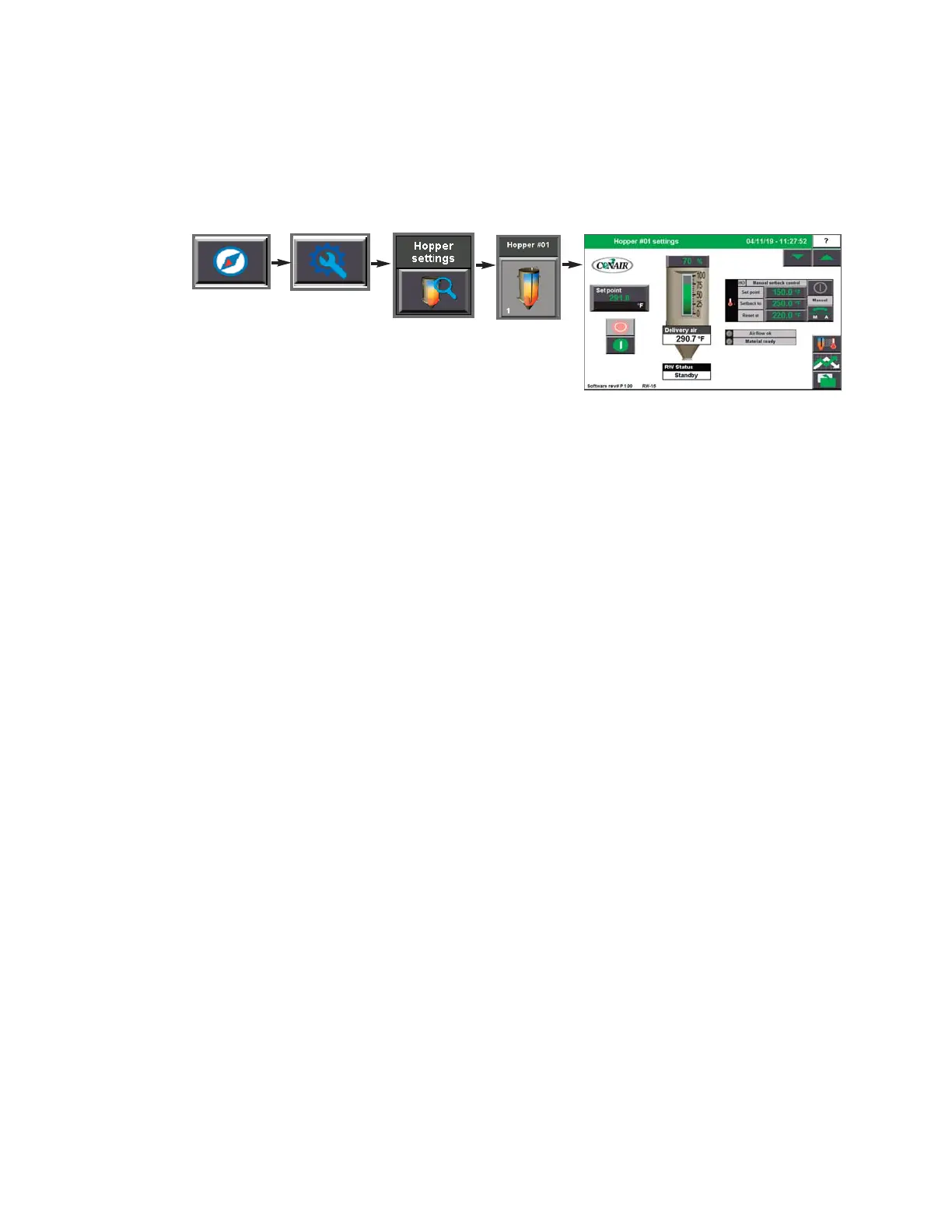
Hopper Setpoint Settings screen
To access the Hopper Setpoint Settings screen:
1 Press Navigation, Settings, Hopper Settings, Hopper Setup Selection.
The Hopper Settings Screen allows the user to establish the setpoints for the Delivery Air,
the Setback, the Hopper Outlet Temperature, and to enable/disable the Setback feature.
These setpoints can be adjusted for each hopper in your drying system (if equipped with set-
back).
Temperature Setback explained:
The purpose of Temperature Setback is to save on delivery air heat (energy) and to minimize
resin degradation due to overheating the material.
Temperature Setback works by monitoring the air temperature at the top of the hopper. The
setback features drops the delivery air temperature if the air temperature at the top of the
hopper gets too high. This saves energy and keeps the material from overheating.
NOTE: Depending on which options
your dryer has been configured with,
whether or not you have the Drying
Monitor enabled, and your user login
level, your screens and icons may
appear different. For example, if
your ResinWorks system is Drying
Monitor equipped, your hoppers will
display as Drying Monitor hoppers.
0
NOTE: Set points boxes are white
with heavy black borders. Set
points can be changed, if the user
has logged in at the proper security
level, by pressing the set point
boxes. This will launch a pop-up
keypad window that can be used to
change the set point.
See Operation
section entitled, How to Navigate
the Control Screens.
After the new
set point value has been entered,
press the "Enter" key to lock in the
new set point.
0
NOTE:
See the Appendix of this
User Guide for more information
about using the Drying Monitor.
0
NOTE: Setback must be installed and enabled at each HTC in a central drying system.
0
NOTE: High temperature at the top of the hopper could be the result of dried resin not leaving the hopper as it
should, or fresh resin not entering the hopper as it should. Check the conveying system to make sure that mate-
rial is entering and exiting the hopper when it should be.
0


 To Next Page