77
First, ensure that the vanes or cams have been set at the floor levels, as instructed in the
manual. It is recommended that each adjustment be performed in the following order:
UP Direction:
* Set the UP start time delay. (“F0" Function)
* Set the UP rated speed. (“F3" Function)
* Set the UP leveling speed. (“F2" Function)
* Set the UP acceleration and deceleration. (“F1" Function)
DOWN Direction:
* Set the DOWN rated speed. (“F6" Function)
* Set the DOWN leveling speed. (“F5" Function)
* Set the DOWN acceleration and deceleration. (“F4" Function)
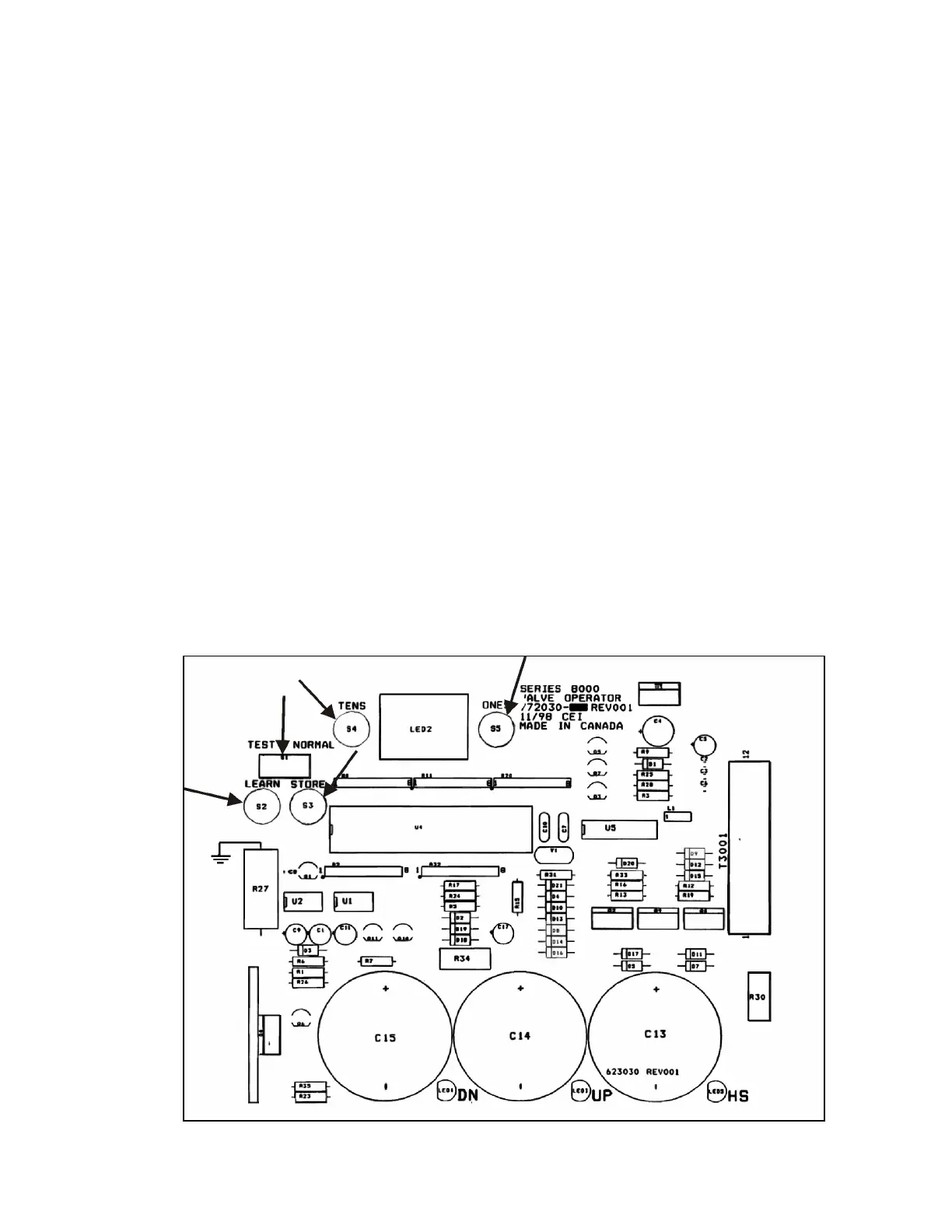
The valve PC board is also equipped with several switches and buttons for setting purposes:
TEST/NORMAL / LEARN / STORE / ONES / TENS
The change to the settings starts with movement of the TEST/NORMAL switch from the
NORMAL position to the TEST position. All adjustments to the factory settings are done from
the TEST position.
If the processor detects no input from the technician for five minutes, it will default back to the
NORMAL mode, even if the switch is in TEST mode. Any changes made while in TEST mode
will be lost, and the processor will default back to the settings, as they were when the
technician originally entered TEST mode. The five-minute time limit restarts every time there
is input into the processor. To permanently save the settings made while in TEST mode, the
TEST switch must be returned to NORMAL before the five-minute delay passes.
Figure # 51 Valve Operator Board


 To Next Page