Parameter
structure
Keypad and
display
Parameter x.00
Parameter description
format
Advanced parameter
descriptions
Serial comms
protocol
Electronic
nameplate
Performance
12 Digitax ST Advanced User Guide
www.controltechniques.com Issue Number: 1
2.8 Alarm and trip display
An alarm can flash alternately with the data displayed on the 2nd row
when one of the following conditions occur. If action is not taken to
eliminate the alarm, except "Auto tunE", "Lt" and "PLC", the drive may
eventually trip. Alarms flash once every 640ms except "PLC" which
flashes once every 10s. Alarms are not displayed when a parameter is
being edited.
When a trip occurs the drive switches to status mode and "trip" is shown
on the 1st row and the trip string flashes on the 2nd row. The read only
parameters listed below are frozen with any trip except UV trip until the
trip is cleared. For a list of the possible trip strings see Pr 10.20.
Pressing any of the parameter keys changes the mode to the parameter
view mode. If the trip is HF01 to HF16 then no key action is recognized.
2.9 Keypad control mode (SM-Keypad
Plus only)
The drive can be controlled from the keypad if Pr 1.14 is set to 4. The
Stop and Run keys automatically become active (the Reverse key may
be optionally enabled with Pr 6.13). The speed reference is defined by
Pr 1.17. This is a read only parameter that can only be adjusted in status
mode by pressing the Up or Down keys. If keypad control mode is
selected, then pressing the Up or Down keys in status mode will cause
the drive to automatically display the keypad reference and adjust it in
the relevant direction. This can be done whether the drive is disabled or
running. If the Up or Down keys are held the rate of change of keypad
reference increases with time. The units used for to display the keypad
reference is rpm.
2.10 Drive reset
A drive reset is required to: reset the drive from a trip (except some
“HFxx” trips which cannot be reset); and other functions as defined in
section 3 Parameter x.00 on page 13. A reset can be performed in four
ways:
1. Stop key: If the drive has been set up such that the stop key is not
operative then the key has a drive reset function only. When the stop
function of the stop key is enabled, a reset is initiated while the drive
is running by holding the Run key and then pressing the Stop key.
When the drive is not running the Stop key will always reset the
drive.
2. The drive resets after a 0 to 1 transition of the Drive Reset parameter
(Pr 10.33). A digital input can be programmed to change this
parameter.
3. Serial comms, fieldbus or applications Solutions Module: Drive reset
is triggered by a value of 100 being written to the User trip parameter
(Pr 10.38).
4. Auto-reset: Pr 10.34 can be used to provide an auto-reset function.
If the drive trips EEF (internal EEPROM error) then it is not possible to
reset the drive using the normal reset methods described above. 1233 or
1244 must be entered into Pr x.00 before the drive can be reset. Default
parameters are loaded after an EEF trip, and so the parameters should
be reprogrammed as required and saved in EEPROM.
If the drive is reset after a trip from any source other than the Stop key,
the drive restarts immediately, if:
1. A non-latching sequencer is used with the enable active and one of
run forward, run reverse or run active
2. A latching sequencer is used if the enable and “not stop” are active
and one of run forward, run reverse or run is active.
If the drive is reset with the Stop key the drive does not restart until a not
active to active edge occurs on run forward, run reverse or run.
2.11 Second motor parameters
An alternative set of motor parameters are held in menu 21 which can be
selected by Pr 11.45. When the alternative parameter set is being used
by the drive the decimal point after the right hand digit in the 1st row is
on.
2.12 Special display functions
The following special display functions are used.
1. If the second motor map is being used the decimal point second
from the right of the first row is on.
2. When parameters are saved to a SMARTCARD the right-most
decimal point on the first row flashes for 2 seconds.
During power up one or more of the following actions may be required.
Each action may take several seconds, and so special display strings
are shown.
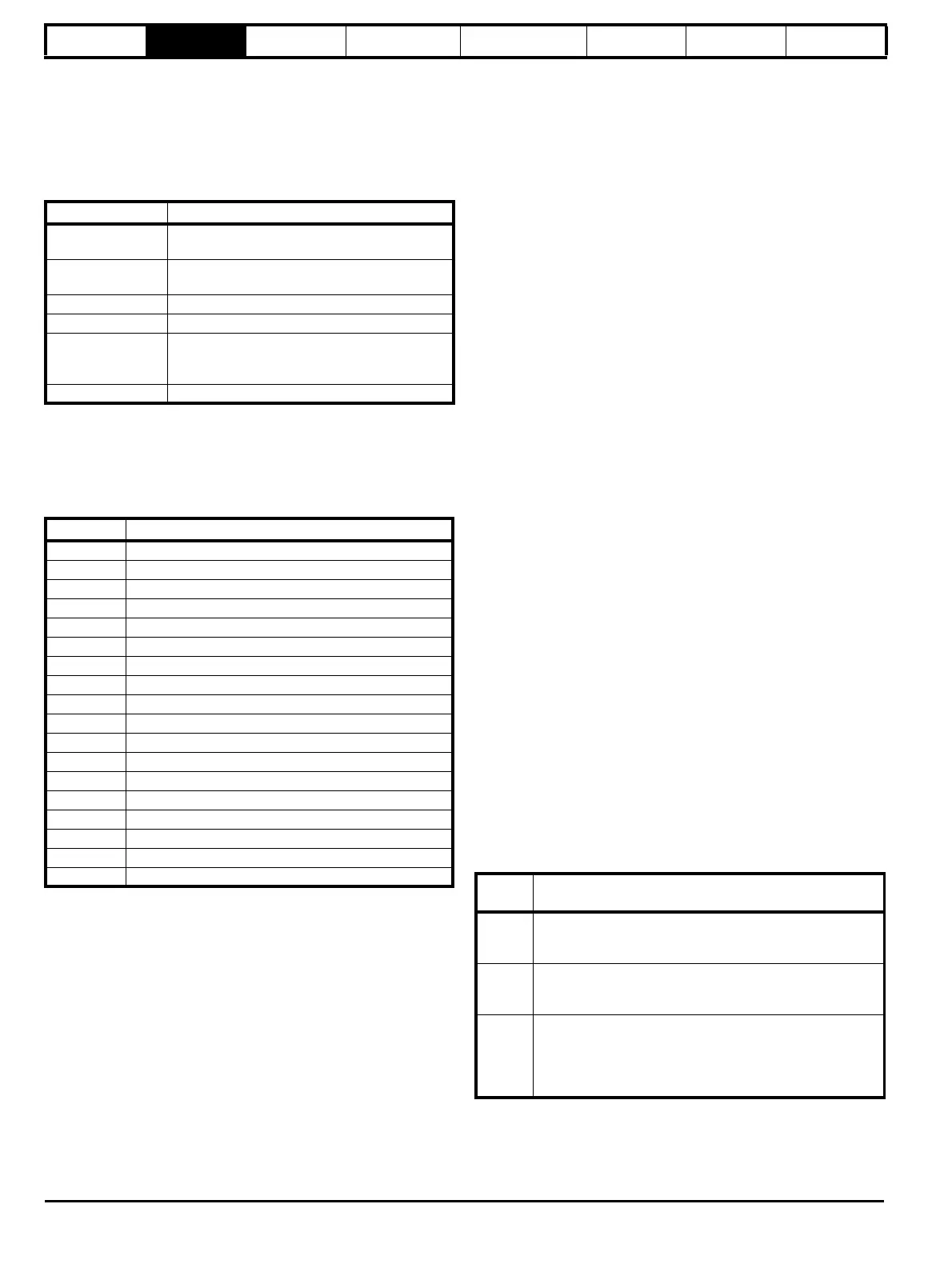
Alarm string Alarm condition
br.rS
Braking resistor (Pr 10.39 > 75.0% and the
braking IGBT is active)
OVLd
Motor overload (Pr 4.20 > 75% and the drive
output current > Pr 5.07)
hot Heatsink or control board alarms are active
Auto tunE Auto tune in progress
Lt
Indicates that a limit switch is active and that it is
causing the motor to be stopped (i.e. forward
limit switch with forward reference etc.)
PLC On-board PLC program is running
Parameter Description
1.01 Speed reference
1.02 Speed reference
1.03 Pre-ramp reference
2.01 Post-ramp reference
3.01 Final speed reference
3.02 Speed feedback
3.03 Speed error
3.04 Speed controller output
4.01 Current magnitude
4.02 Active current
4.17 Magnetising current
5.01 Output frequency
5.02 Output voltage
5.03 Power
5.05 DC bus voltage
7.01 Analog input 1
7.02 Analog input 2
7.03 Analog input 3
Display
string
Action
boot
If a SMARTCARD is present with Pr 11.42 set to boot the
parameters from the card must be transferred to the drive
EEPROM.
card
If the drive is in auto or boot mode (Pr 11.42 set to 3 or 4) the
drive ensures that the data on the card is consistent with the
drive by writing to the card.
loading
It may be necessary for a Solutions Module to transfer
parameter information from the drive. This is only carried out
if the parameter information held by the Solutions Module is
for a different drive software version. The drive allows up to 5
seconds for this process.


 To Next Page