Parameter
structure
Keypad and display Parameter x.00
Parameter description
format
Advanced parameter
descriptions
Serial comms
protocol
Electronic
nameplate
Performance
Digitax ST Advanced User Guide 5
Issue Number: 1 www.controltechniques.com
1 Parameter structure
The drive parameter structure consists of menus and parameters.
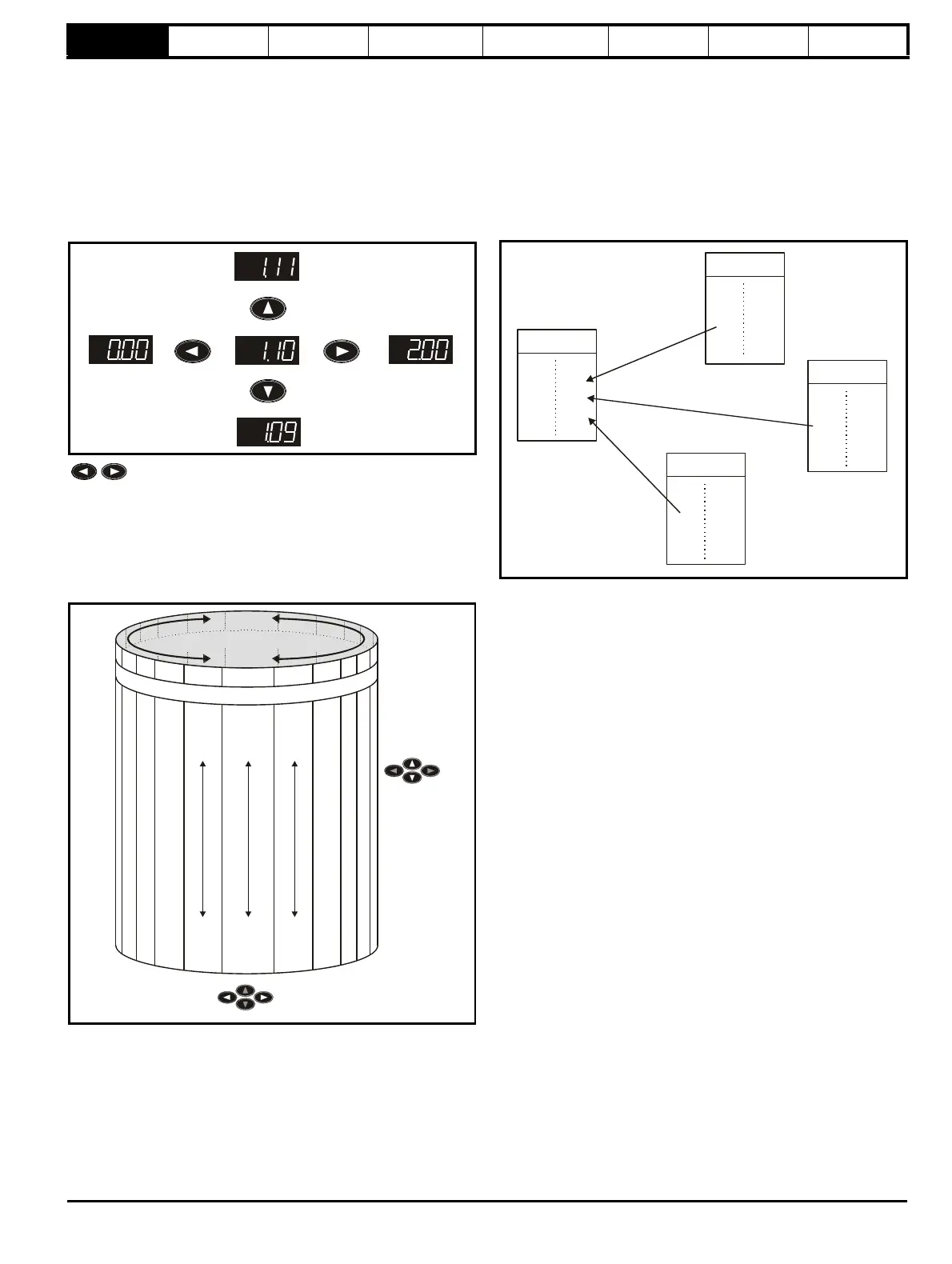
The drive initially powers up so that only menu 0 can be viewed. The up
and down arrow buttons are used to navigate between parameters and
once level 2 access (L2) has been enabled in Pr 0.49, and the left and
right buttons are used to navigate between menus. For further
information, see section 2.7 Parameter access level and security on
page 11.
Figure 1-1 Parameter navigation
* can only be used to move between menus if L2 access
has been enabled (Pr 0.49).
The menus and parameters roll over in both directions; i.e. if the last
parameter is displayed, a further press will cause the display to rollover
and show the first parameter.
When changing between menus the drive remembers which parameter
was last viewed in a particular menu and thus displays that parameter.
Figure 1-2 Menu structure
1.1 Menu 0
Menu 0 has up to 19 fixed parameters and 40 programmable parameters
that are defined in menu 11 and menu 22. Menu 0 parameters are
copies of advanced menu parameters, and although these parameters
are accessible via drive serial comms, they are not accessible to any
Solutions Modules. All menu 0 read/write parameters are saved on
exiting the edit mode. Table 1-1 gives the default structure for menu 0.
Where alternative parameters are selected with motor map 2 from menu
21 these are shown below the motor map 1 parameters.
Figure 1-3 Menu 0 copying
Menu 0 is used to bring together various commonly used parameters for
basic easy set up of the drive. All the parameters in menu 0 appear in
other menus in the drive (denoted by {…}).
Menus 11 and 22 can be used to change most of the parameters in
menu 0. Menu 0 can also contain up to 59 parameters by setting up
menu 22.
Moves
between
parameters
Moves between Menus
Menu 0
....XX.00....
0.50
0.49
0.48
0.47
0.46
0.01
0.02
0.03
0.04
0.05
M
e
n
u
2
2
M
e
n
u
1
M
e
n
u
2
M
e
n
u
2
1
2
2
.
2
9
2
2
.
2
8
2
2
.
2
7
2
2
.
2
6
2
2
.
2
5
2
2
.
0
1
2
2
.
0
2
2
2
.
0
3
2
2
.
0
4
2
2
.
0
5
1
.
0
1
1
.
0
2
1
.
0
3
1
.
0
4
1
.
0
5
1
.
5
0
1
.
4
9
1
.
4
8
1
.
4
7
1
.
4
6
Menu 0
0.04
0.05
0.06
Menu 2
2.21


 To Next Page