Viper Low overrun Service Manual
Publication Number: 621360241LOEWSE - 12 - © 2016, Cornelius Inc.
Control Panel Buttons
The second area are the buttons and arrows located across the bottom and on the right side of the control panel.
There are up to five buttons and four directional arrows that may be used on a screen to activate and control vari-
ous the functions of the system. Each button that is active for a given menu has a label directly above it. The label
describes what that button controls. For example, from the Barrel Status menu, pressing button 1 (labeled MENU)
displays the Select menu with more options — pressing button 3 (labeled OFF) turns off the highlighted barrel.
On each menu below the Select menu, there is a button (labeled BACK) to save any settings and return to the pre-
vious menu. There is another button (GO) to advance to the highlighted menu.
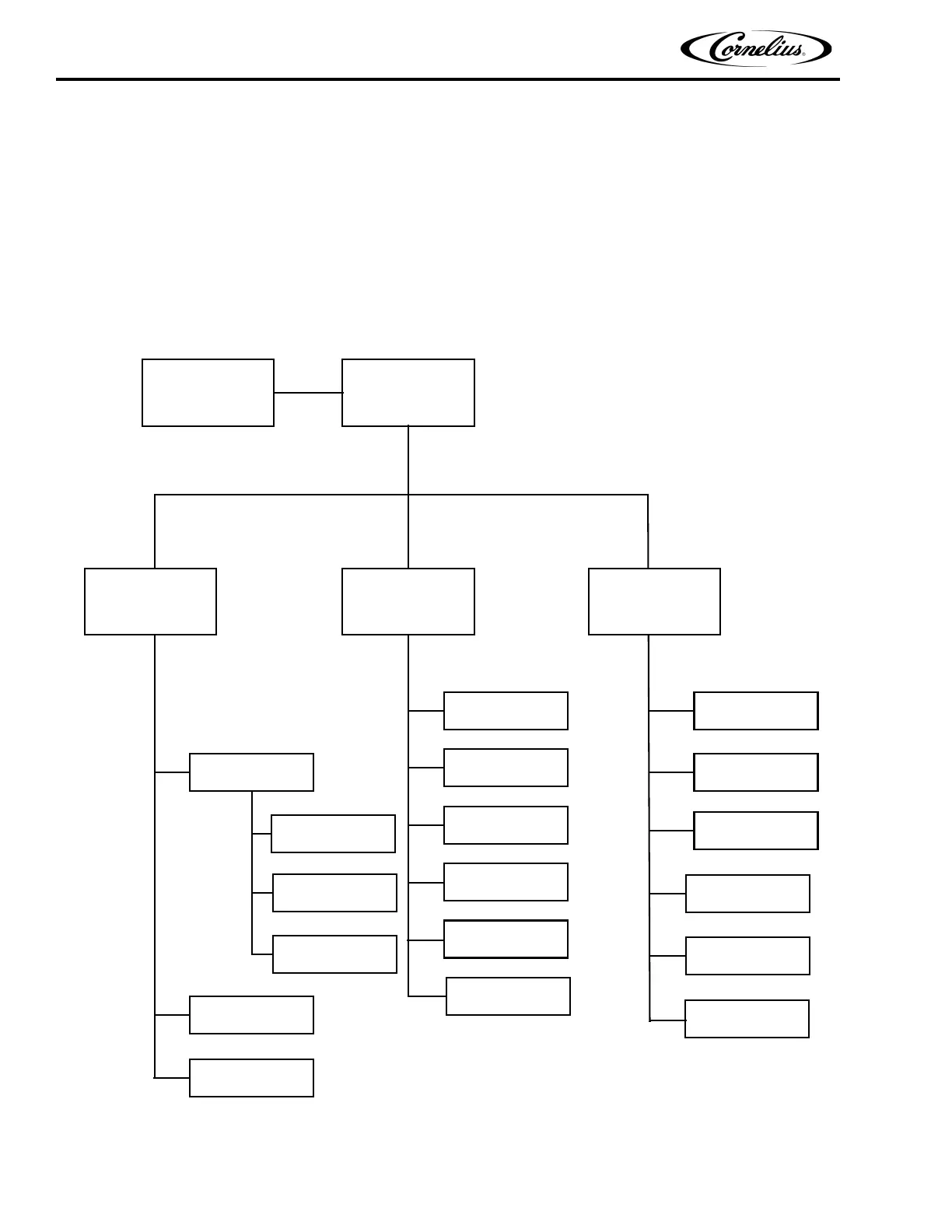
Figure 7. Software Structure
Initialization
Screens
Barrel
Status
(Home Screen)
Error Status
Unit Data
Error Log
Clock Setup
Event Setup
Option Setup
Viscosity Setup
Brix Setup
Motor Setup
Barrel Maint.
Manual Diag
Totals
Barrel Data
Unit Data
Software Ver.
Setup
Sub-Menus
Main
Sub-Menus
Maintenance
Sub-Menus
System Setup
CO2 Setup
Barrel Maint.



 To Next Page