Viper Low overrun Service Manual
Publication Number: 621360241LOEWSE - 16 - © 2016, Cornelius Inc.
Error Log Menu
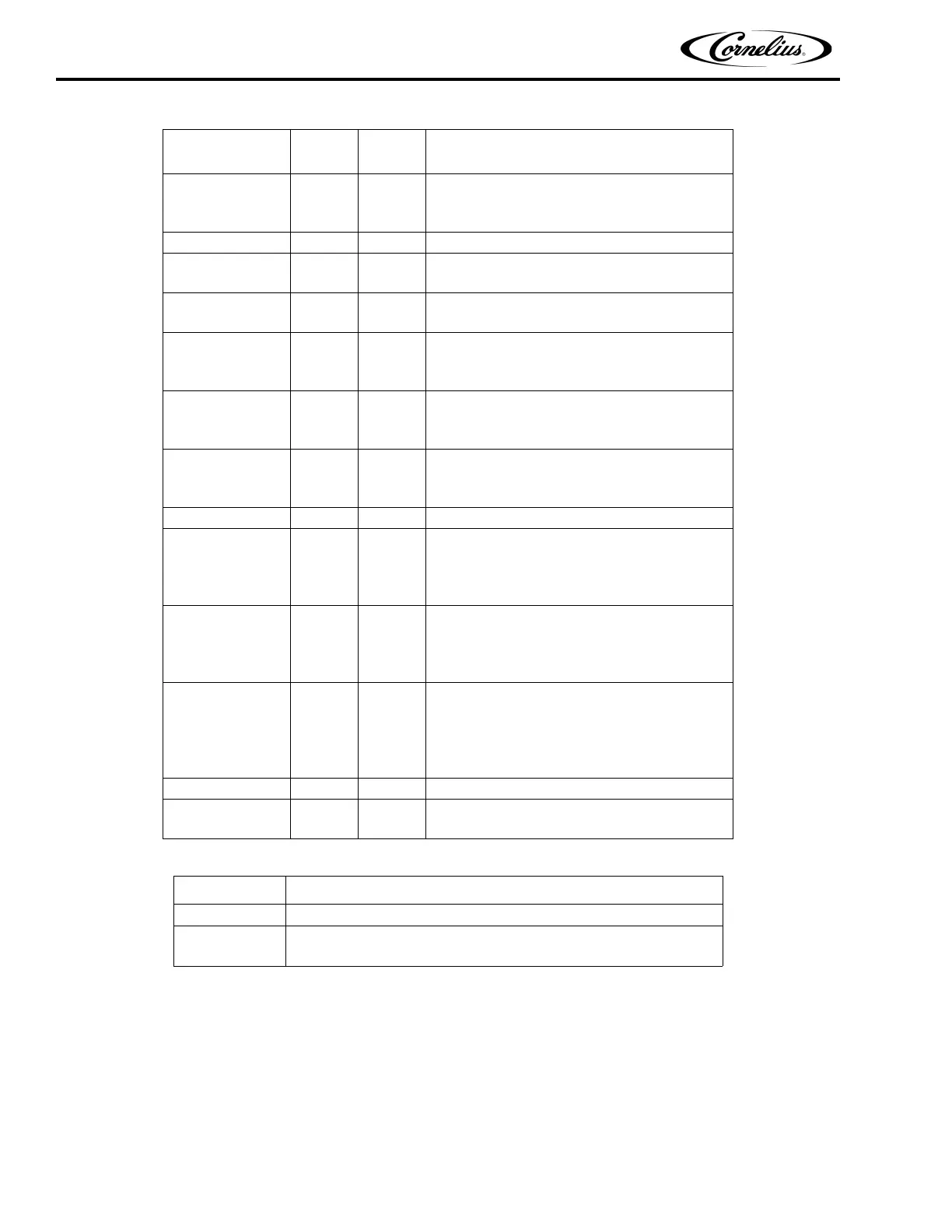
The Error Log screen displays information about any errors generated by the unit, as shown in Figure 12. If no
errors have been detected, the right side of the display is blank. To view more than one error, press the Up or Down
arrows on the right side of the display to scroll through the error log. Button functions are described in Table 8.
MOTOR STALL Barrel
Motor stalled. A two minute defrost and two
retries are allowed, then the message is dis-
played,
METER FAIL Barrel Metering chip is nonresponsive.
BRL RECOVER Barrel
Barrel viscosity is too high. Motor cannot rotate.
Automatic two minute defrost to thaw barrel.
COM ERR STAT Limp
Communications error, the system continues to
run.
HIGH VOLTAGE System
The unit is experiencing voltage greater than
260VAC. System is enabled when line voltage
drops below 260VAC for two minutes.
LOW VOLTAGE System
The unit is experiencing voltage less than
200VAC. System is enabled when line voltage
rises above 200VAC for two minutes.
NO MOTOR Barrel
The motor is reporting no current draw when acti-
vated. Motor is unplugged or thermal cutoff has
tripped.
FILL ERROR Barrel Barrel has not filled properly within 2 min.
H
2O OUT System
Water pressure is too low for proper operation.
This error occurs when the H
2O sensor reports
no or low water pressure for more than one sec-
ond. Error is cleared 10 sec. after restoration.
CO
2 OUT System
CO2 pressure is below required operating pres-
sure. This error occurs when the CO
2 sensor
reports no or low CO
2 pressure for more than one
second. Error is cleared 10 sec. after restoration.
SYRUP OUT Barrel
Syrup pressure is below required operating pres-
sure. This error occurs when the syrup sensor
reports no or low syrup pressure for more than
one second. Error is cleared 10 sec. after resto-
ration.
CLOCK System The real time system clock is not functioning.
MTR CTL
EEPROM
System Motor control EEPROM is bad or missing.
Table 7.
Button Description
BACK Returns the display to the Select menu
RESET
Allows the user to reset the highlighted error (This button only appears
on certain manually resettable errors).
Table 6.
Displayed
Message
Action Type Description



 To Next Page