EVOLUTION COVER page-49
LIMIT SWITCH ADJUSTMENT
WARNING
Disconnect or turn off the power supply before
starting any work on the cover. All electrical work
should be performed by a qualified electrician.
NOTE
The up and down limit switches have been factory-
adjusted and there should be no need to readjust
them. If adjustments are required to ensure the
cover does not come in contact with surrounding
obstacles while being raised, the maximum height
may be reduced. Never change the factory setting
of the down limit nor increase the up limit beyond
the factory setting. Failing to do so may result in
equipment damage and/or injury.
1.
Disconnect or turn off the power and lock out
the power source.
2.
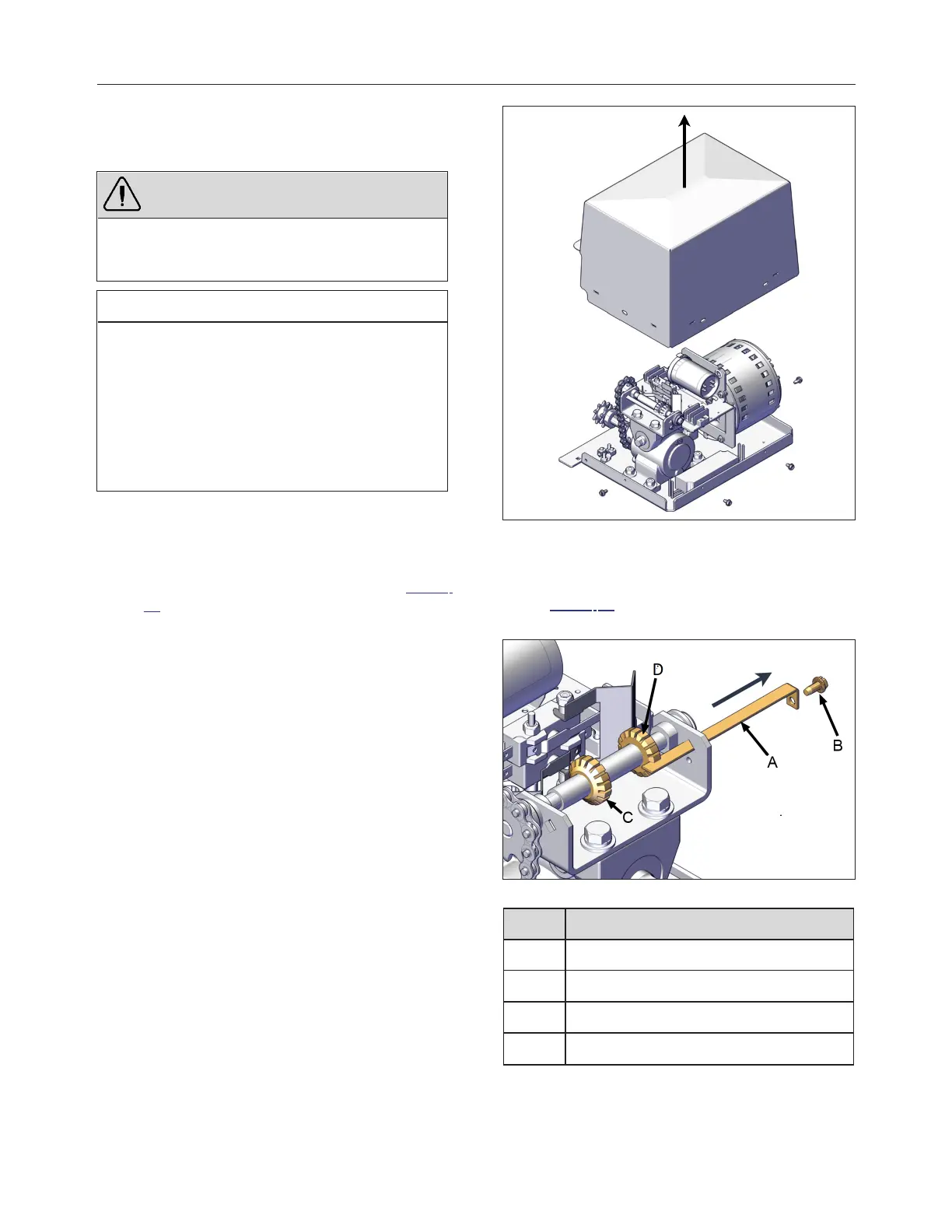
Remove the four slotted screws at the bottom
of the operator and remove the cover Figure
79.
FIGURE 79: REMOVE OPERATOR COVER
3.
Remove the slotted retaining screw and slide
the cam plate out from operator frame see
Figure 80. Be careful not to rotate the cam
wheels.
FIGURE 80: CAM PLATE REMOVAL
ID DESCRIPTION
A CAM PLATE
B SLOTTED SCREW
C DOWN-CAM WHEEL
D UP-CAM WHEEL
240799 OWNER'S MANUAL REVISION 4



 To Next Page