Kangaroo™ Console | 20
Battery and Storage
Charging:
Between uses the console with the battery should be plugged into AC power to keep
it at full charge. Charging stations and extra batteries are optional accessories. When
using a charging station, refer to the instructions for use provided in the charging
station packaging.
Battery:
The console has a replaceable rechargeable battery. It is also recommended that the
battery charge be “topped off” before battery-only operation is utilized. The battery
pack will charge continuously whenever the device is plugged into a wall outlet,
including during normal use of the device with AC power.
Battery level indicator:
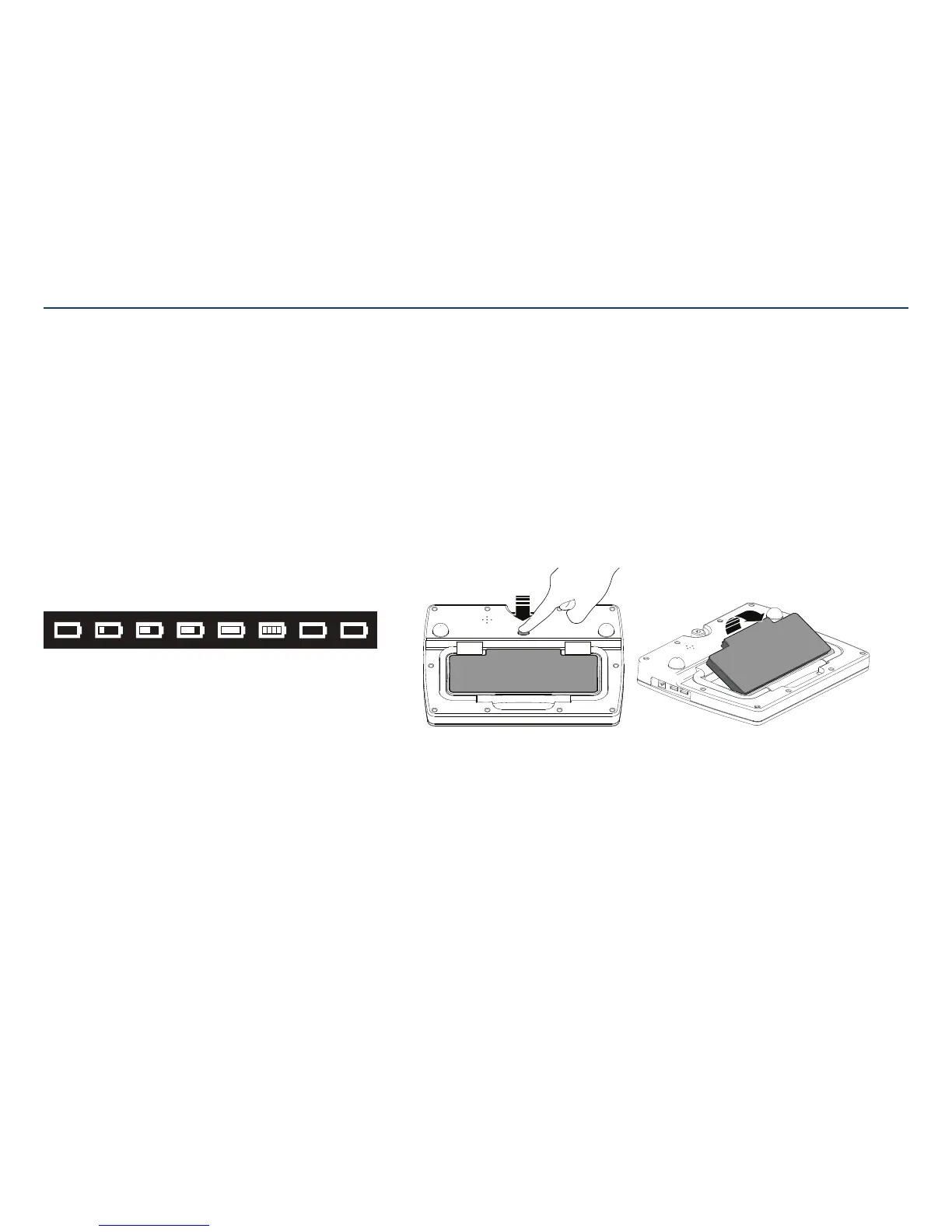
In the upper right corner of the screen is a battery icon.
This icon changes to reflect the amount of battery life remaining until recharging
is needed. The icon will also show when the console is connected to an AC
poweroutlet.
Left to right the symbols show 1) <10% 2) 10%-25% 3) 26%-50% 4) 51%-75%
5) 76%-100% 6) charging, 7) communication error, 8) missing battery.
When the console battery has 10% capacity left a low battery warning screen will
appear. Tap the check mark and connect the console to an AC outlet using the
removable power cord.
If the battery is very low, a warning screen will appear and the console will shut off.
Plug the console in to charge the battery.
Storage requirements:
Store in environments of 0°C to +50°C and relative humidity of 15% to 85%
(non-condensing).
Section IV: Cleaning, Charging, and Storage
Store the console away from direct sunlight, heat sources, and dust; in particular, do
not expose the console to direct sunlight for long periods of time. Remove battery
from console to preserve longevity. When using the mounting clamp, the console
must be removed from the pole prior to removing thebattery.
Removing the battery:
The battery can be easily removed, and replaced if necessary, by the user.
When the console is not in use for extended periods of time, removing the battery and
storing separately can help maintain the battery’s longevity.
Press the battery release button to pop one side of the battery out. Then, lift the
battery off the console and place in proper storage.
Do not attempt to remove the battery while the console is attached to apole.



 To Next Page