Using Your Creative Prodikeys 3-11
Step 6: Selecting
Tempos
Depending on the type of song you are going to play, select the speed for the
rhythm.
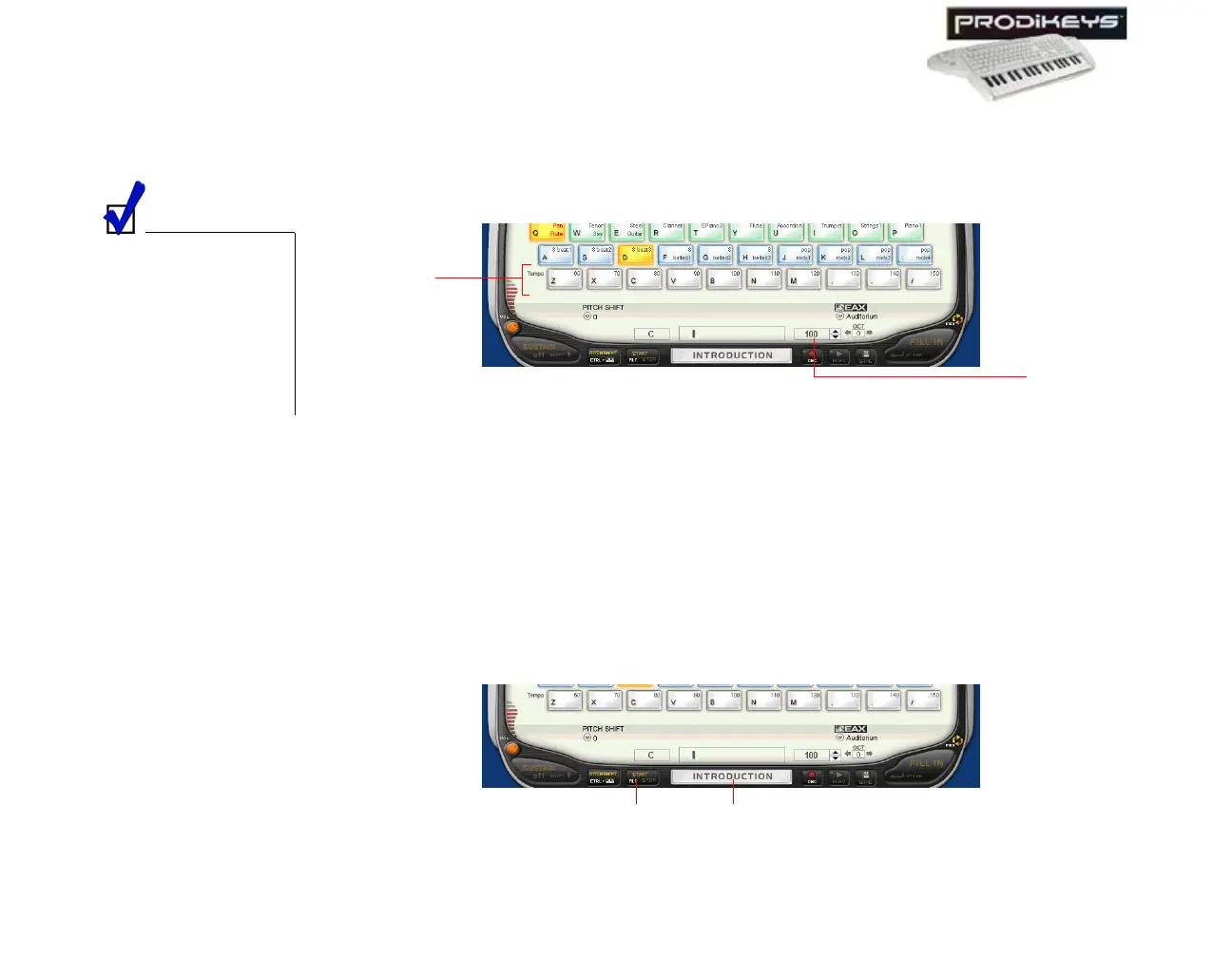
To select a tempo: Click the Tempo keys in the Creative Prodikeys software, or
press the corresponding keys on your computer keyboard.
Step 7: Starting
the Rhythm
You are now ready to play! To begin, just start the rhythm. You can start the
rhythm with or without an introductory rhythm pattern.
To start the rhythm with an introductory rhythm pattern: Click the
Introduction/Ending button in the Creative Prodikeys software, or press
SPACEBAR on your computer keyboard.
To start the rhythm without an introductory rhythm pattern: Click the
Start/Stop button in the Creative Prodikeys software, or press ALT on your
computer keyboard.
You can also click the
Up or Down buttons
beside the Tempo box
in the Creative
Prodikeys software, or
press MINUS SIGN (-)
or PLUS SIGN (+) on
the computer
keyboard to adjust the
tempo.
Figure 3-16
Temp o
keys
Tem po
box
Figure 3-17
Introduction/
Ending button
Start/Stop
button



 To Next Page