Crestron SIMPL™ Windows Software
Show SIMPL+ Memory Usage
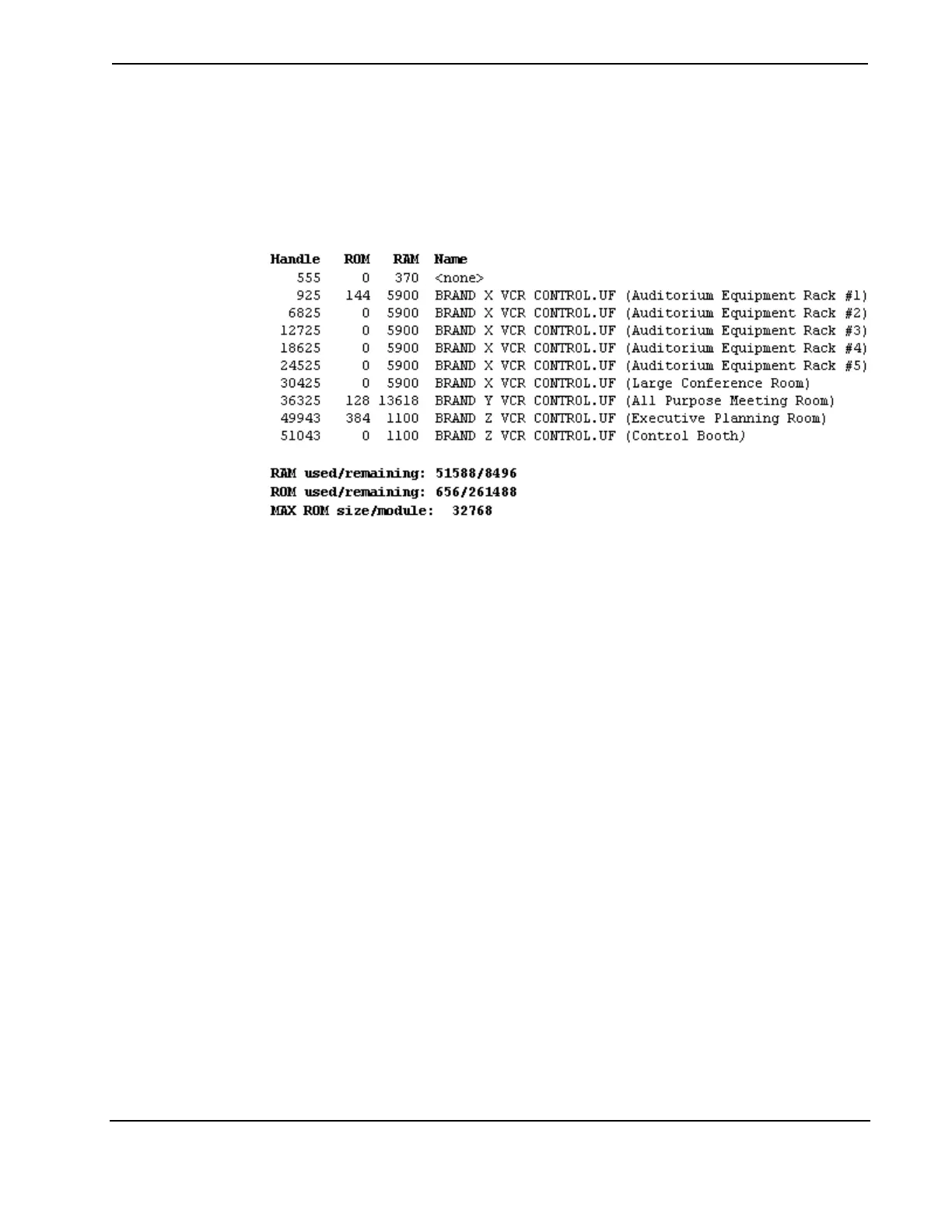
In X Series control systems only, the Show SIMPL+ Memory Usage command
displays the "tasks" list, which is the list of SIMPL+ tasks/processes running in the
control system. The data includes the amount of memory being used by each
SIMPL+ module, in the following format:
The ROM column represents how much permanent memory the module is using in
the control system. A module is stored only once. In the example above, three
modules are stored in ROM:
BRAND X VCR CONTROL.UF takes up 144 bytes of ROM.
BRAND Y VCR CONTROL.UF takes up 128 bytes of ROM.
BRAND Z VCR CONTROL.UF takes up 384 bytes of ROM.
A module can be instantiated several times; each instance of a module takes up RAM
(as shown in the RAM column), but no additional ROM. In the above example,
BRAND X VCR CONTROL.UF is instantiated 5 times. Each instance takes up the
same amount of RAM.
The name in parentheses is the reference name. In SIMPL Windows, all SIMPL+
modules have a <Reference Name> parameter. Whatever is typed into this field is
what will be shown in the parentheses. This provides a unique identifier for each
copy of a module. If any errors are generated at runtime, the error message will give
both the module name and the reference name, as follows:
~TEMP1[7] <-- Array out of bounds in BRAND Z VCR
CONTROL.UF (Executive Planning Room)
~TEMP[16][17] <-- Array out of bounds in BRAND Z VCR
CONTROL.UF (Executive Planning Room)
~X$[10] <-- Array out of bounds in BRAND Z VCR
CONTROL.UF (Executive Planning Room)
The reference name makes it easier to track the instance of a module that is causing
the run-time error.
The Handle column is used internally by the control processor and can be
disregarded. The <none> task is a system internal task that is always present.
Installation & Operations Guide – DOC. 5728C Crestron SIMPL Windows • 111



 To Next Page