Software Crestron SIMPL™ Windows
Example-Serial Driver Configuration
Much of the equipment in the A/V industry is controlled by serial communication
standards like RS-232, RS-422, and RS-485 for example. The control system
specified for our design is a CNMSX-PRO which has a CNXCOM-6 control card
installed from the factory. The CNXCOM-6 is a two-way serial card that supports
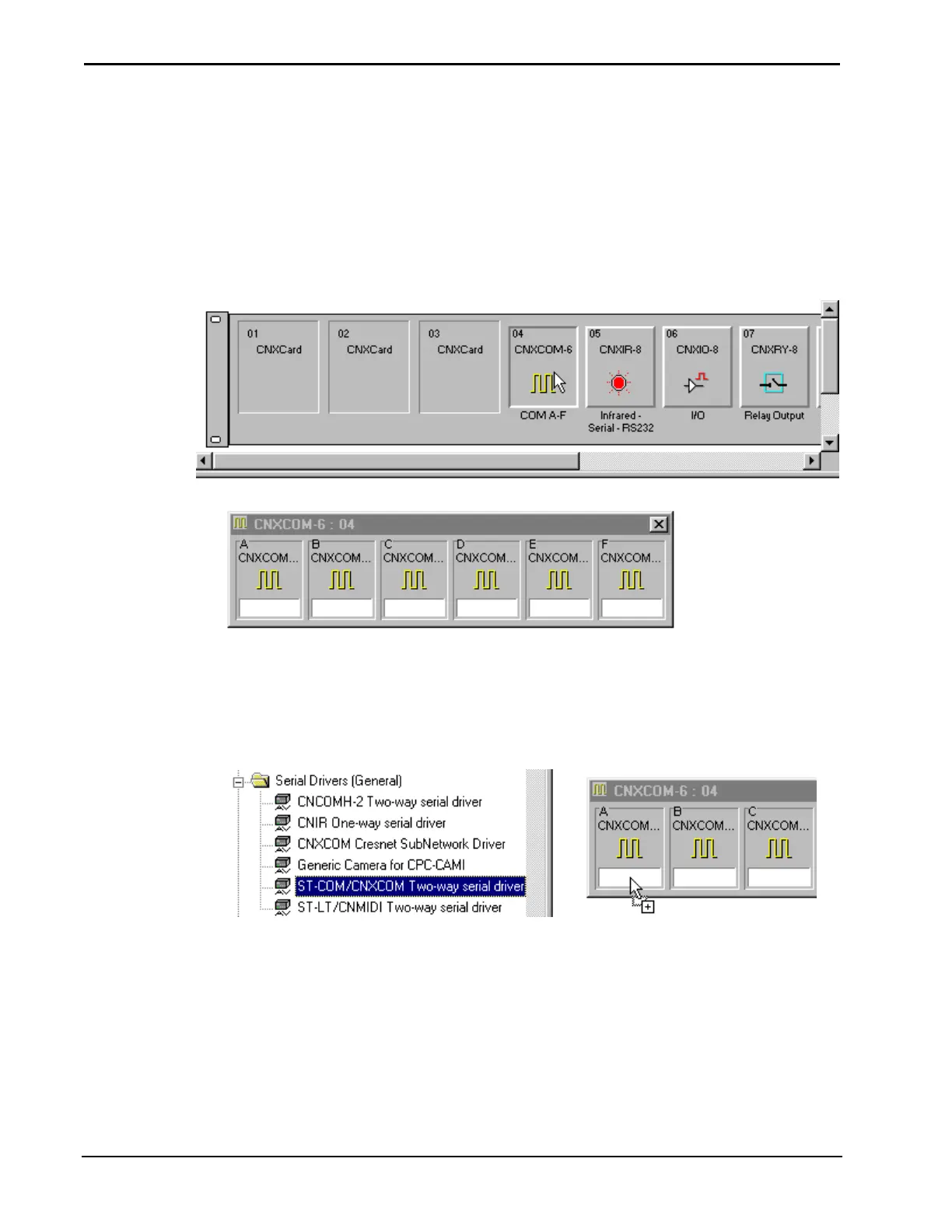
RS-232, RS-422, and RS-485. Click on the CNXCOM-6 to display the six serial
ports in Detail System View.
Network System View of CNMSX-PRO (top), Detail System View of CNXCOM-6 (bottom)
Some serial cards may have a default driver already installed. If this is not the
preferred drive, replace it by selecting another driver. Select the serial driver from
the Device Library. In this example a ST-COM/CNXCOM two-way serial driver is
selected. Click and drag the ST-COM/CNXCOM and drop it into Port A of the
CNXCOM-6 control card.
Select Serial Driver to be Installed and Drop into Appropriate Control Port
Right mouse click on the driver to configure the device settings or delete the device.
For this example, select Configure.
36 • Crestron SIMPL Windows Installation & Operations Guide – DOC. 5728C



 To Next Page