Operation
Interior lights
Lighting of the instrument panel, dis-
plays and switches
Depending on the model, the lighting of the
instrument panel and controls can be adjus-
t
ed in the Easy Connect system, using the
> SETTINGS key
›››
page 80.
In certain cases,when the engine is running
and the lights are not switched on; e.g., pass-
ing through a tunnel without having activa-
ted the function, a Switch on the
lights warning will appear on the instru-
ment panel.
Interior and reading lights
1)
Glove compartment and luggage com-
partment lighting*
When opening and clo
sing the glo
ve com-
partment on the front passenger side and
the rear lid, the respective light will automati-
cally switch on and off.
Footwell lighting*
The lights in the footwell area below the dash
(driver and front passenger sides) will switch
on when the doors are opened and will de-
crease in intensity while driving. This intensity
can be changed through the infotainment
system menu (key > SETTINGS >
Lighting > Interior lighting
›››
page 80).
Ambient light*
The ambient light lights up the area of the
centre console, the footwell area and, de-
pending on the version, the front door pan-
els.
The ambient lighting in the door panels may
change colour. The intensity and color can
be adjusted through the infotainment system
menu (key > SETTINGS > Background
lighting
›››
page 80).
Note
The reading lights switch off when the vehi-
cle is locked using a key or after several mi-
nutes if the key is removed from the igni-
tion. This prevents the battery from dis-
charging.
Visibility
Windscreen wiper and rear
window wiper systems
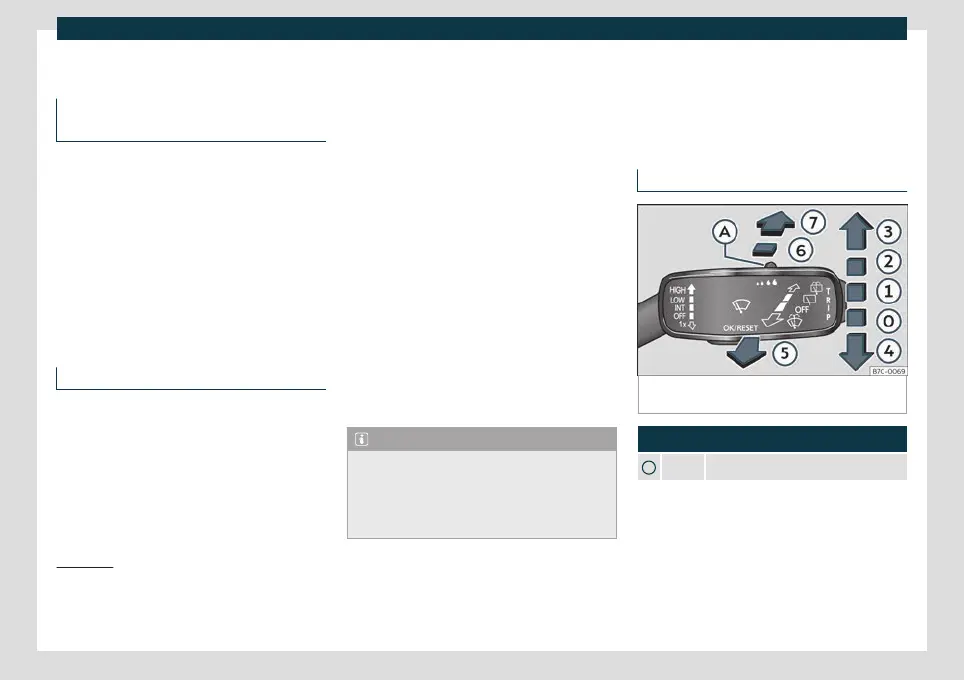
Window washer lever
Fig. 91
Operating the windscreen wiper and rear
wiper.
More the lever to the required position:
0
Windscreen wipers off.
1)
Depending on the features fitted in the vehicle, LEDs
can be used for the following interior lights: front vanity
mirror light, rear vanity mirror light, footwell light, sun
blind and glove compartment light.
114



 To Next Page