Infotainment System
Initial configuration wizard
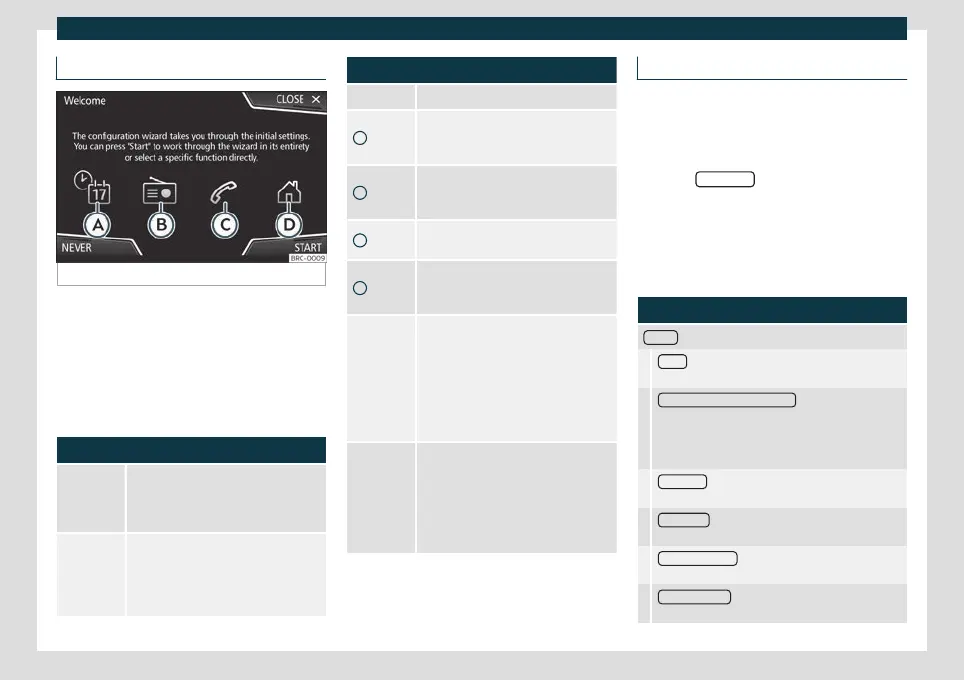
Fig. 132
Initial configuration wizard
It will help you to set up your Infotainment
s
y
stem the first time you switch it on.
Every time you switch on the Infotainment
system, the initial setup screen will appear
›››
Fig. 132 if any parameters have not been
set or if the NEVER function button has not
been pressed.
Function button: function
CLOSE
Closes the Configuration Wizard, and
the main menu or last mode in which
you used the Infotainment system will
appear.
NEVER
Disables the possibility of changing the
settings of the Infotainment system. To
configure the system go to: System
settings and select Configuration
wizard.
Function button: function
START Starts up the Configuration Wizard.
A
If the system includes navigation, the
date and time are set automatically by
the GPS.
B
Search and save the radio stations with
the best reception at that time in all
available bands.
C
Link your mobile phone to the Infotain-
ment system.
D
Add your home address using your cur-
rent position or by manually entering an
address.
PREVIOUS
NEXT
Previous or next parameter to config-
ure.
When a parameter has been config-
ured, the only way to reconfigure it is by
clicking on it on the main menu, not by
using the Previous/Next buttons.
When you configure a parameter,
will be displayed over it.
FINISH
Once one or more settings have been
applied, finalise the configuration in the
main menu of the wizzard.
If you have not set all the parameters,
the Initial Configuration Wizard will start
the next time you turn the Infotainment
system on.
Menu and system settings
The settings that can be selected varies de-
pending on the country and the equipment
in question, and on the vehicle's equipment.
●
Pr
ess the Infotainment button and then
press the SETTINGS
function button.
Press the function butt
on of the main menu
or the functions for which you want to
change the settings. All settings are auto-
matically applied when the menus are
closed.
Function button: function
Screen
: To change the screen settings.
Menu
: To select the main menu display mode (Mo-
saic or Carousel).
Switch off screen (in 10 seconds)
: If this function is ac-
tive and the infotainment system is not used, the
screen will automatically switch off after approx. 10
seconds. Pressing the screen or pressing one of the
infotainment buttons will turn the screen on again.
Brightness
: To select the brightness level of the
screen.
Day / Night
: To select the type of display (Day,
Night or Automatic).
Touchscreen tone : The confirmation tone when a
function button is pressed is active.
Proximity sensor : The proximity sensors are active.
Also see
›››
page 153, Proximity sensor.
154



 To Next Page