Connectivity
Tethering of portable devices that
support MirrorLink
®
, Android Auto™
and/or Apple CarPlay™ technologies
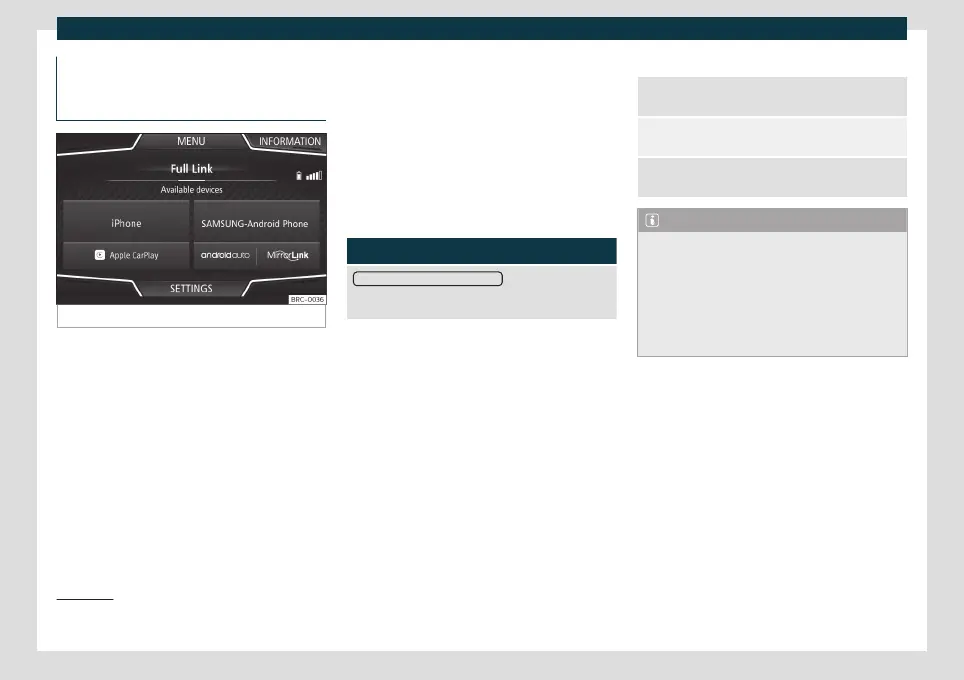
Fig. 138
Full Link menu
When you enter Full Link for the first time,
the t
echnolo
gies available for pairing the
portable device are displayed.
Once the device connects via USB, the sys-
tem will offer you the technologies available
for establishing a connection.
In the event of simultaneous connections
between two devices with different operat-
ing systems, a choice will be presented for
which one to make the connection with
›››
Fig. 138.
View of the device list
iPhone™ devices only support Apple Car-
Play™.
There are some Android devices that sup-
port MirrorLink
®
and Android Auto™.
Bear in mind that once the device is connec-
ted it will not be available as an audio source.
Full Link Settings
Function button: function
Activate data transfer for SEAT apps
: allows the exchange
of information between the vehicle and applications
authorised by SEAT.
Last Mode
If the t
elephone connection is t
erminated
only by unplugging the cable, the next time
the device is connected, the session will start
without the user having to take any action
1)
.
Information
Consult the mobile device manual.
Depends on each technology:
Availability in a country
Third party applications
1.
2.
For further information:
MirrorLink
®
:
www.mirrorlink.com
Apple CarPlay™:
www.apple.com/ios/carplay
Android Auto™:
www.android.com/auto
Note
●
In order to use Android Auto™ technolo-
gy it is necessary to download the Android
Auto™ application, located on Google
Play™.
●
Only compatible applications can be
used, in accordance with the technology
connected.
1)
Unless the device requires the screen to be
unlocked in or
der to establish the connection.
163



 To Next Page