Operating modes
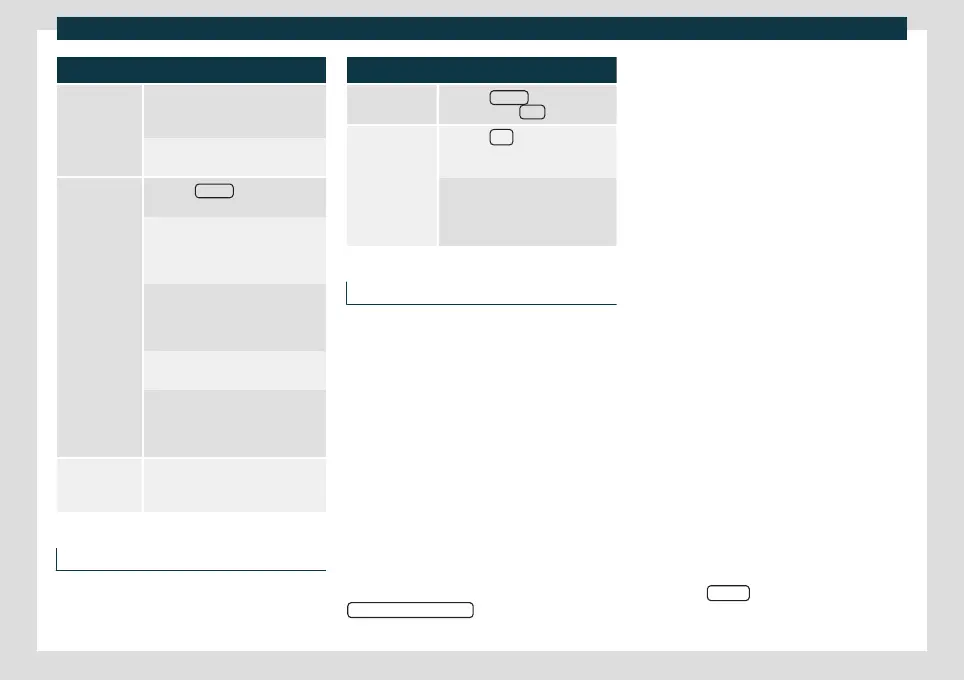
Presetting stations
Saving the sta-
tion that is be-
ing listened to.
Press and hold the desired preset
button
›››
Fig. 142 until an audible
signal is heard.
The tuned station is stored on a pre-
set button.
Saving a station
from the sta-
tions list
Press the Stations
›››
Fig. 142 func-
tion button to open the station list.
The stations that are already stored
on a memory key are marked on the
station list with the symbol
›››
Fig. 143.
Select the desired station by press-
ing and holding it down on the
screen. A screen opens for saving
the station on the memory buttons.
Press the memory key where the
station will be saved.
A sound is heard and the station is
saved on the memory button. Re-
peat the process to continue saving
other station on the list.
Delete preset
stations
The Settings menu can be used to
delete all of the saved stations to-
gether, or separately
›››
page 176.
Automatic playback (SCAN)
When automatic playback is active, all tune-
able st
ations in the select
ed frequency band
are played for approximately 5 seconds each.
Start and end automatic playback
Start automatic
playback
Press the Settings
function button
and then select Scan
.
End automatic
playback
Press the
function button to
stop automatic playback on the
station that is being played.
Automatic playback also ends
when a station is selected manually
using the memory buttons, or
when the screen is changed.
Traffic information (TP)
It is only possible for traffic information to be
tr
ack
ed with the TP function if the station in
question can be tuned. Stations with the
traffic information function are shown on the
RADIO main menu and on the station list
with the symbol TP
›››
Fig. 142 and
›››
Fig. 143.
Some stations without their own traffic infor-
mation support the TP function by broad-
casting traffic announcement from other
stations (EON).
Activating and deactivating the TP func-
tion
●
In the Settings (FM, AM, DAB) menu,
activate or deactivate the
Traffic programme (TP)
function button by
pr
essing it
›
››
page 176.
Active TP function and station selection
Traffic announcements are played in Audio
mode.
If a station without the TP function in FM
mode is selected, the radio tries to find sta-
tions with this function in the background. If
none are found, it will be displayed half way
up the left hand side of the screen
.
In AM mode or in Media mode, a traffic sta-
tion is automatically tuned in the back-
ground as long as there is one available. De-
pending on the situation this operation may
take some time.
Incoming traffic announcement
In Audio mode, traffic announcements are
played automatically when they are received.
While the traffic announcement is playing, a
pop-up window is displayed and the radio
switches, if necessary, to the traffic informa-
tion station.
Media mode is interrupted and the volume is
set as adjusted
›››
page 155.
The volume of the traffic announcement
can be changed with the volume control .
The modified volume remains as set for sub-
sequent warnings.
●
Press the Cancel
function button to end
the curr
ent tr
avel warning. The TP function
remains active.
»
175



 To Next Page