Operating modes
The reading speed can vary considerably de-
pending on the siz
e, the usag
e status (copy-
ing and deleting processes), the structure of
the folders and the type of files of the data
media used.
Playlists only establish a certain playback or-
der. The files are not saved in them. Playlists
cannot be played if the files on the data me-
dia are not saved to the path to which the
playlist refers.
A cover can only be displayed when the
name starts with “Cover”, “Folder” or “Al-
bum”.
Note
●
Do not use memory card adaptors, USB
extension cords or USB hubs!
●
CUPRA assumes no liability for any dete-
rioration or loss of files on data storage de-
vices.
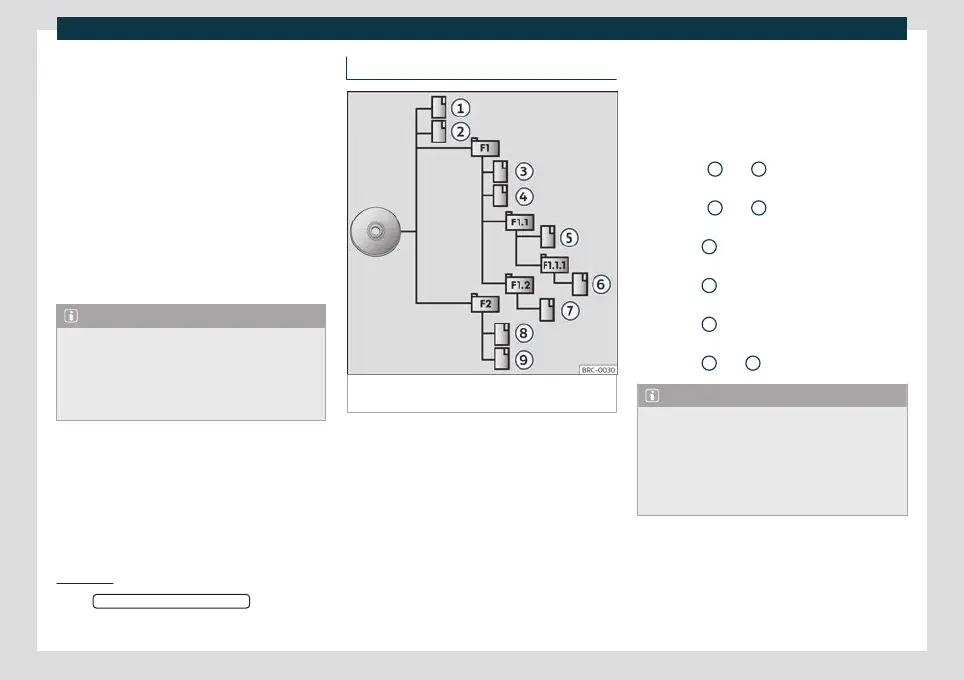
Playback order of files and folders
Fig. 148
Example of the structure of an audio da-
ta CD.
The audio files
st
or
ed on data media are
often arranged by file folders
and playlists
to establish a certain playback order.
Depending on their name on the data me-
dia, tracks, folders and playlists are ordered
numerically and alphabetically.
The illustration shows an example of a con-
ventional audio data CD, containing tracks
, folders and subfolders
›››
Fig. 148.
In this case the tracks will be played as fol-
lows
1)
:
Tracks
1
and
2
in the root directory
(R
oot) of the CD
T
racks
3
and
4
in the fir
st F1 f
older of
the CD root directory
Track
5
in the fir
st subfolder F1.1 of
f
older F1.
Track
6
in the fir
st subfolder F1.1.1 of
subf
older F1.1
Track
7
in the second subf
older F1.2 of
f
older F1
Track
8
and
9
in the second f
older F2
Note
●
The playback sequence can be modified
by selecting the different playback modes
›››
page 182.
●
Playlists do not play automatically, they
have to be selected directly from the track
selection menu
›››
page 185.
1.
2.
3.
4.
5.
6.
1)
The Mix/repe
at including subfolders
function
must be active in the
Media settings menu
›››
page 195.
181



 To Next Page