Infotainment System
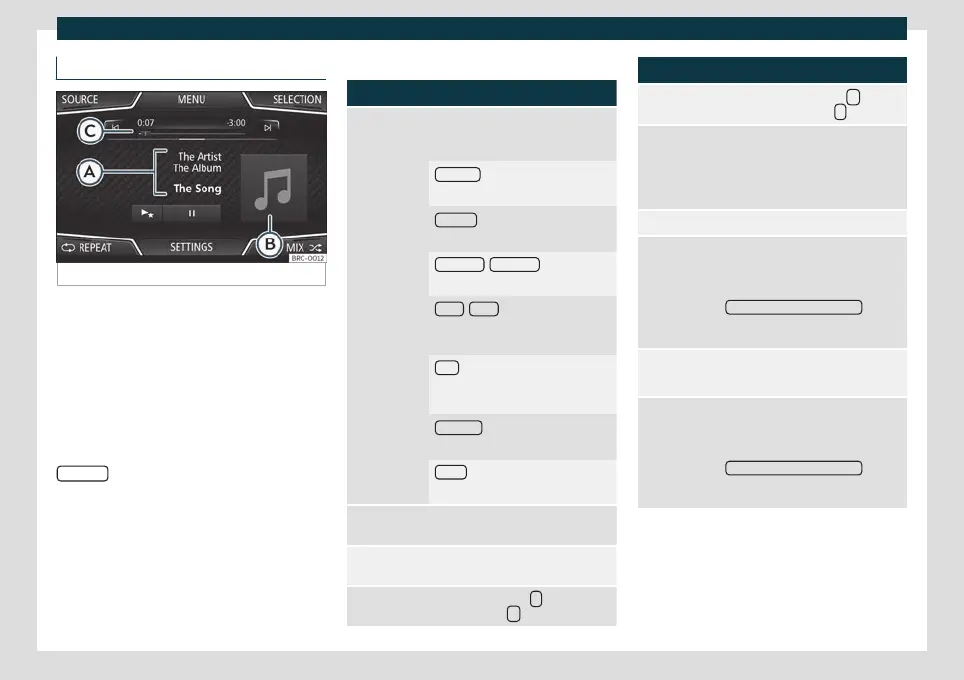
MEDIA main menu
Fig. 149
MEDIA main menu.
Using the Media main menu, diff
er
ent media
sources can be selected and played.
●
Press the infotainment button to open
the Media main menu
›››
Fig. 149.
It will continue playing the last media source
selected from the same point.
The media source being played is indicated
on the dropdown list when pressing the
SOURCE
function button
›
›
›
Fig. 149.
If there is no available media source, the Me-
dia main menu is displayed.
MEDIA main menu function buttons
Function button: function
SOURCE
The media source that is being
played. Press to select another media
source.
JUKEBOX
a)
: Internal hard drive (SSD)
›››
page 190.
CD/DVD
a)
: Internal CD and DVD
drive
›››
page 186.
SD CARD 1
, SD CARD 2 *: SD memory
card
›››
page 187.
USB 1
, USB 2 *: External data storage
device connected to the USB port
›››
page 187.
AUX : External audio source connec-
ted to the AUX-IN multimedia socket
›››
page 188.
BT AUDIO
: Bluetooth
®
audio
›››
page 189.
WLAN *: External audio source con-
nected by WLAN
›››
page 191
SELECTION
Depending on the level, track list,
folders or source.
/
Changes track in Media mode or fast
forward/rewind.
Playback stops. The
function but-
ton changes to
.
Function button: function
Playback is resumed. The
func-
tion button changes to
.
a)
Play similar tracks.
Creates a virtual playlist that includes
tracks with a similar rhythm to the
one being played if available using
Gracenote
®
.
SETTINGS Opens the menu Media Settings.
REPEAT
Repeats all the tracks that are on the
same memory level as the track be-
ing played at that moment. If in the
Media Settings menu the
Mix/Repeat including subfolders
option
is enabled, it also includes the sub-
folders.
REPEAT
Repeat the current track.
MIX
Random playback of tracks that are
at the same memory level as the cur-
rent track. If in the Media Settings
menu the
Mix/Repeat including subfolders
option
is enabled, it also includes the sub-
folders.
a)
Only available for the Navi System Plus model.
182



 To Next Page