Driver assistance systems
Green symbol
The ACC is active.
A vehicle in front has been detected. The ACC adjusts
speed and distance from the vehicle in front.
Grey symbol
ACC is inactive (Standby).
A vehicle in front has been detected. The speed and
distance from the vehicle in front are not adjusted.
Green symbol
The ACC is active.
No vehicle has been detected in front.
Grey symbol
ACC is inactive (Standby).
No vehicle has been detected in front.
Some control and warning lamps will light up
briefly when the ignition is s
wit
ched on to
check certain functions. They will switch off
after a few seconds.
WARNING
Observe the safety warnings
›››
in Con-
trol and w
arning lamps on page 79.
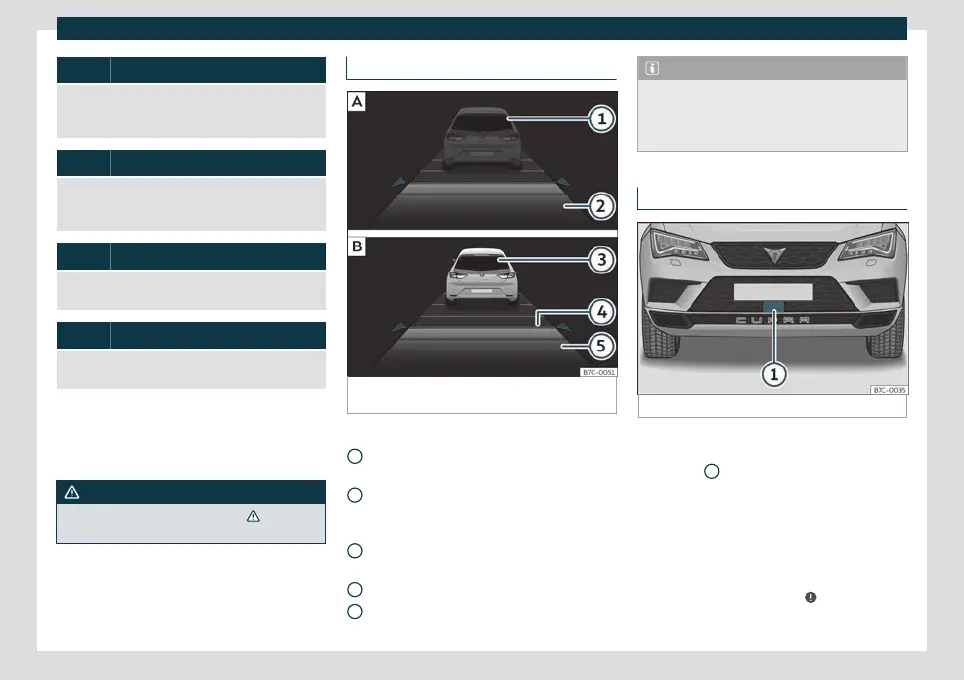
Status display
Fig. 215
On the instrument panel display:
ACC
inactive (Standby).
ACC active.
Indications on the display
›
›
›
Fig. 215:
Vehicle ahead detected. ACC is not ac-
tive and is not regulating your speed.
Distance from the vehicle ahead. ACC is
not active and is not regulating your dis-
tance.
Vehicle ahead detected. ACC is active
and is regulating your speed.
Distance level 2 set by the driver.
ACC is active and is regulating your dis-
tance based on speed.
1
2
3
4
5
Note
When the ACC is connected, the indica-
tions on the instrument panel screen may
be concealed by warnings from other func-
tions, such as an incoming call.
Radar sensors
Fig. 216
On the front bumper: radar sensors.
A radar sensor is installed on the front bump-
er t
o det
ermine the traffic situation
›››
Fig. 216
1
.
The r
adar sensor's visibilit
y may be impaired
by dirt, or by environmental influences such
as rain or mist. In this case the adaptive
cruise control (ACC) does not work. The in-
strument panel displays the following mes-
sage: ACC: No sensor vision! If necessa-
ry clean the radar sensor
›››
.
»
257



 To Next Page