Dual-Speed Stackable Hub Web-based Management User’s Guide
Cables and Connectors112
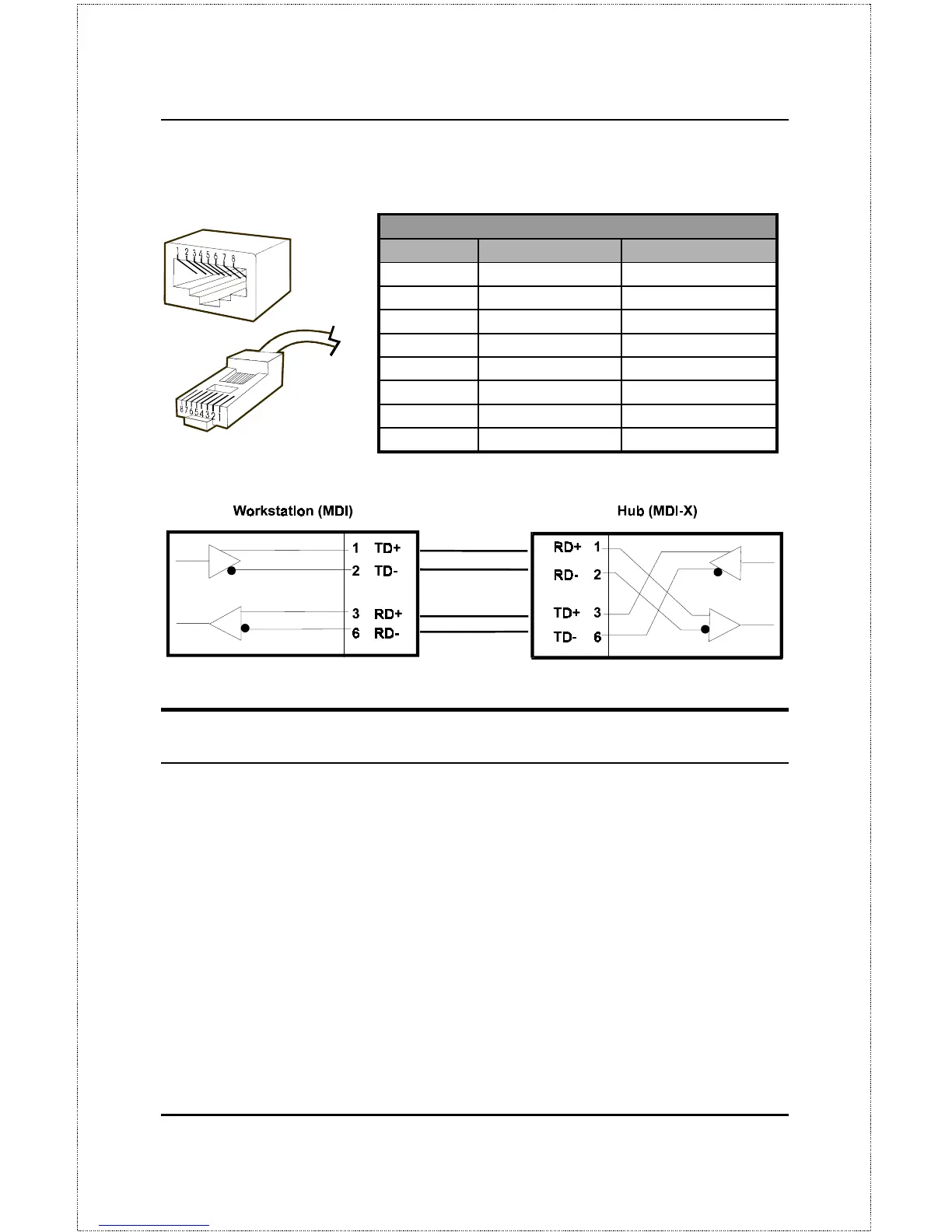
Straight Twisted-Pair Cable Pinouts
Contact MDI-X Signal MDI Signal
1 RD+ (receive) TD+ (transmit)
2 RD- (receive) TD- (transmit)
3 TD+ (transmit) RD+ (receive)
4 Not used Not used
5 Not used Not used
6 TD- (transmit) RD- (receive)
7 Not used Not used
8 Not used Not used
Crossover Cables
When cascading or connecting the hub to another switch, bridge, or hub
through the UTP port, a modified crossover cable is necessary. With a cross-
over cable, two pairs of wires are switched at one connector end. Carry out
the following steps to create a customized, crossover twisted-pair cable:
1.
Leave one end of the cable as is, with the RJ-45 connector intact. The
wiring at just one end of the cable needs to be modified.
2.
At the other end of the cable, connect wires 1 and 2 to contacts 3 and
6 respectively. Likewise, connect wires 3 and 6 to contacts 1 and 2.
Refer to the following diagram:



 To Next Page