20D-Link DNS-313 User Manual
Section 3 - Configuration
Click n’ Connect Utility
Repairing a Previously Incomplete DNS-313 Installation
The Click n’ Connect Utility includes a repair feature. The repair feature should be used if you had a problem installing
a new hard drive in the DNS-313. The repair feature can also be used if you cannot use the Click n’ Connect Utility to
modify existing DNS-313 settings.
Note: No data on your DNS-313 will be erased during the repair process.
To use the repair feature, select the Repair a previously incomplete DNS-313 installation Click n’ Connect menu
option and carry out the following steps:
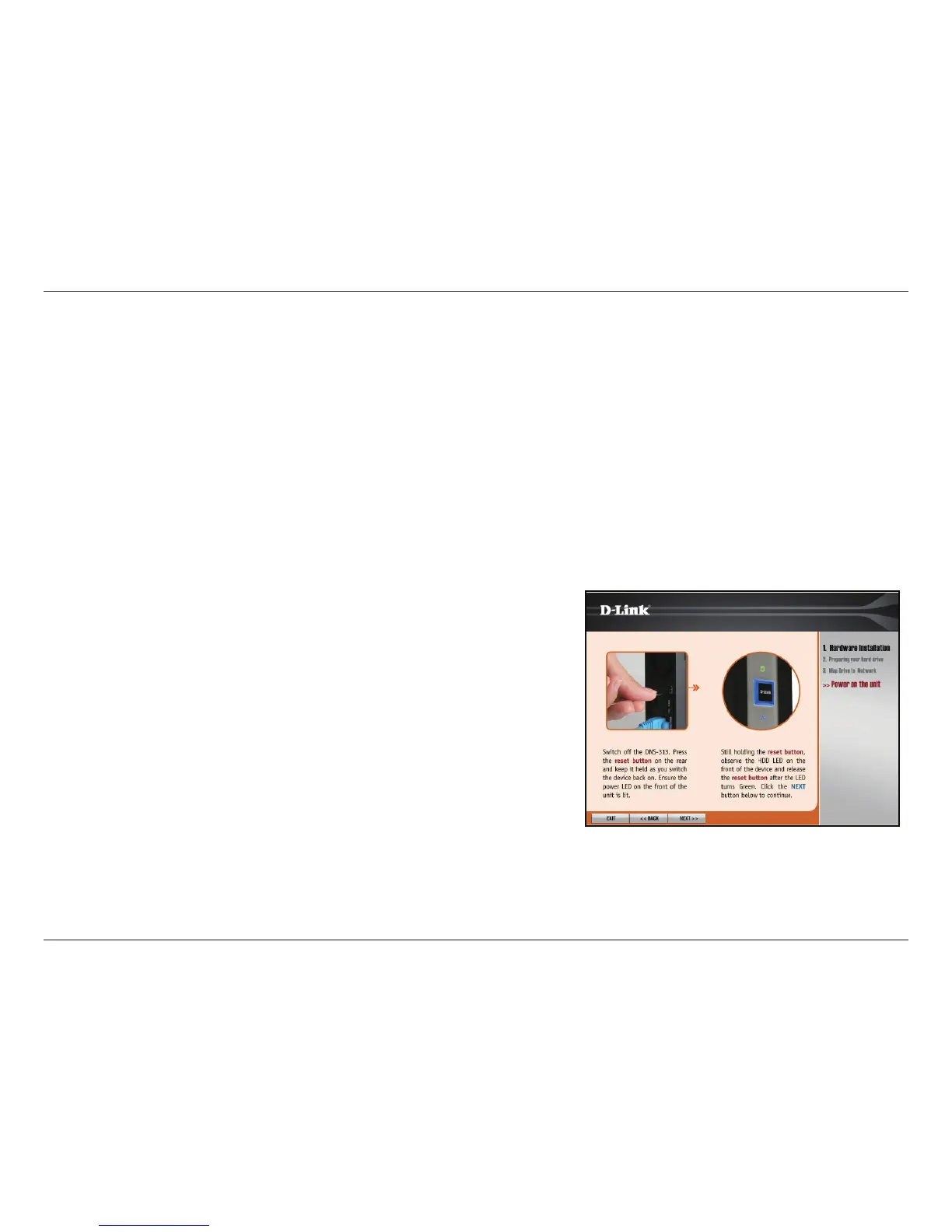
1. The following window shows you how to start the
procedure for repairing a previously incomplete
DNS-313 installation.
Power off the DNS-313 and hold down the reset
button on the back of the DNS-313 and keep the
button held down as you switch the DNS-313 back
on. Check that the power LED on the front of the
DNS-313 is lit. Wait for the HDD LED on the front
of the DNS-313 to turn green and release the reset
button.
Click the Next button to proceed to the next
window.














 To Next Page