51D-Link DSL-2745 Wireless N300 ADSL2+ Modem Router User Manual
Section 4 - Conguration
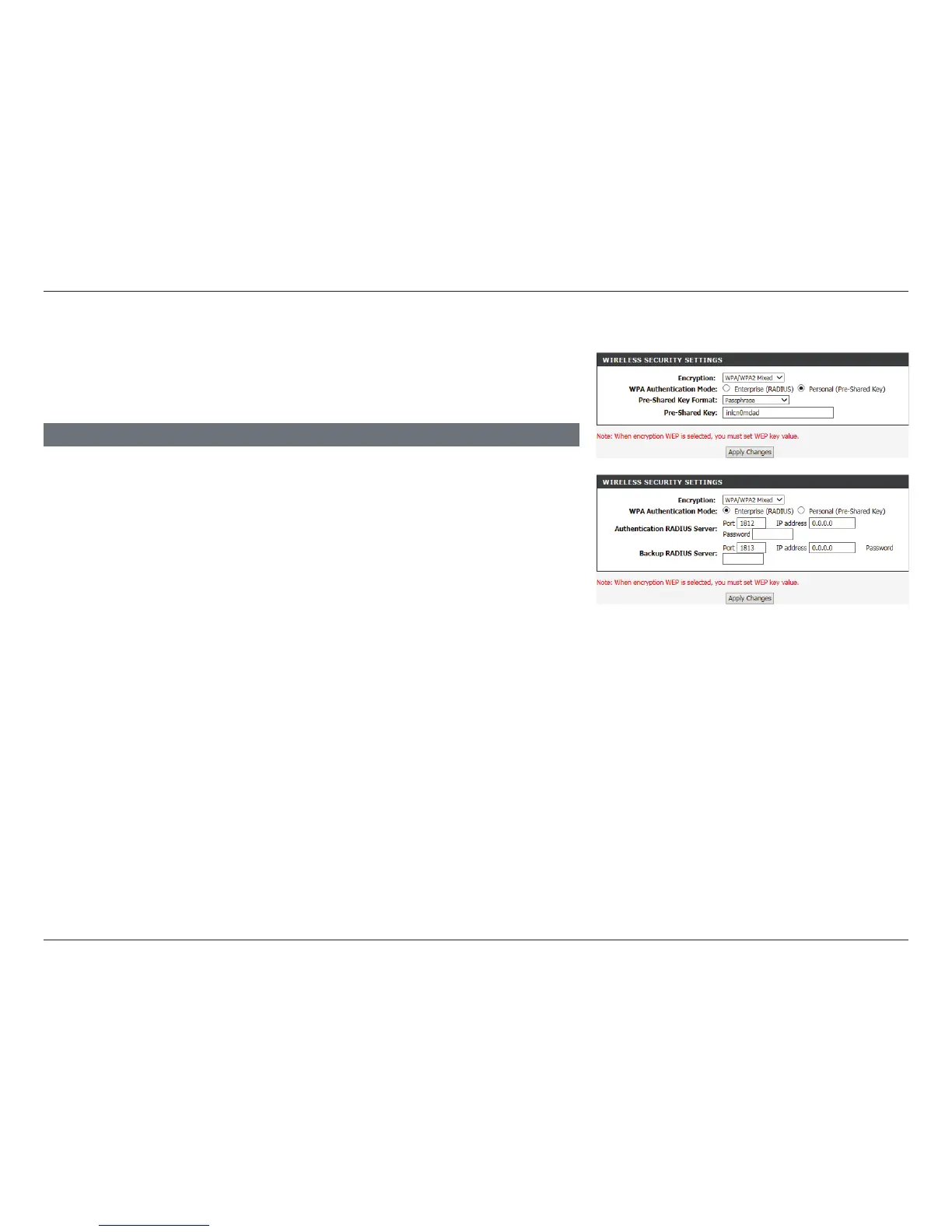
Encryption: WPA/WPA2 Mixed
Click Apply Changes to have your changes take effect.
Encryption: Choose WPA/WPA2 Mixed from the drop-down menu.
WPA
Authentication
Mode:
Choose either Enterprise (Radius) or Personal (Pre-shared
Key). Most small home/business networks will want to use
Personal (Pre-shared Key). If you are running a dedicated RADIUS
authentication server, choose Enterprise (RADIUS)
If Personal (Pre-Shared Key) is selected:
Pre-Shared Key
Format:
Select the Encryption key format. Choose either Passphrase or
HEX(26 Characters).
Pre-Shared Key: Enter a wireless key to use on your wireless network.
If Enterprise (Radius) is selected:
Authentication
RADIUS Server:
Enter the Port, IP address, and Password of the RADIUS Server.
Backup RADIUS
Server:
Enter the Port, IP address, and Password of the backup RADIUS
Server.
WIRELESS SECURITY SETTINGS
WPA/WPA2 Mixed(AES) is a reasonably strong wireless security encryption type.
This is for wireless clients which do not support WPA2 encryption, otherwise
use of WP2(AES) is recommended.



 To Next Page