64
5
Control Panel
2-6. Parameter Setting Mode
This mode is used to make settings of the following parameters to determine the basic operation of Oil Cooling Unit.
○Setting of external output procedure when an alarm or warning occurs …n001 to n003
○Setting of conditions for auto tuning …………………………………………n004, n005
○Setting of gain rate for temperature control …………………………………n006 to n009
○Setting of monitoring subject for temperature warning ……………………n010, n012, n014, n016, n018
○Setting of operating temperature (difference) for temperature warning …n011, n013, n015, n017, n019
○Setting of YES or NO of use of parallel communication ……………………n020
○Setting of minimum pulse for electronic expansion valve …………………n024
Furthermore, if the malfunction prevention switch on the main board turns ON, no operation mode settings will be
made. In this case, turn OFF this switch to make these settings.
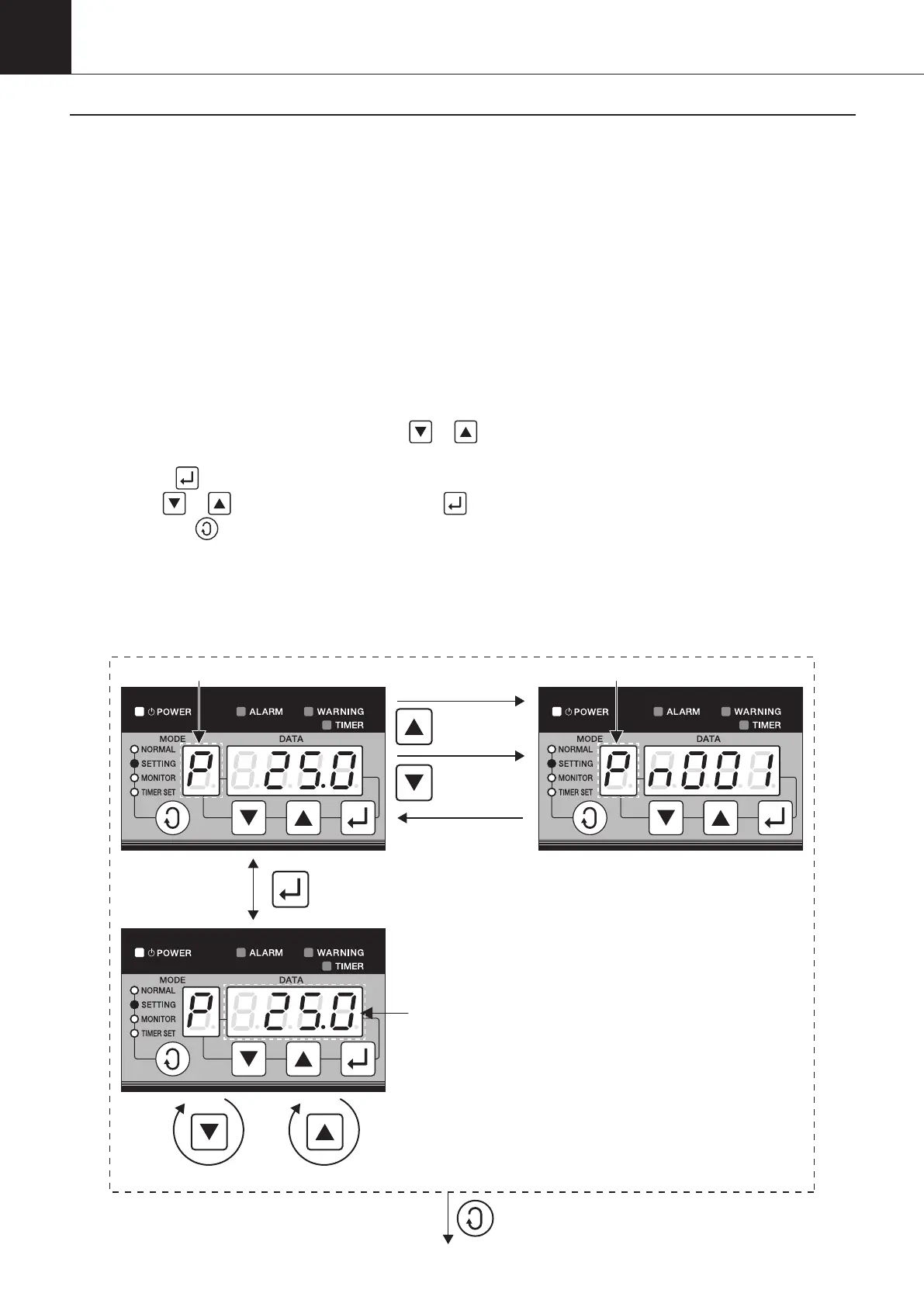
(1) Parameter setting procedure
With
‘
P
’
blinking in the MODE block, use the or button to select a parameter No.
The DATA block displays the parameter No. selected for a period of approximately 0.5 seconds and then data.
When the
button is pressed, the DATA block will start blinking and displaying.
Use the
or button to change data and the button to save the data.
Pressing the
button before saving the data will discard the data to return to the previous value.
[Note] Parameters are classified into two groups: One group of parameters becomes enabled on the spot,
while the other group of parameters requires turning ON the power supply again.
Determine which group the parameters belong to, refer to List of parameters.
Decrease the data No. by 1 Increase the data No. by 1
Decrease the
parameter No. by 1.
After a lapse of 0.5 sec.,
return to the previous display.
Increase the
parameter No. by 1.
Flash
Flash
Flash
00_PB00540A_M10.indb 64 2023/08/09 12:59:03


 To Next Page