58
5
Control Panel
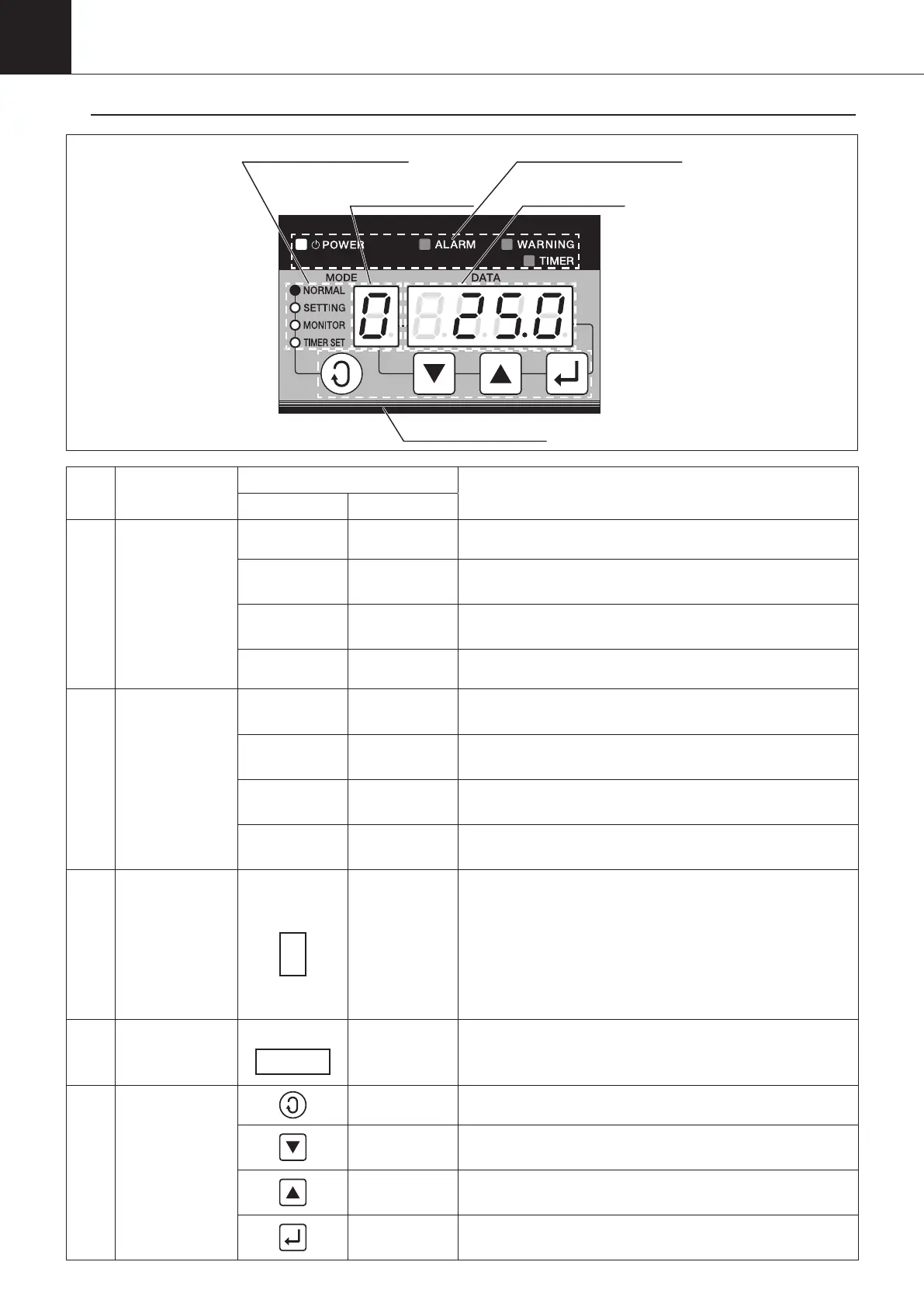
Name and Function of Each Part
1
⑤Operation button
②Lamp display block B ①Lamp display block A
④Data display
③Mode No./
Data No. display
No. Item
Display section
Operation and function
Display Designations
①
Lamp display
block A
■POWER POWER lamp It is always lit up while the power is supplied.
■ALARM ALARM lamp
It flashes or is lit up when an alarm occurs. (level 1:
flash, level 2: lit up)
■WARNING
WARNING
lamp
It flashes or is lit up when a warning occurs. (level 1:
flash, level 2: lit up)
■TIMER TIMER lamp It flashes while the unit stops in the timer mode.
②
Lamp display
block B
■NORMAL Normal mode
It is lit up in the normal mode, and flashes in the auto-
tuning mode or special monitor mode.
■SETTING
Operation
setting mode
It is lit up in the operation setting mode, and flashes in
the parameter setting mode.
■MONITOR Monitor mode
It is lit up in the monitor setting mode, and flashes in the
service monitor mode.
■
TIMER SET
Timer setting
mode
It is lit up in the timer setting mode.
③
Mode No./data
No. display
MODE
----
In the respective setting modes, contents below are displayed.
•
In the case of setting the normal mode or operation setting
mode: The current operation mode No. is displayed.
•
In the case of setting the monitor mode: The data No. of the
date displayed in the data display section.
•
In the case of setting the parameter setting mode: "P" is
displayed druing the parameter setting.
④
Data display
DATA
----
Various data is dipslayed. (The displayed data varies depending on
the setting morde or data No.)
“ACF” lights for a few seconds after turning OFF the power supply.
⑤
Operation
button
Selector button
It is used for changing the modes.
Down button
It is used to decrease the value of mode No./data No./data (-1/-
0.1). If it is pressed and held for a while, the value is -10 (-1).
Up button
It is used to increase the value of mode No./data No./data (+1/+0.1).
If it is pressed and held for a while, the value is +10 (+1).
Confirmation
button
It is used to confirm the setting of mode No./data No./data
being changed.
00_PB00540A_M10.indb 58 2023/08/09 12:59:00


 To Next Page