35
PIM00504
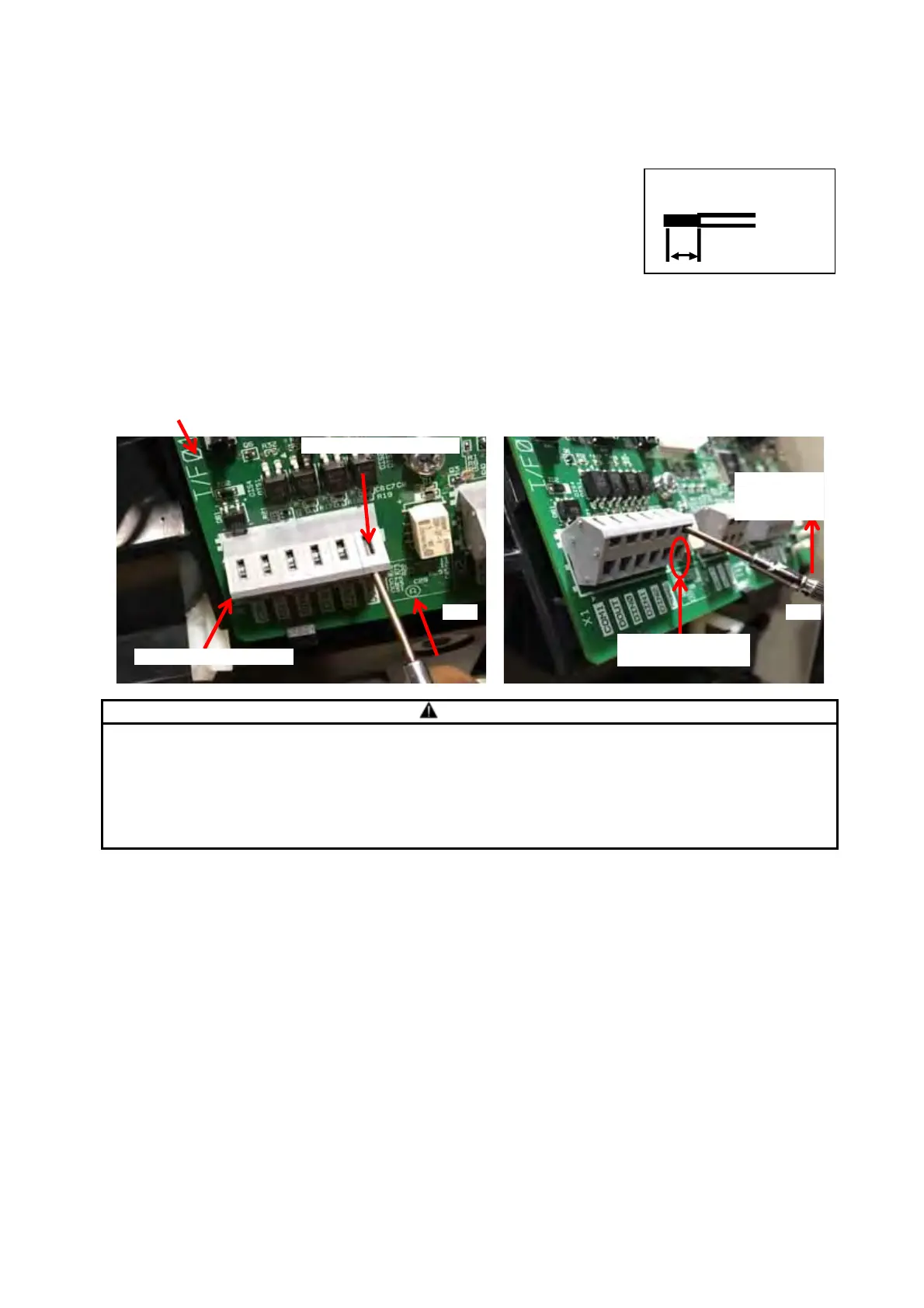
<<Method for Connecting to the Terminal Block>>
1) Push on the spring with e.g. a screwdriver.
2) Pushing the screwdriver up will open up the opening for insertion.
3) Check the stripped length of the wire, and insert it fully home without
making any loose strands.
4) Remove the screwdriver or other tool from the lever.
5) Lightly pull the wire to check that it is securely connected.
CAUTION
Check the specifications of each signal before making the connections.
Be sure to terminate shielded cables, and connect them to the shielded cable grounding
terminal.
If noise is not eliminated even when connected to the shielded cable grounding terminal,
make a single-point grounding connection on your own equipment (disconnect the grounding
at the unit).
Controller interior Interface board
(1) (2)
Digital I/O terminal block
Insert the screwdriver.
Push the
screwdriver
upward.
Opening for cable
insertion
電線剥き長さ:6mm
Cable stripping length :
6 mm





 To Next Page