41
PIM00504
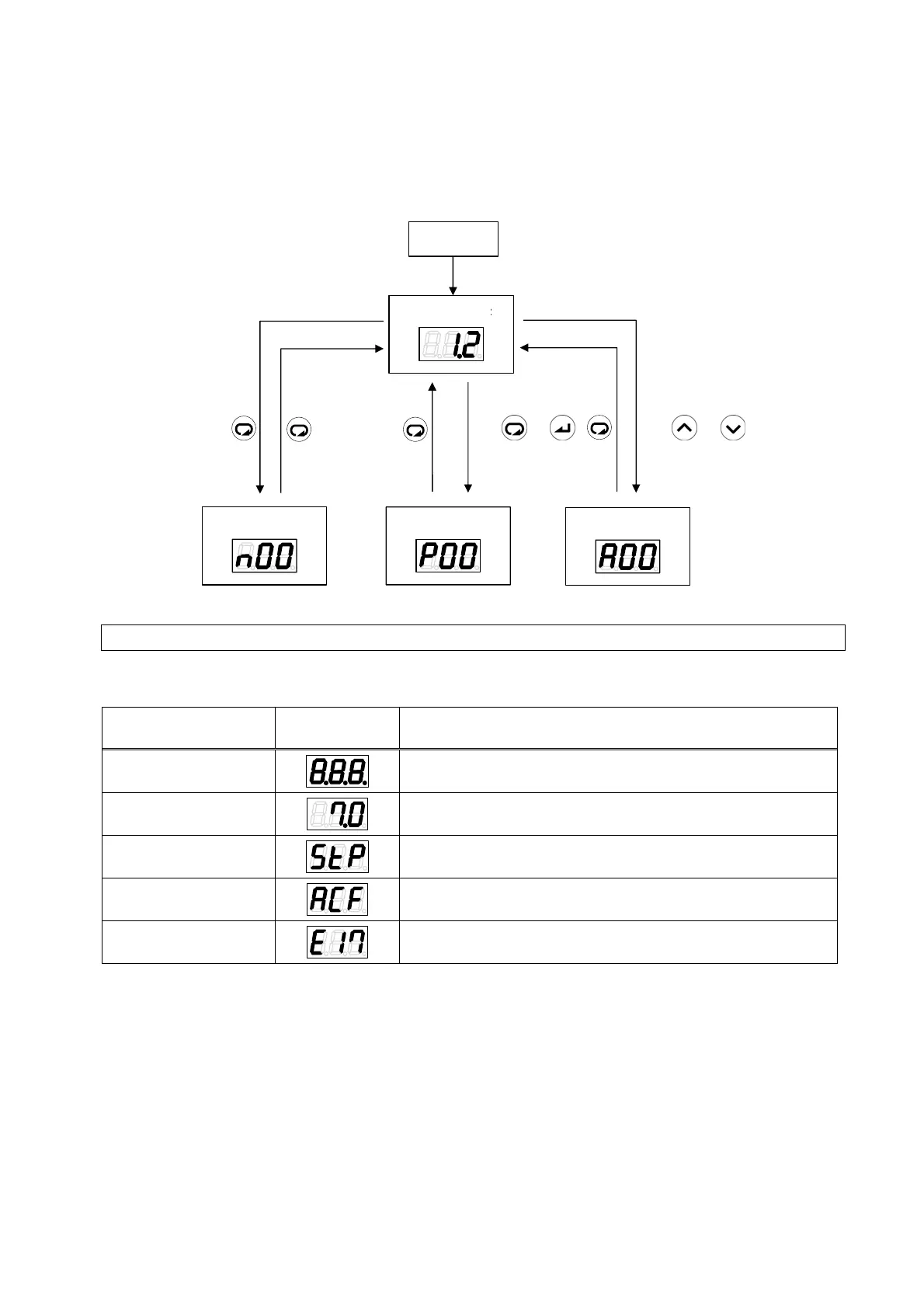
11.2.2 Switching Among Modes
Switch among the modes as shown in the figure below. For details on the operations, refer to the
explanations of each mode.
モニタモード
通常モード
設定モード
アラームモード
と
を同時に2秒
以上押す
と
を同時に2秒
以上押す
電源投入
11.3 Regular Mode
In the regular mode, the display is as follows depending on the status at the time.
Status Panel
Indication
Description
Powering on
At powering on, all the LEDs flash momentarily.
Normal
In the normal status, the current pressure is displayed.
Stopped
Displayed when a stop command is in effect, and when the
pressure is 0.15 MPa or lower.
AC failure
This is displayed flashing in the event of an AC failure (status
where the power supply is shut off while charging the unit).
Occurrence of an
alarm/warning
When an alarm/warning occurs, the corresponding alarm
code or warning code is displayed.
Monitor mode Setting mode
Alarm mode
Power on
Regular mode
Press and
simultaneously for 2
seconds or longer.
Press and
simultaneously for 2
seconds or longer.





 To Next Page