76
PIM00504
13.10 Minimum Rotational Speed Adjustment Instructions
Mounting the fixed throttle will also change the rotational speed in the pressure holding status, so adjust
to the appropriate speed (380 min
-1
).
1) Press the mode key on the panel to switch the display mode to the monitor mode.
2) Press the setting keys with the “n00” displayed to select [n05] (motor speed indication) to
display the current motor speed.
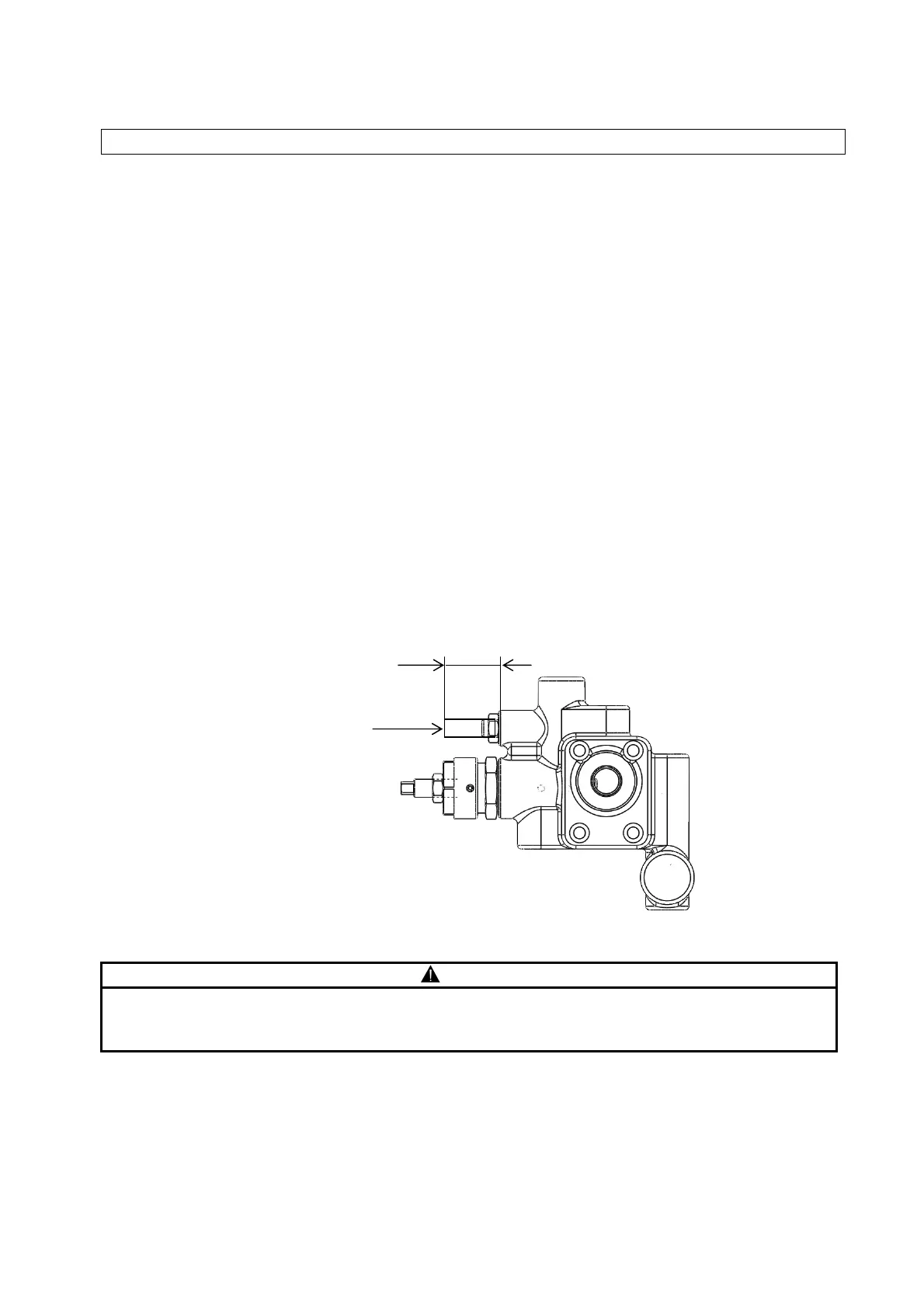
3) Loosen the lock nut of the throttle valve for minimum rotational speed adjustment.
4) Adjust the throttle valve while monitoring the actual motor rotation speed displayed. (The motor
rotation speed decreases during clockwise rotation, and increases during counterclockwise
rotation.)
5) Tighten the lock nut to complete the adjustment.
6) Press the mode key to switch to actual pressure indication.
CAUTION
If the minimum rotational speed adjustment throttle valve adjusting screw is loosened too far
it will come out and oil will spout out.
Ensure that the adjusting screw does not project beyond 19 mm from its mount.
Minimum rotational speed
adjustment throttle valve
adjusting screw, lock nut
19 mm max.





 To Next Page