43
PIM00504
No. Name Unit Details
n25 Power consumption kW
Displays the current approximate power
consumption.
n26 I/F board temperature
°C
Displays the current approximate temperature in the
controller.
n27 (Reserved for the system) - Displays “-99”.
By pressing the
key while an alarm code is displayed, the current power-up count can be checked.
Memo
When the power-up count displayed for “n04 : Latest alarm code” exceeds 999, it is cleared
to 0.
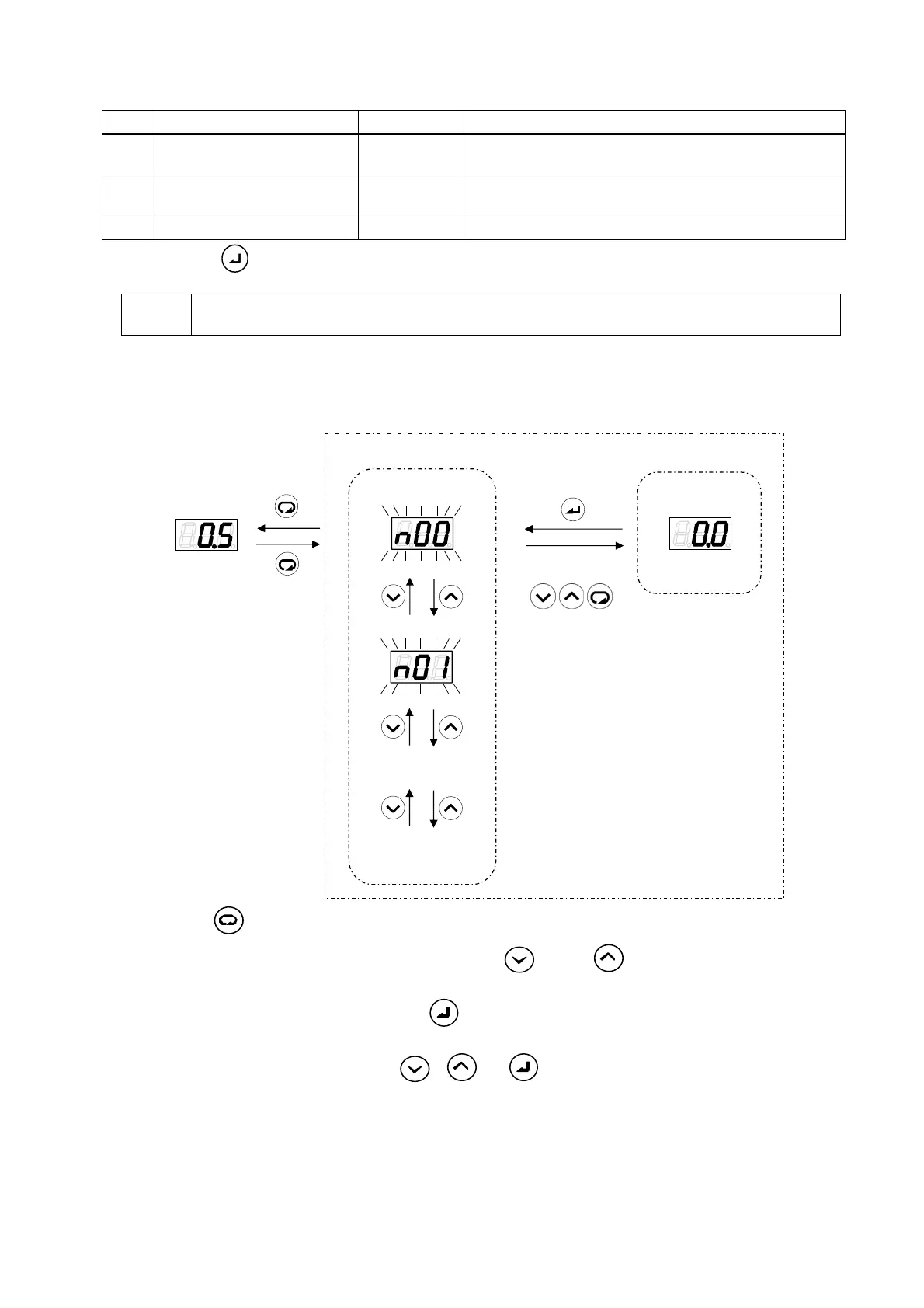
11.4.2 Monitor mode operations
最大データ番号の
次はn00に戻ります
のいずれか
通常モード
モニタモード
データ番号の選択
値表示
・・・
④
③
②
①
①
Press the
key in the regular mode. The mode will switch to the monitor mode.
②
Select the data number to be displayed by using the
key or key. During data number
selection, the display will flash.
③
Confirm the data number by pressing the
key. The value for the selected data number will be
displayed.
④
Return to data number selection with
, or .
Monitor mode
Value display
Selection of data number
Regular mode
The data number selected
after the maximum data
number returns to n00.
One of
①
②
③
④





 To Next Page