42
PIM00504
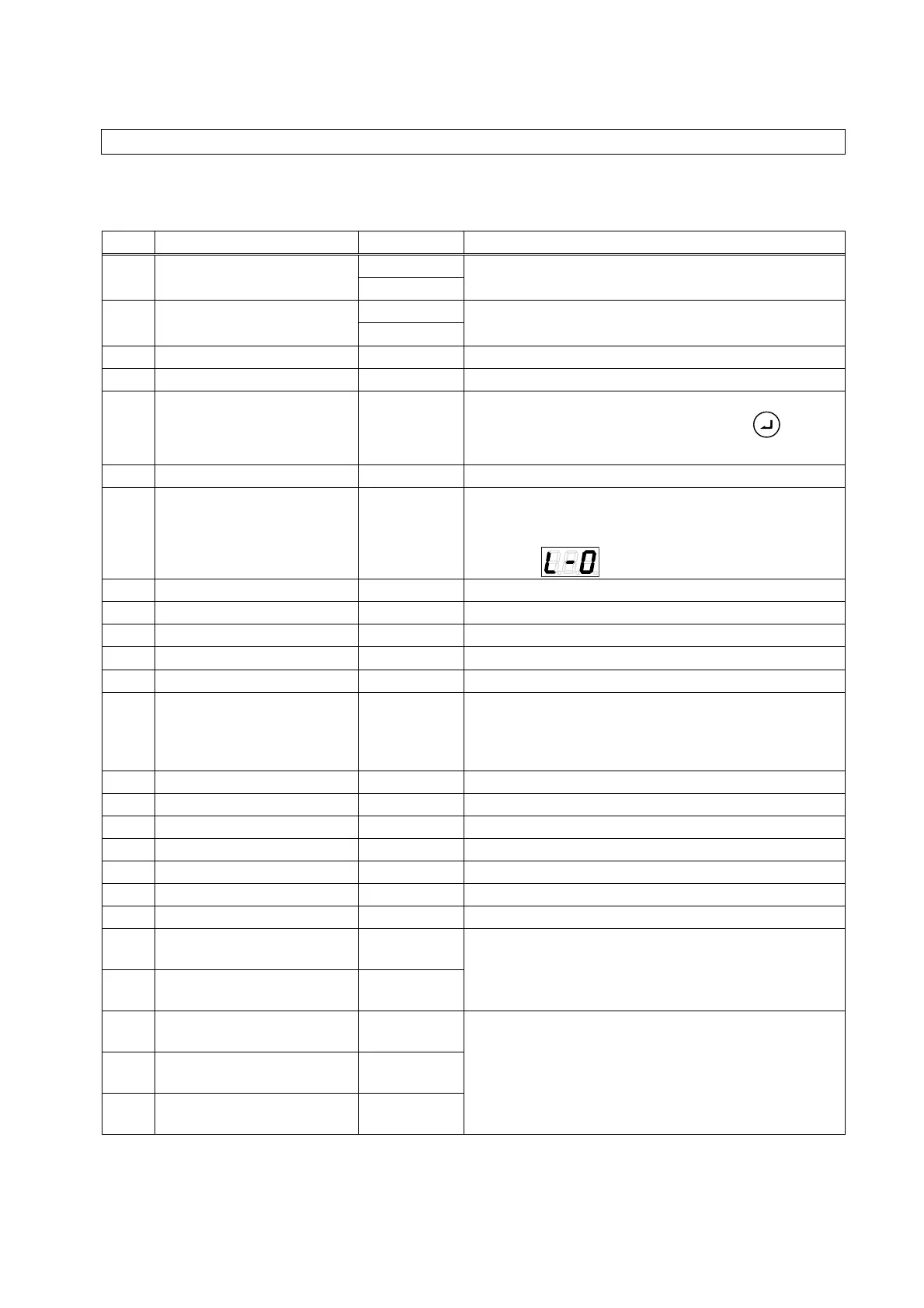
11.4 Monitor Mode
11.4.1 List of display items in the monitor mode
The monitor mode enables monitoring of the items listed in the table below by selection.
No. Name Unit Details
n00 Pressure switch set value
MPa
Displays the value set with the pressure switch.
×10 PSI
n01 Pressure set value
MPa
Displays the current set value for pressure.
×10 PSI
n02 Flow rate set value L/min Displays the current set value for flow rate.
n03 Flow rate L/min Displays the current flow rate.
n04 Latest alarm code -
Displays the alarm code for the alarm that occurred
immediately previously. By pressing the
key,
the current power-up count can also be checked.
n05 Motor rotation speed
×10 min
−
1
Displays the current rotational speed of the motor.
n06 Running status display -
Displays the running status of the pump. While the
pump is running, the segment dots repeatedly cycle
from left to right.
Example:
PQ selection No. 0
n07 (Reserved for the system) - This is reserved for the system.
n08 (Reserved for the system) - This is reserved for the system.
n09 (Reserved for the system) - This is reserved for the system.
n10 Motor temperature
°C
Displays the motor temperature.
n11 Radiating fin temperature
°C
Displays the temperature of the radiating fins.
n12 Main circuit DC voltage V
Displays the direct current voltage of the controller’s
main circuit. The voltage value is the supply power
voltage multiplied by the square root of 2, and it
varies depending on the running status.
n13 (Reserved for the system) - This is reserved for the system.
n14 (Reserved for the system) - This is reserved for the system.
n15 (Reserved for the system) - This is reserved for the system.
n16 (Reserved for the system) - This is reserved for the system.
n17 (Reserved for the system) - This is reserved for the system.
n18 (Reserved for the system) - This is reserved for the system.
n19 (Reserved for the system) - This is reserved for the system.
n20
Power-on count (lower
digits)
Times
Displays the number of times the unit has been
powered on after shipment from the factory. (On
exceeding a count of 9,999, the value is cleared to
0.)
n21
Power-on count (upper
digits)
×1,000 times
n22
Total operation time
(minutes)
min
Displays the total operation time after shipment from
the factory (time the motor is energized).
n23
Total operation time
(hours)
h
n24
Total operation time
(thousands of hours)
×1,000 h





 To Next Page