44
PIM00504
11.5 Setting Mode
For details of parameters relating to the setting mode, refer to “Chapter 12 ADJUSTING PARAMETERS”.
11.5.1 Setting mode operations
or
・・・
最大データ番号の
次はP00に戻ります
データ番号選択
値表示 値編集
通常モード
同時押し(約2秒)
①
②
③
④
⑤
決定
設定モード
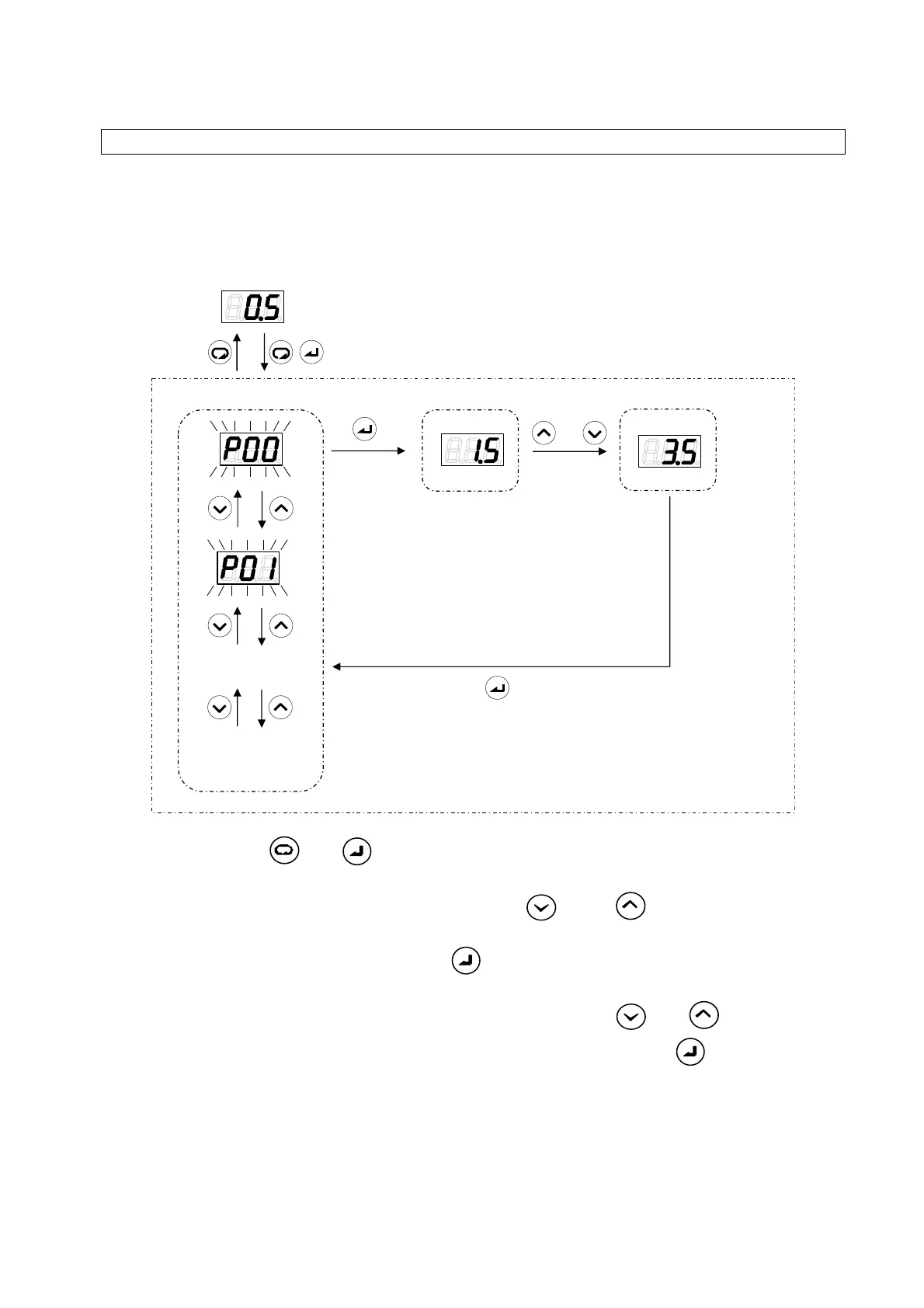
(1) Hold down the
and keys together in the regular mode. After about 2 seconds, the
mode will switch to the setting mode.
(2) Select the data number to be displayed by using the
key or key. During data number
selection, the display will flash.
(3) Confirm the data number by pressing the
key. The value for the selected data number will
be displayed.
(4) Change the set value by incrementing or decrementing it with the
and keys.
(5) Confirm the set value and return to data number selection by pressing the
key.
Regular mode
Holding down together
(Approx. 2 seconds)
Setting mode
Selection of data
number
Confirmation
The data number selected
after the maximum data
number returns to P00.
Value display
Value editing
(1)
(2)
(3) (4)
(5)





 To Next Page