45
PIM00504
PQ selection parameters
or
2秒経過
2秒経過
2秒経過
⑦ データ選択と値表示・編集
or
2秒経過
2秒経過
2秒経過
③
⑧
⑨
同時押し(約2秒)
①
②データ番号の選択
通常モード
⑤
④
⑥
設定モード
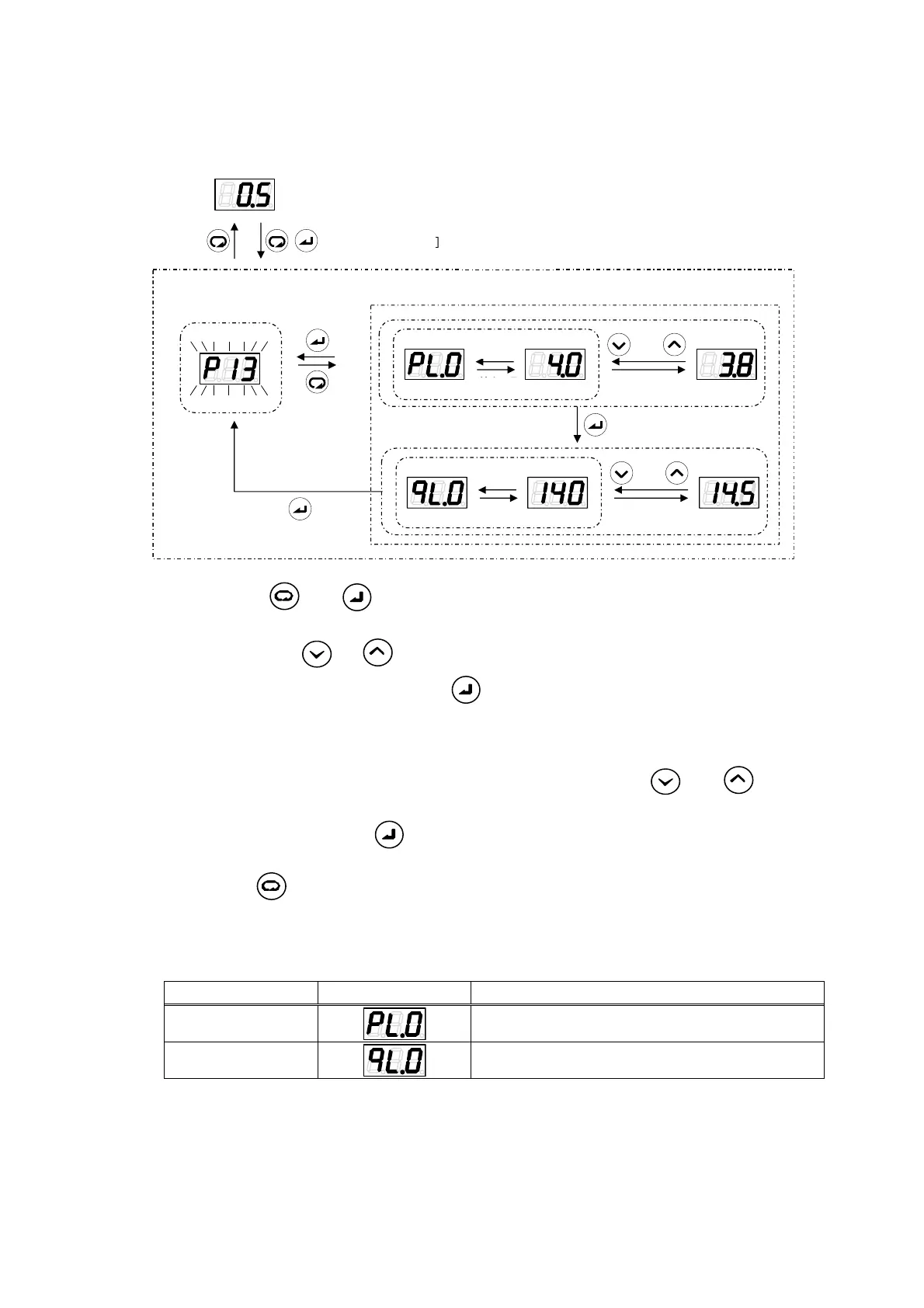
(1) Hold down the
and keys together in the regular mode. After about 2 seconds, the
mode will switch to the setting mode.
(2) Select P13 with the
or key. During data number selection, the display will flash.
(3) Confirm the data number by pressing the
key. The value for the selected data number will
be displayed.
(4) The set values for pressure and flow rate in the PQ selection parameters will be displayed
alternately at approximately 2-second intervals.
(5) Change the set values by incrementing or decrementing them with the
and keys. The
data code will be displayed approximately 2 seconds after a set value has been changed.
(6) Confirm the set value with the
key. The next data code will be displayed.
(7) Repeat steps (4), (5) and (6).
(8) Pressing the
key will switch the display to the data number selection screen. Parameters
whose values have been changed up until that time will retain the changed values.
(9) Setting the flow rate setting “qL.0” will switch the display to the data number selection screen.
Relationship between data display and parameters
Display Order Display *1 Parameter Name
1 Pressure setting
2 Flow rate setting
Regular mode
Holding down together
(approx. 2 seconds)
Setting mode
Data selection and value display/editing
Selection of data number
Elapse of 2 seconds
Elapse of 2 seconds
Elapse of 2 seconds
Elapse of 2 seconds
Elapse of
2 seconds
Elapse of
2 seconds
(1)
(2)
(3)
(8)
(9)
(7)
(5)
(4)
(6)





 To Next Page