48
PIM00504
Chapter 12. ADJUSTING PARAMETERS
12.1 Parameter List
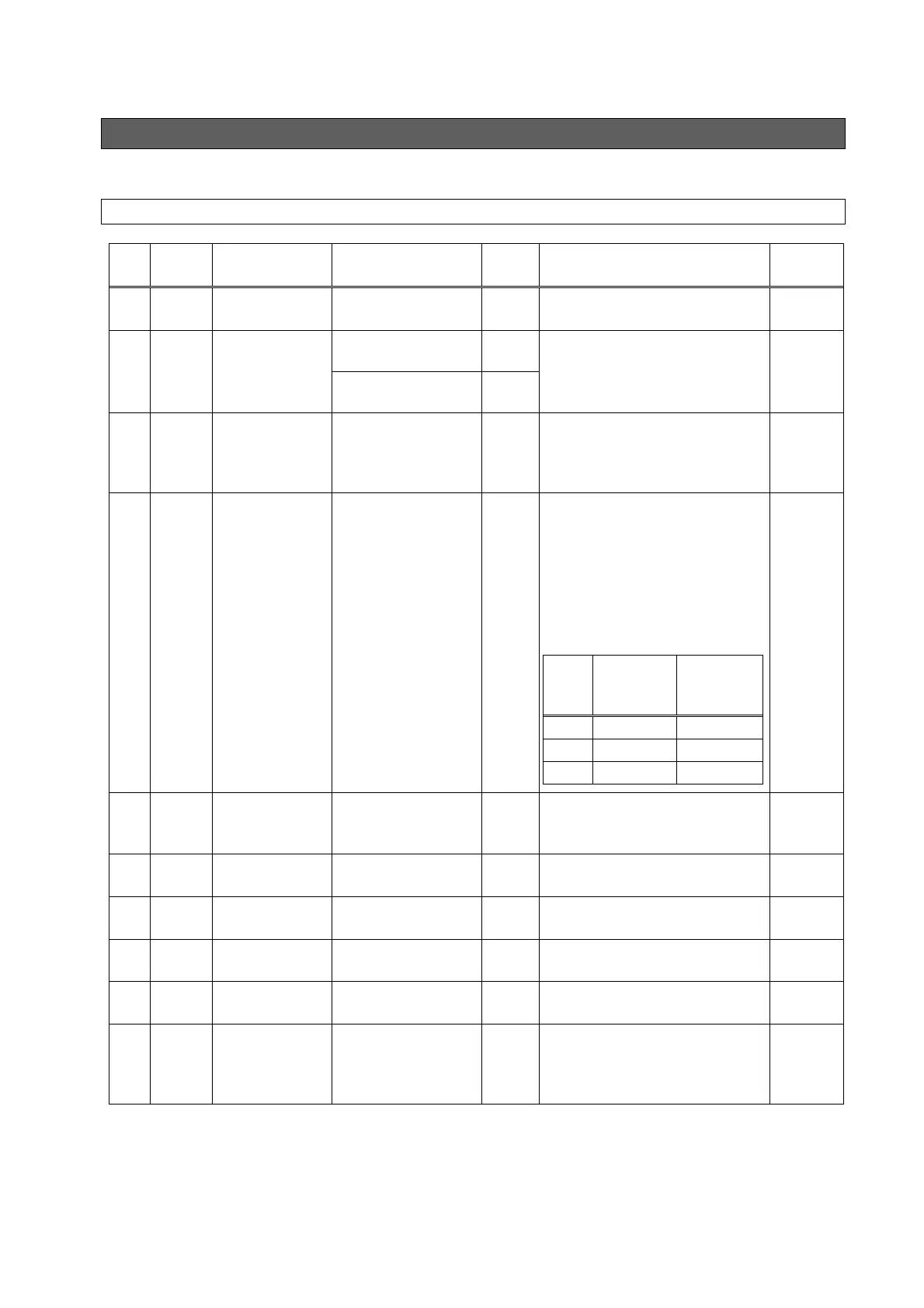
Item Code Name Operation range
Default
Value
Details Reference
P00 DI_A
ON/OFF signal
switching
0: Runs at DIN1-ON,
1: Runs at DIN1-OFF
1
DIN1: Sets the effective logic for the
ON/OFF signal.
12.2
P01 SW_L Pressure switch
0 - 35.0 [MPa] 0
Sets the actuation value of the
pressure switch. If set to “0”, the
pressure switch function is disabled.
12.5
0 - 507 [×10 PSI] 0
P02 T_SW
Pressure switch
output delay time
0.00 - 9.99 [sec] 0.00
Sets the delay time from when the
pressure falls below the set value for
“P01: Pressure switch” to
confirmation of the pressure drop.
12.5
P03 PSWH
Pressure switch
indication
retention setting
0 - 2 0
When the “L63: Pressure switch
actuation” warning has occurred, the
“L63” indication displayed on the
operation panel can be retained. It
is also possible to record the “L63:
Pressure switch actuation” warning
in the alarm history, although it is
not usually recorded there.
Value
L63
Indication
Retention
Recording in
Alarm History
0 Not retained No recorded
1 Retained No recorded
2 Retained Recorded
12.5
P04 DS_P
Pressure unit
selection setting*
0: MPa indication
1: PSI indication
0
Enables selection of the display unit
for pressures displayed on the
panel.
-
P05 K_RT
(Reserved for the
system)
- - This is reserved for the system. -
P06 D_RT
(Reserved for the
system)
- - This is reserved for the system. -
P07 WN_M
(Reserved for the
system)
- - This is reserved for the system. -
P08 AMIX
(Reserved for the
system)
- - This is reserved for the system. -
P09 INIF
Initialize to
defaults
0: Disable
1: Initialize P00 to P09
2: Initialize all
parameters
0
Setting “1” or “2” then turning the
power off and back on initializes
parameters to their default values
according to the setting made.
-





 To Next Page