Si33-105 Test Operation
Test Operation R407C PLUS Series Heat Recovery System 121
1.8 Wiring Check Operation
If within 12 hours of stopping cooling or heating, be sure to run all indoor units in the system you
want to check in the fan mode for about 60 minutes in order to prevent mis-detection.
Operation
Method
1. In the monitor mode, check the number of connected indoor units. (See monitor mode.)
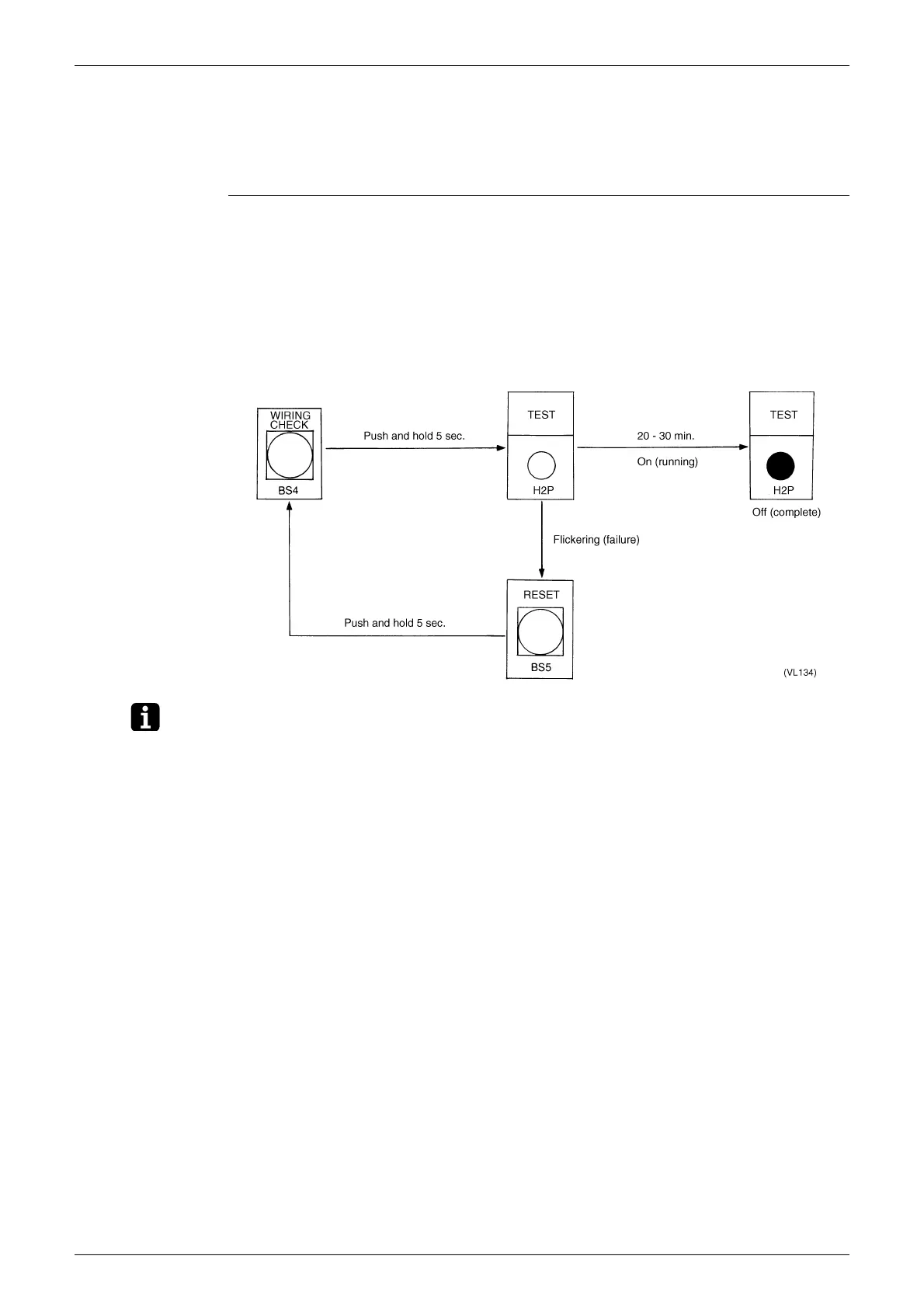
2. Push and hold the WIRING CHECK button (BS4) for 5 seconds to perform wiring check
operation. While running, TEST (H2P) lights and goes off when finished.
If TEST (H2P) flickers (wiring check operation failure), push and hold the RESET button
(BS5) for 5 seconds, and then repeat the procedure from the beginning.
3. About 1 minute after you finish running the system, once again check the number of
connected indoor units in the monitor mode and make sure the number agrees with the first
time you checked. If not, it indicates that there is a wiring mistake. Fix the wiring of the indoor
unit whose remote controller displays “UF” when its ON/OFF switch is turned ON.
Note: Other settings are not accepted during wiring check operation.



 To Next Page