Troubleshooting by Remote Controller Si33-105
144 Troubleshooting R407C PLUS Series Heat Recovery System
2. Troubleshooting by Remote Controller
2.1 The INSPECTION / TEST Button
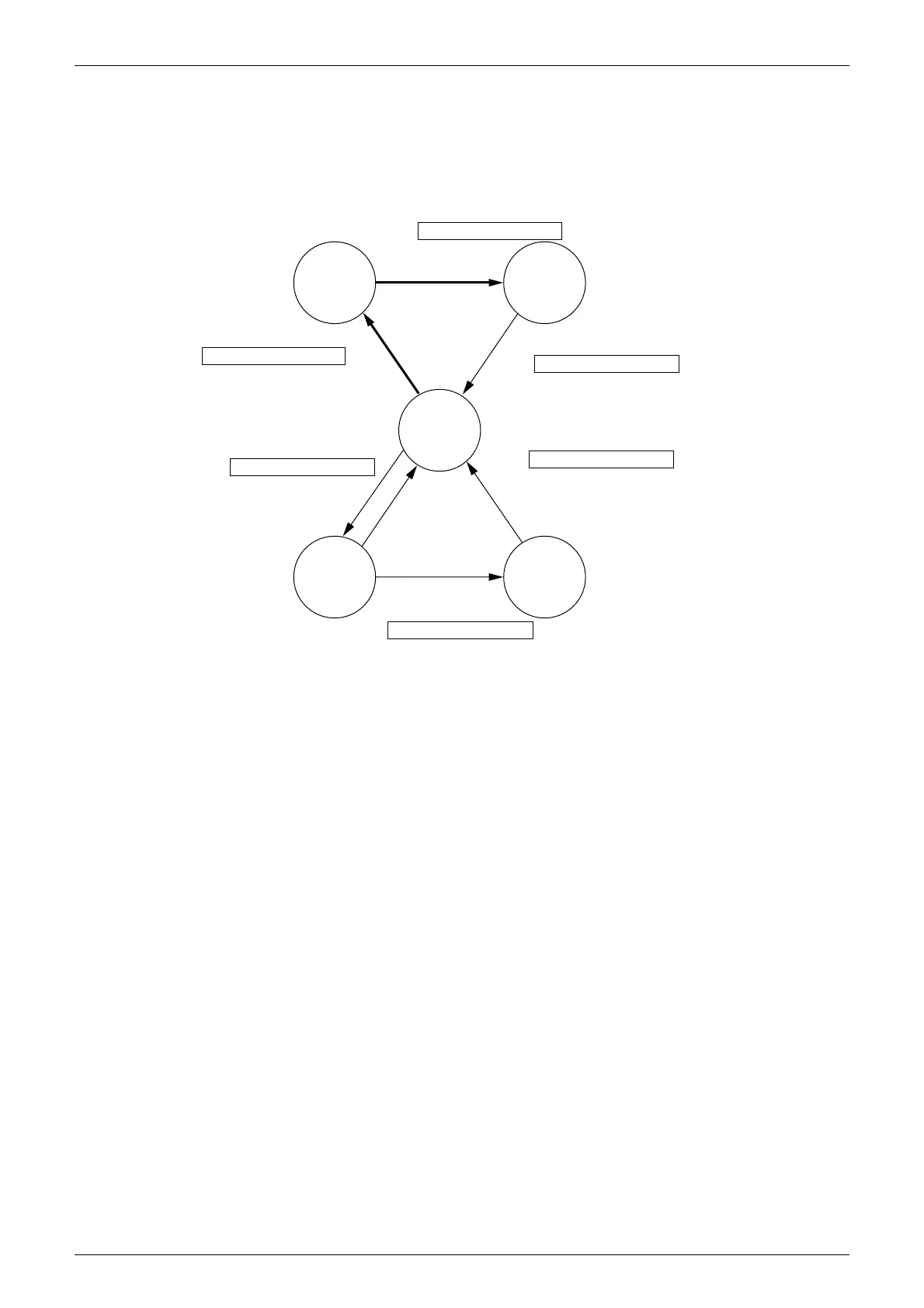
The following modes can be selected by using the [Inspection/Test Operation] button on the
remote control.
Normal
mode
Inspection
mode
Test
operation
mode
Local
setting
mode
Service
mode
Depress Inspection/Test Operation button
for more than 4 seconds.
Depress Inspection/Test Operation button
for more than 4 seconds.
Press Inspection/Test Operation button once.
Press Inspection/Test Operation button once.
Or after 30 minutes
After 10 seconds
Press Inspection/Test Operation
button once.
Press Inspection/Test Operation
button once.
Indoor unit settings can be made
• Filter sign time
• Air flow direction
• Others
Following codes can be checked.
• Malfunction codes
• Indoor model code
• Outdoor model code
Service data can be obtained.
• Malfunciton code history
• Temperature data of various sections
Service settings can be made.
• Forced fan ON
• Air flow direction/volume setting
Thermostat is forcibly turned on.
(V0815)



 To Next Page