Controls
www.DaikinApplied.com 40 Vertical Stack WSHP • IM 986-11
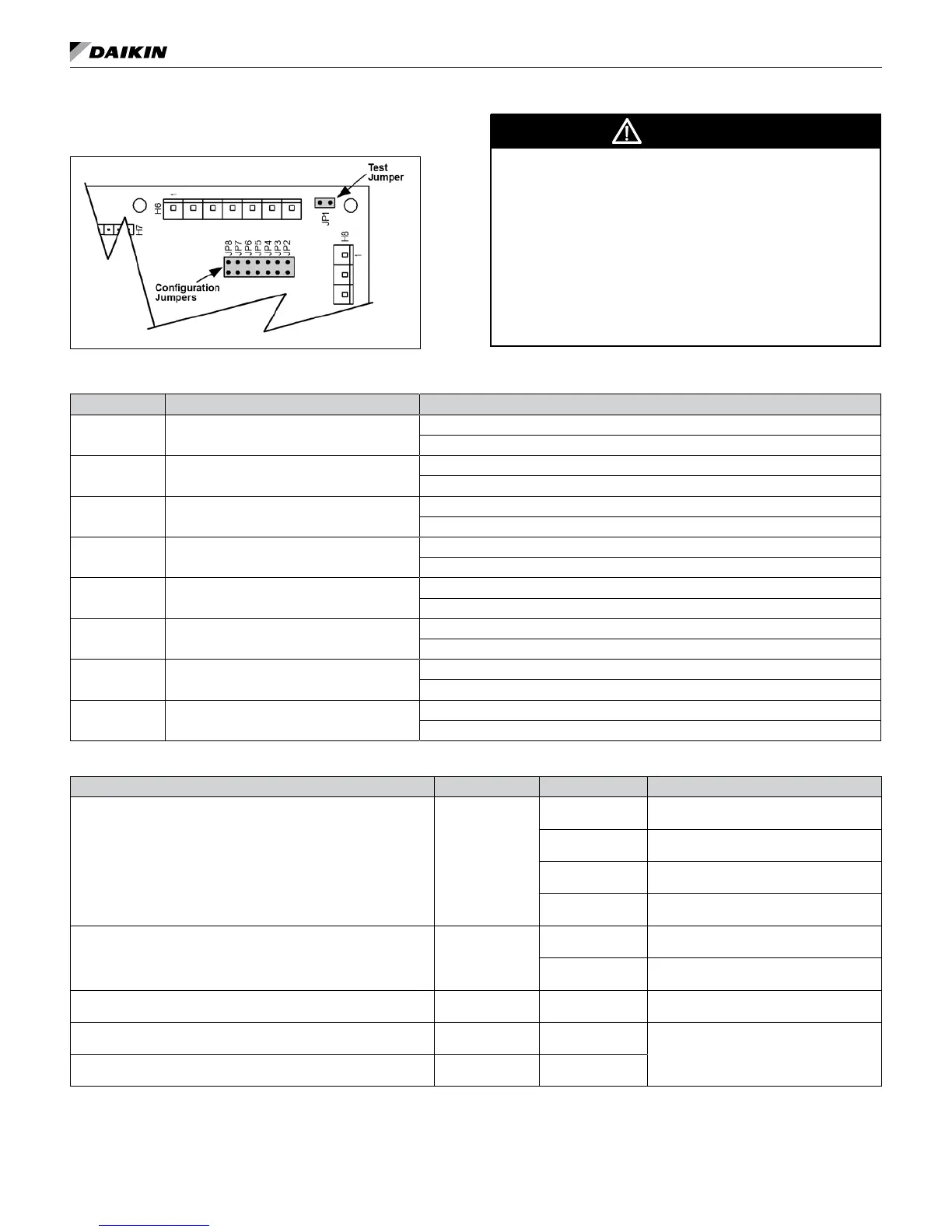
Jumper Conguration Settings
Figure 51: Configuration jumpers location
WARNING
Proper antifreeze/water solution is required to minimize the
potential of uid freeze-up. Jumper JP3 is factory set for
water freeze protection with the jumper open. Operation at
uid temperatures below 32°F with anti-freeze protection
requires JP3 to be eld congured for the jumper closed.
If unit is employing a fresh water system (no anti-freeze
protection), it is extremely important that JP3 jumper
setting remains in the open position (factory default setting)
in order to shut down the unit at the appropriate water
temperature to protect your heat pump from freezing.
Failure to do so can result in unit damage and uid leaks.
Table 14: Jumper settings and descriptions
Jumper Description Options
JP1 Mode
Open for normal operation mode
Shorted for service/test operation mode
JP2 Fan operation
Open for continuous fan operation, when not in unoccupied mode.
Shorted for cycling fan operation
JP3
(See Warning)
Freeze Protection
Open for water freeze protection
Shorted for systems with anti-freeze protection (15°F (9°C)
JP4 Freeze Fault Protection
Open for none
Shorted to enable freeze fault protection based on Leaving Water Temperature (LWT)
JP5
Set point adjustment range only applies to
network controls with a room temperature sensor
Open for adjustment range of -5.0° to +5.0° F
Shorted for 55° to 95° F adjustment range
JP6 Room control type
Open for thermostatic room control
Shorted for room temperature sensor control, MicroTech III only.
JP7 Compressor heating source
Open to enable compressor heating
Shorted to disable compressor heating
JP8 I/O expansion module
Open when I/O expansion module is not required
Shorted when I/O expansion module is required
Table 15: I/O expansion module jumper settings
I/O Expansion Description Jumper(s) Setting Description
Fan Row Select for Operating Modes:
▪ Fan Only
▪ Hydronic Heating
JP1 & JP2
JP1 = Open
JP2 = Open
Fan Row #1 Selected
JP1 = Shorted
JP2 = Open
Fan Row #2 Selected
JP1 = Open
JP2 = Shorted
Fan Row #3 Selected
JP1 = Shorted
JP2 = Shorted
Fan Row #4 Selected
Heating Options JP3 & JP4
JP3 = Open
JP4 = Open
None
JP3 = Shorted
JP4 = Shorted
Hydronic Heat
Not Used JP5 & JP6
JP5 = Open
JP6 = Open
None
Not Used JP7 JP7 = Open
None
Not Used JP8
JP8 = Open




 To Next Page