10 Installation
Install the 200-Card Input Hopper
Thestandardinputhoppercanholdabout1000.030in.(0.762mm)cards.Theprinterscanbe
upgradedtousea200‐cardinputhopper.
The200‐cardinputhopperkitincludesthelargerhopperwithanattachedcover.Thestandard
hopperiseasilyremovedandthe200‐cardhoppercan
beinstalledwithoutusingtools.Youalso
canrefertotheinstructionsshippedwiththe200‐cardinputhopperkit.
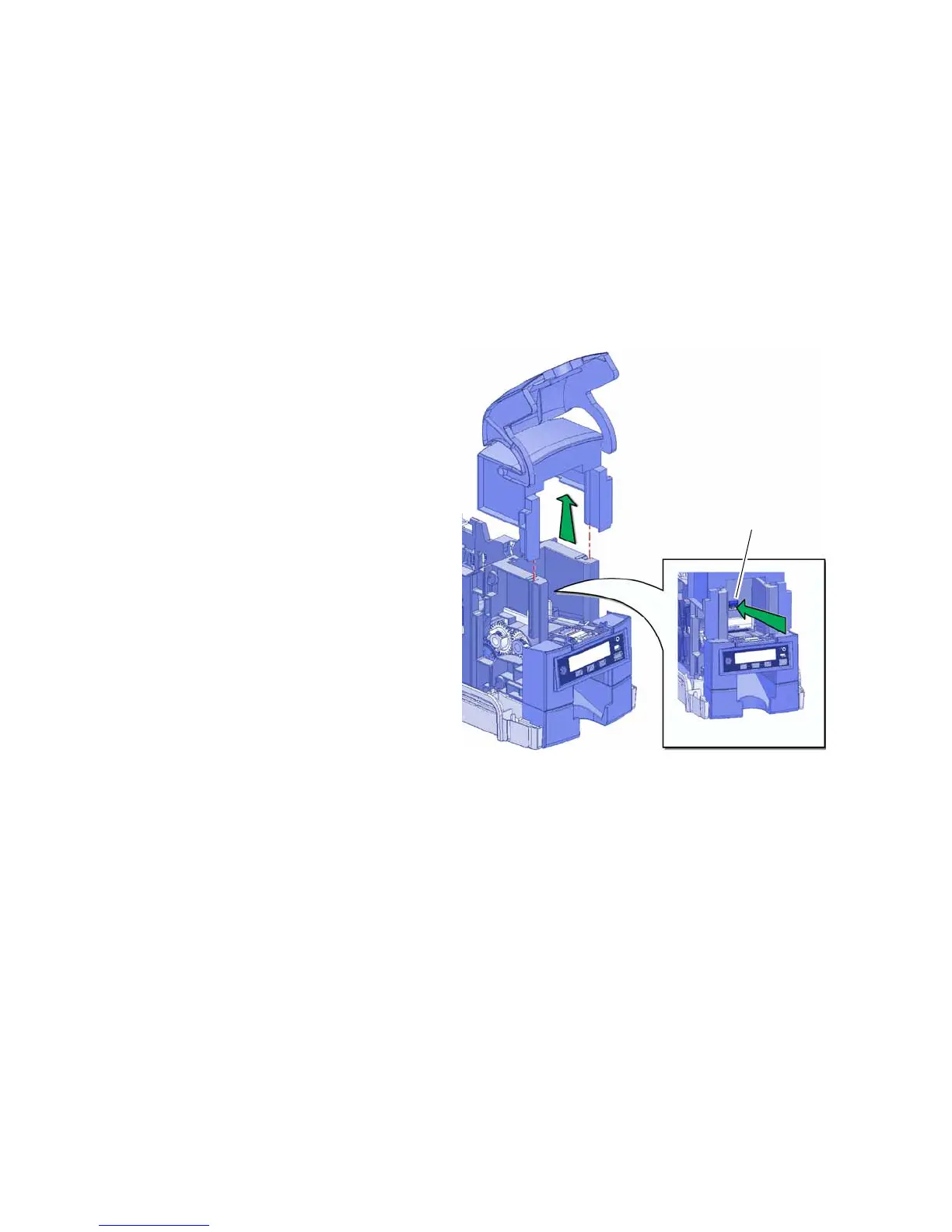
1. Opentheinputhopper.
2. Pressthereleasetablocatedonthe
backwallofthehopperwhile
liftingthehopperupandoffthe
printer.
3. Installthe200‐card
inputhopper
byaligningthetabswiththeslots
ontheprinter.
4. Pushthehopperdownuntilitclicks
intoplace.
5. Loadupto200cardsinthehopper
andclosethehoppercover.The
printerisreadytoprintcards.




 To Next Page