Enter/Exit Programming Mode
260
Gryphon™ I GD44XX/GBT4400/GM440X
BT PIN Code
After enabling Security Mode (see "BT Security Mode" on page 259), specify
whether you want to set a 4-digit or a 16-digit PIN Code. See page 304 for
detailed information and examples for setting this feature.
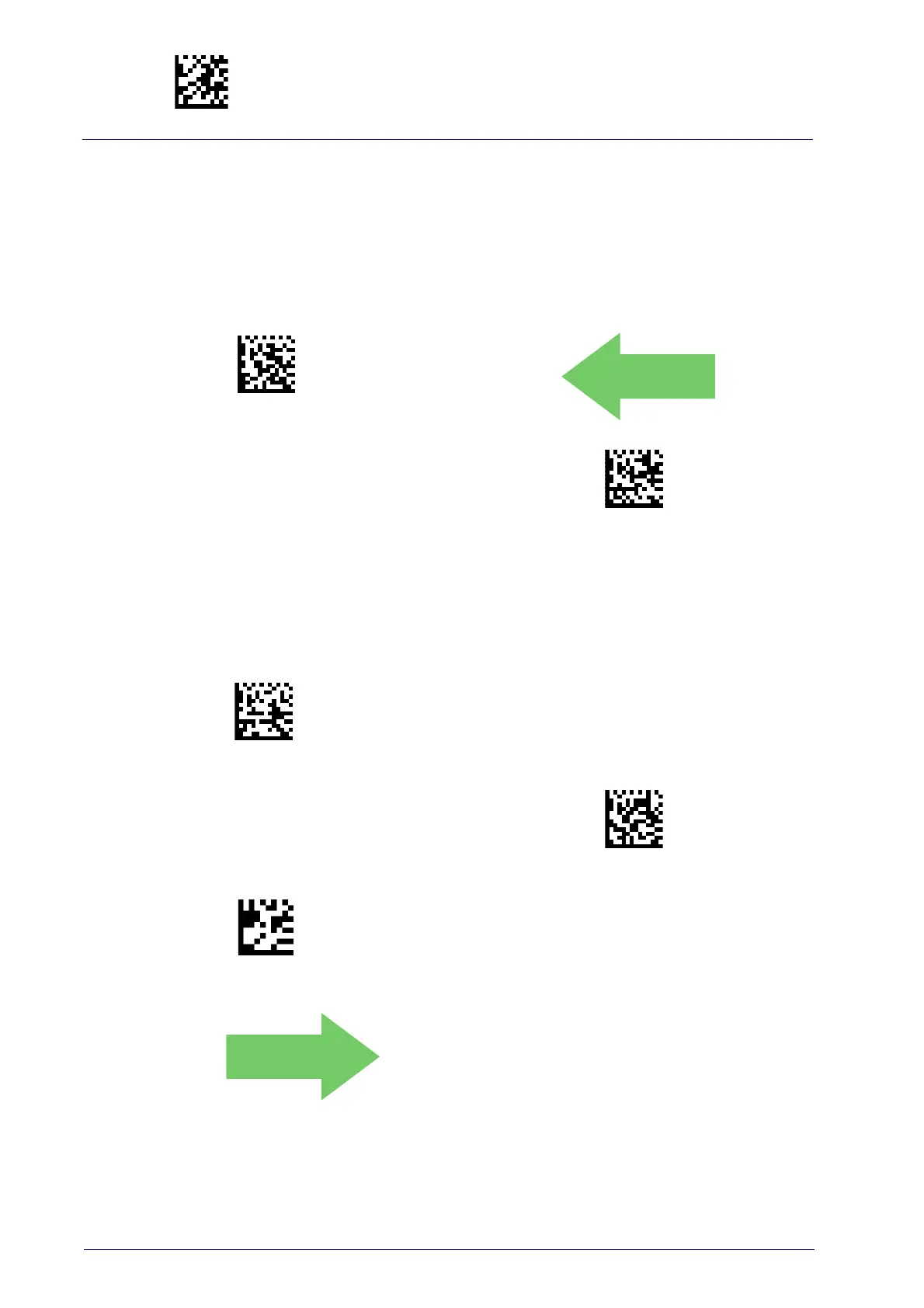
Select 4-character BT PIN Code
DEFAULT
Select 16-character BT PIN Code
Select PIN Code Length
Set PIN Code
Determine the desired characters for the PIN code, then convert to hexadec-
imal using the ASCII Chart on the inside back cove
r of this manual. See
page 304 for detailed information and examples for setting this feature.
Set 4-character BT PIN Code
To configure this feature, scan the ENTER/EXIT PROGRAM-
MING MODE bar code above, then the bar code at left fol-
lowed by the digits from the Alphanumeric characters in
Appendix D, Keypad
representing your desired charac-
ter(s). End by scanning the ENTER/EXIT bar code again.
Set 16-character BT PIN Code
CANCEL
Make a mistake? Scan the CANCEL bar code to abort and
not save the
entry string. You can then start again at the
beginning.
31323334 = Default PIN Code is 1234



 To Next Page
 Loading...