68
Mobile Viewing
Android
™
Viewing
From your Android
™
phone:
The easiest way to download and install the Asee application is directly from your Android
™
phone's marketplace. A
WI-FI network or 3G network must be available to your phone to download using this method.
1. Turn on the phone and enter the main menu.
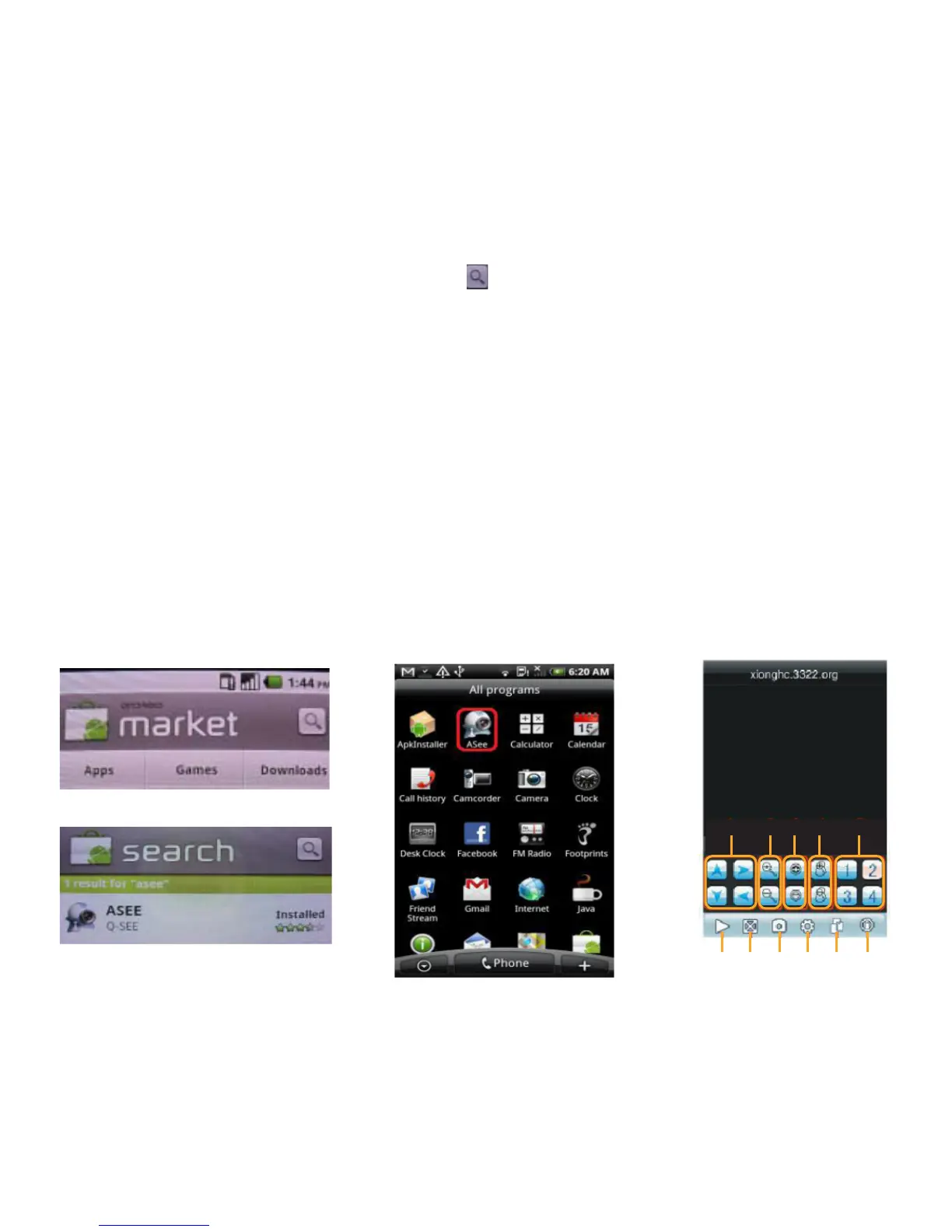
2. Select the MARKET icon, and select the SEARCH icon on the top right hand of the screen.
3. In the search field, type in Asee. The application will come up in the results. Asee is a free application.
4. Select the Asee application and press the INSTALL button on the bottom of the screen. The application will begin
downloading and install automatically when the download is finished.
5. Once the application finishes installing there will be an option to open the application. Choose this option on the
bottom of your screen.
6. From now on, the Asee application will be available from your main menu.
Installing viewing software to your phone’s SD card, from your computer:
1. Connect phone to computer and open the memory card folder.
2. Insert included CD into drive and open up to view files.
3. Copy and paste the android-viewing software onto the phone’s memory card or installation folder.
4. Open the SD card folder on your Android
™
phone and choose the ASEE.APK file.
5. The file will install and be available from your main menu.
Search Screen
Market Main Screen
A B C D E
F G H I J K
A- PTZ Direction
B- Zoom+ -
C- Aperture
D- Focus+ -
E- CH Select
F- Play & Pause
G- Full/Normal Screen
H- Snapshot
I- Setup
J- CH change
K- Help



 To Next Page