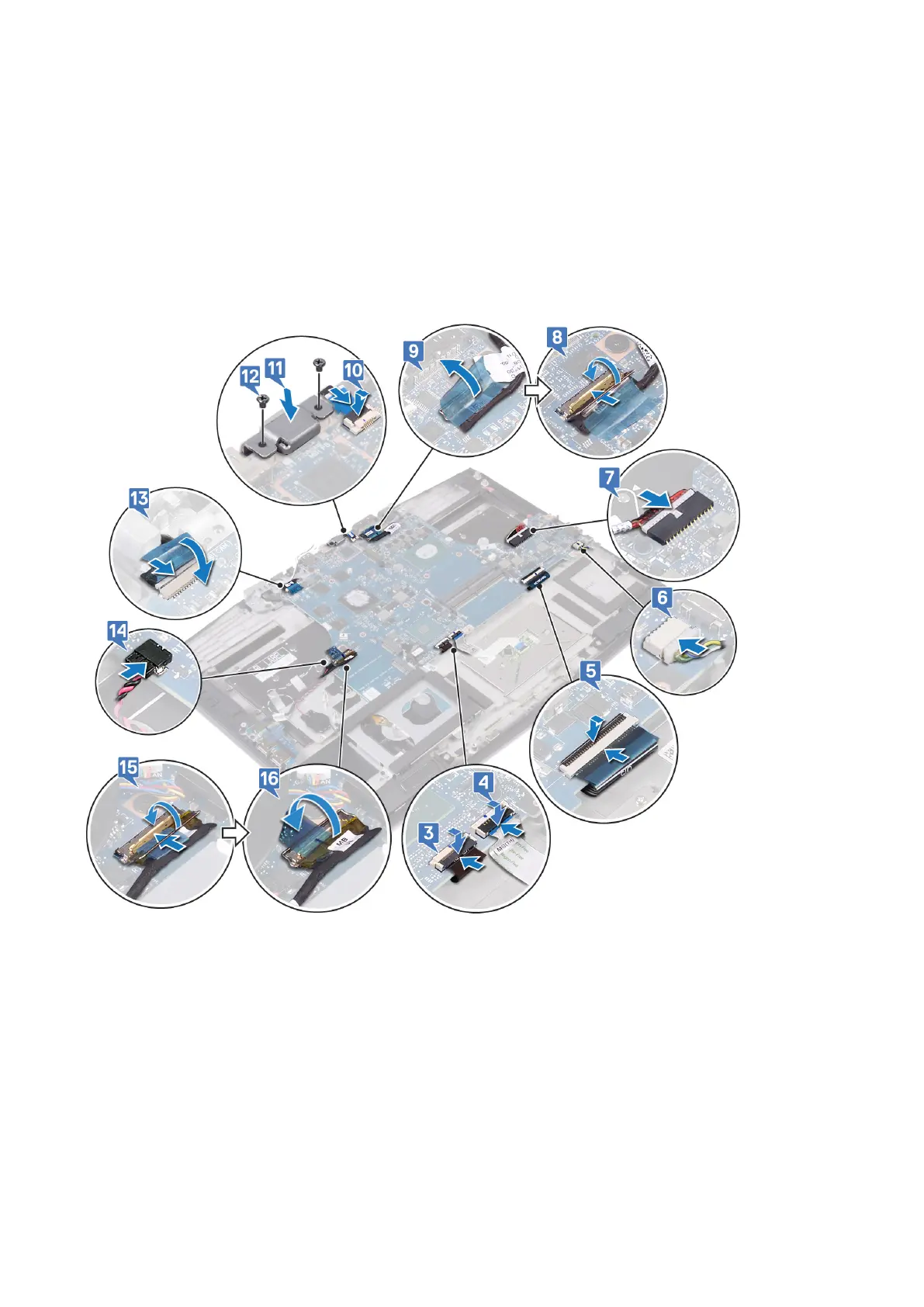
7. Connect the power-adapter port cable to the system board.
8. Connect the display cable and close the latch to secure the cable.
9. Adhere the tape that secures the display cable to the system board.
10. Connect the power-button board cable to the system board.
11. Place and align the USB Type-C port bracket on the palm-rest assembly.
12. Replace the two screws (M2x3) that secure the USB Type-C port bracket to the palm-rest assembly.
13. Connect the camera cable to the system board and adhere the tape that secures the camera cable to the system board.
14. Connect the coin-cell battery to the system board.
15. Connect the I/O-board cable to the system board and close the latch to secure the cable.
16. Adhere the tape that secures the I/O-board cable connector latch to the system board.
Post-requisites
1. Follow the procedure from step 2 to step 6 in Replacing the heat sink.
2. Replace the solid-state drive/Intel Optane.
3. Replace the wireless card.
4. Replace the memory modules.
5. Follow the procedure from step 4 to step 6 in Replacing the hard drive.
6. Replace the battery (half-length) or the battery (full-length), whichever applicable.
7. Replace the base cover.
90
Replacing the system board












 To Next Page