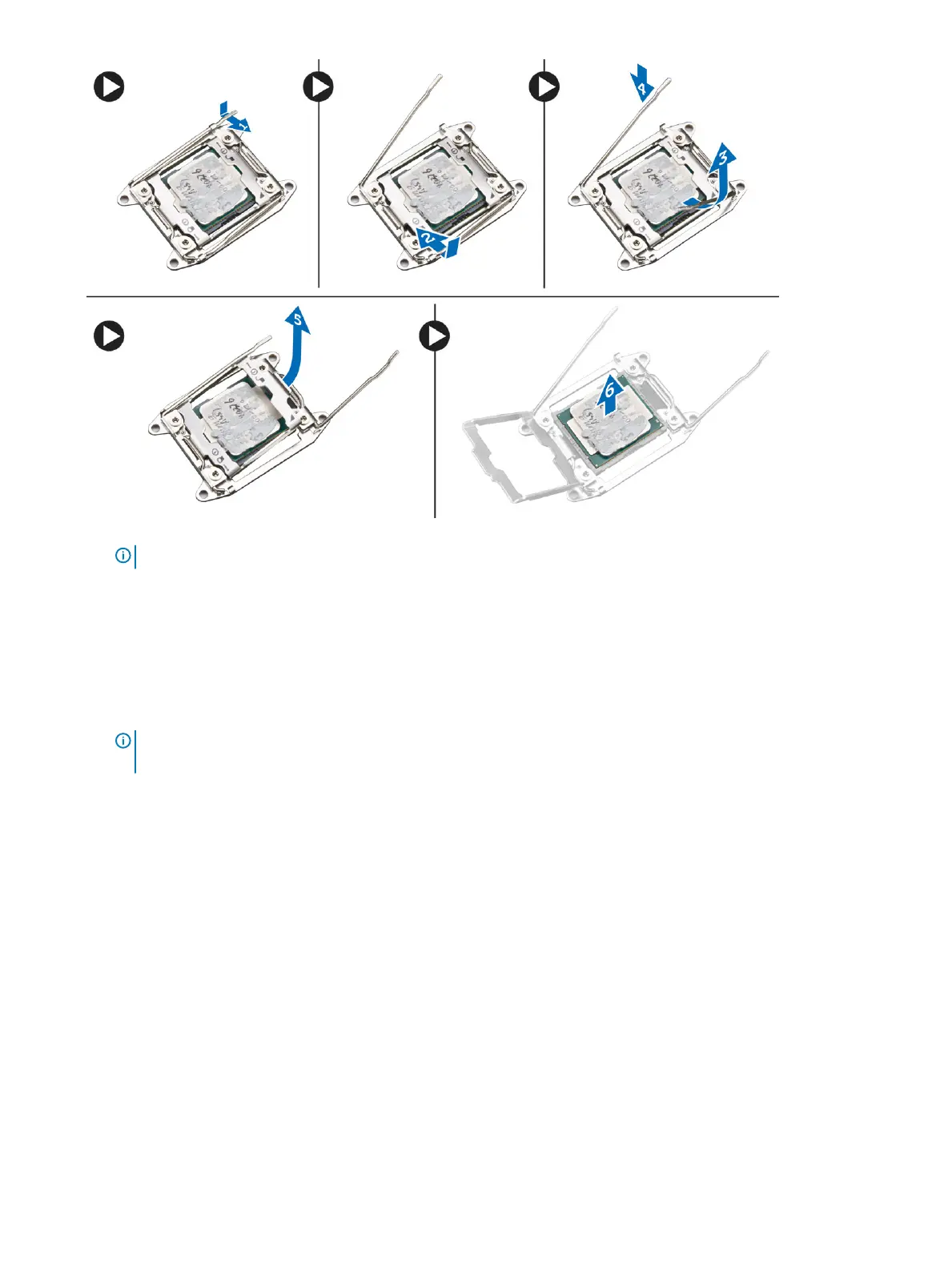
NOTE: Damaging pins during removal of the processor can cause damage to the processor.
4 Repeat the above steps to remove the second processor (if available) from the computer.
To verify if your computer has dual processor slots, see the System Board components.
Installing the Processor
1 Place the processor in its socket.
2 Replace the processor cover.
NOTE
: The processor cover is secured by two levers. They have icons that indicate which lever needs to be opened rst
and which lever closes rst.
3 Slide the rst lever sideways into the retention hook to secure the processor.
4 Repeat step '3' to slide the second lever into the retention hook.
5 Install:
a heatsink
b left cover
6 Follow the procedures in After Working Inside Your Computer.
Removing the Hard-Drive Fan
1 Follow the procedures in Before Working Inside Your Computer.
2 Remove:
a left cover
b right cover
3 Disconnect the hard-drive fan cable from the system board.
Removing and installing components
45



 To Next Page