156 Mini Tower Computer Parts
NOTE: Memory purchased from Dell is covered under your computer warranty.
Installing Memory
CAUTION: Before you begin any of the procedures in this section, follow the
safety instructions in the Product Information Guide.
NOTICE: To prevent static damage to components inside your computer, discharge
static electricity from your body before you touch any of your computer’s electronic
components. You can do so by touching an unpainted metal surface on the
computer chassis.
1
Follow the procedures in "Before You Begin" on page 143.
2
Remove the computer cover (see "Removing the Computer Cover" on
page 147).
3
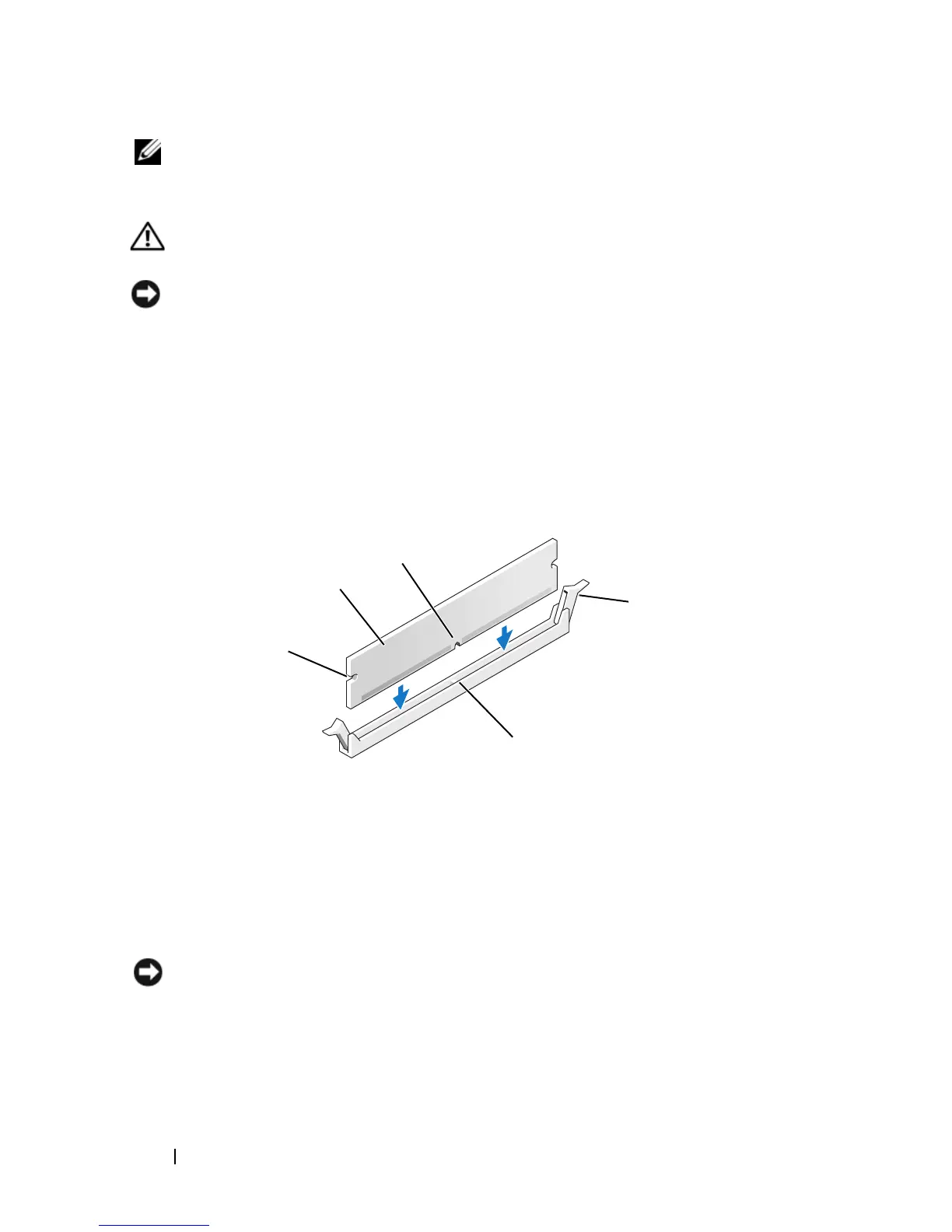
Press the securing clip at each end of the memory module connector.
4
Align the notch on the bottom of the module with the crossbar in the
connector.
NOTICE: To avoid damage to the memory module, press the module straight down
into the connector while you apply equal force to each end of the module.
5
Insert the module into the connector until the module snaps into position.
If you insert the module correctly, the securing clips snap into the cutouts
at each end of the module.
1 cutouts (2) 2 memory module
3 notch 4 securing clip (2)
5 crossbar
3
2
1
5
4














 To Next Page