Identifier GUID-94E88AEC-6F12-4B0E-AA6A-B28D8E200225
Status Released
Replacing the wireless card
WARNING: Before working inside your computer, read the safety
information that shipped with your computer and follow the steps in Before
working inside your computer. After working inside your computer, follow
the instructions in After working inside your computer. For more safety best
practices, see the Regulatory Compliance home page at www.dell.com/
regulatory_compliance.
Identifier GUID-1055C01E-E722-47F7-988C-908805AA070F
Status Released
Post-requisites
1 Replace the battery.
2 Replace the base cover.
Identifier GUID-4E6E9D8B-34B9-499F-9636-4848570A5A03
Status Released
Procedure
CAUTION: To avoid damage to the wireless card, do not place any cables
under it.
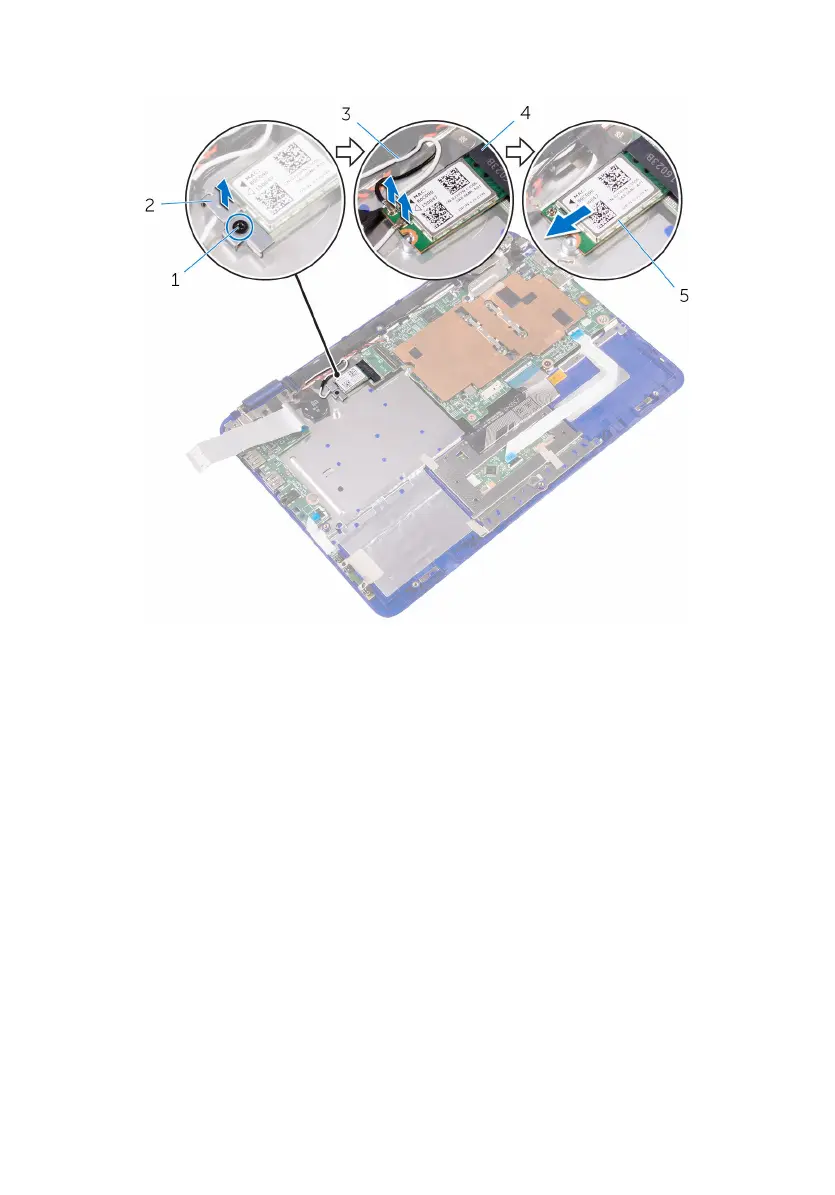
1 Align the notch on the wireless card with the tab on the wireless-card slot on
the system board.
2 Insert the wireless card at an angle into the wireless-card slot.
3 Align the screw hole on the wireless card with the screw hole on the system
board.
4 Replace the screw that secures the wireless card to the system board.
5 Connect the antenna cables to the wireless card.
41



 To Next Page