Chapter 7 Optional AccessoriesC2000
7-98
Frame D
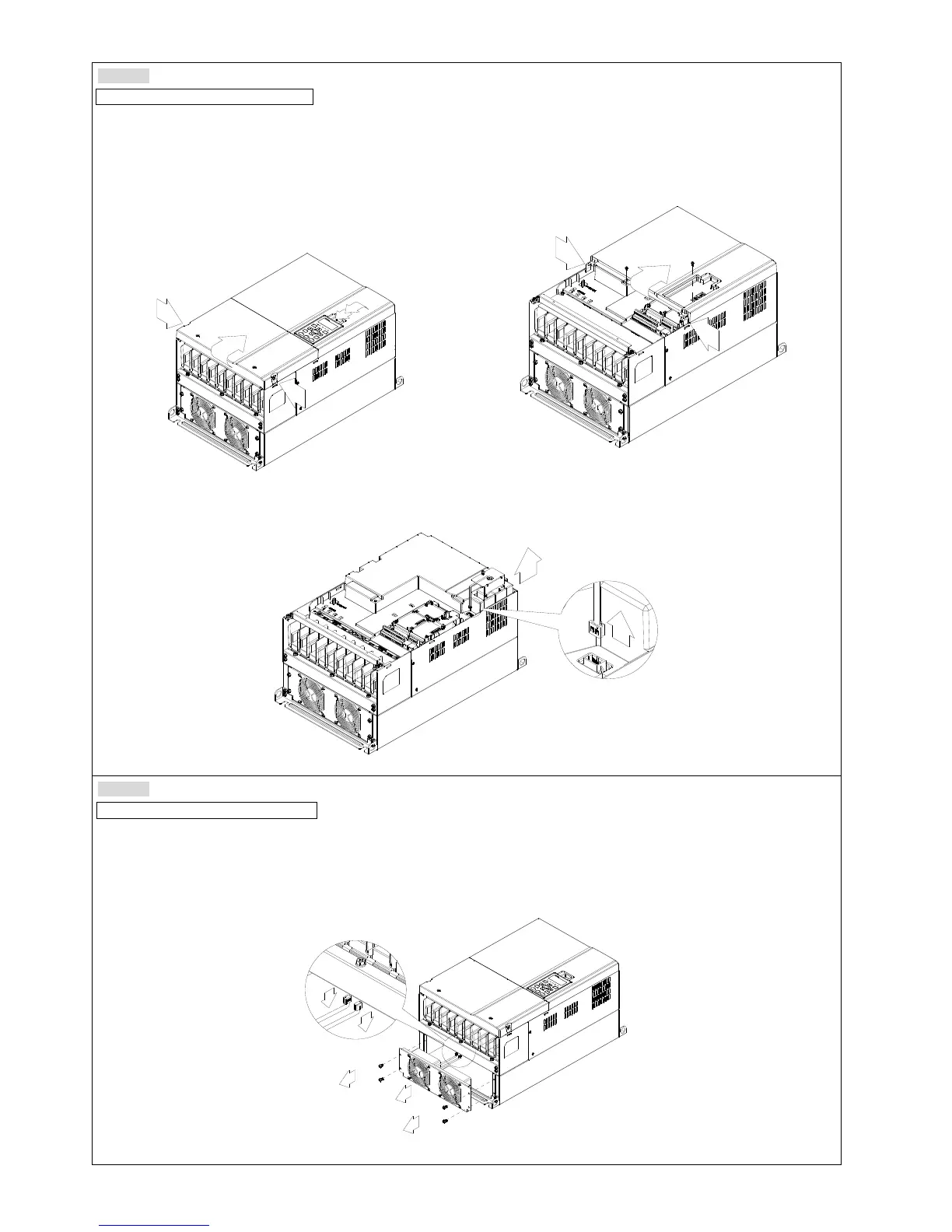
Model “MKC-DFKB” Capacitor Fan
Applicable model
VFD300C23A/23E; VFD370C23A/23E; VFD550C43A/43E; VFD750C43A/43E; VFD450C63B-00; VFD550C63B-00;
VFD450C63B-21; VFD550C63B-21
1. (Figure 1) Loosen screw 1 and screw 2, press the tab on
the right and the left to remove the cover, follow the
direction the arrows indicate in the following figure.
Press on the top of digital keypad to properly remove it.
Screw 1, 2 Torque: 12~15 kg-cm / [10.4~13 lb-in.] /
[1.2~1.5 Nm]
1
2
Figure 1
2. (Figure 2) Loosen screw 3 & 4, press the tab on the right
and the left to remove the cover. Screw 3, 4 Torque: 6~8
kg-cm / [5.2~6.9 lb-in.] / [0.6~0.8 Nm]
3
4
Figure 2
3. Loosen screw 5 (figure 3) and disconnect fan power and pull out the fan. (As shown in the enlarged picture 3)
Screw 5 Torque:
10~12 kg-cm / [8.6~10.4 lb-in.] / [1.0~1.2 Nm]
5
Figure 3
Frame D
Model “MKC-DFKM” Heat Sink Fan
Applicable model
VFD300C23A/23E; VFD370C23A/23E; VFD550C43A/43E; VFD750C43A/43E; VFD450C63B-00; VFD550C63B-00;
VFD450C63B-21; VFD550C63B-21
1. Loosen the screw and remove the fan kit. Screw torque: 24~26 kg-cm / [20.8~22.6 lb-in.] / [2.4~2.5 Nm]
2. (As shown Figure 1)
Before removing the fan, remove the cover by using a slotted screwdriver.
1
2
3
4
Figure 1










 To Next Page