EN-46 Originalbetriebsanleitung Allgemein
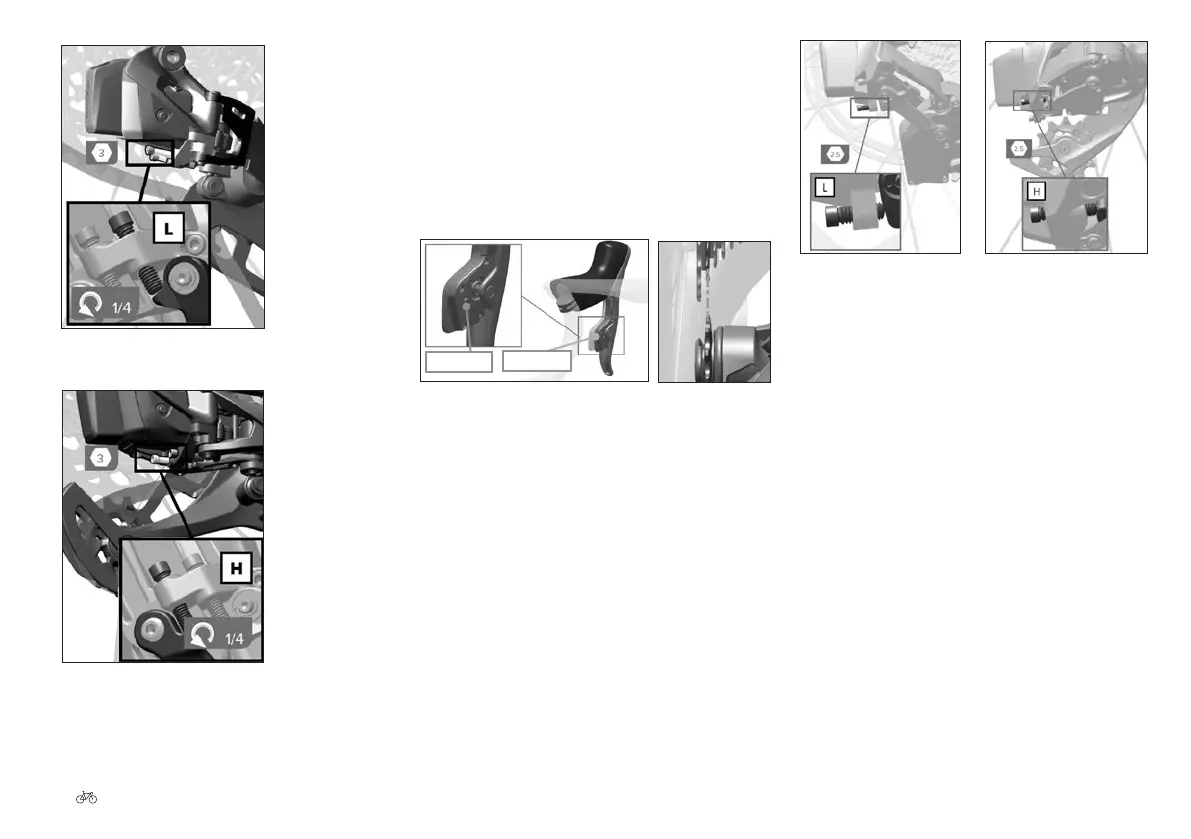
Fig. 92 Stop screw H ©Sram
Fig. 91 Stop screw L ©Sram
24.3.3.4 Sram eTap AXS electronic
derailleur
Setting the rear derailleur
1. Align the upper shift pulley with the middle of the
second largest sprocket by holding the AXS button
on the rear derailleur in the pressed position while
pushing the gear lever inward. The left-hand gear lever
adjusts the rear derailleur inward, and the right-hand
gear lever outward.
Fig. 93 Aligning the shift pulley ©Sram
AXS button
Gear lever
2. Shift the rear derailleur inward to the largest sprocket.
The rear derailleur cage may come into contact with
the rear wheel before the chain is installed. This is
normal.
3. Set the lower stop screw (L) so that it lightly touches
the stop of the inner parallelogram body.
4. Shift the rear derailleur outward to the smallest
sprocket.
5. Set the upper stop screw (H) so that it lightly touches
the stop of the inner parallelogram body.
Fig. 95 Stop screw H
©Sram
Fig. 94 Stop screw L
©Sram
Setting the front derailleur
The front derailleur only needs to be set for 2-derailleur
systems. To set the upper stop screw, the front derailleur
must be in its outer position. Setting the upper stop screw
of the front derailleur while the front derailleur is in the
inner position can cause permanent damage to the front
derailleur. The upper stop screw has a left-handed thread.
1. Shift the rear derailleur outward to the smallest
sprocket. Ensure that the front derailleur is in the
outer position and that the chain is on the large
chainring and the smallest sprocket.
2. Turn the upper stop screw until the distance between
the inside of the outer front derailleur cage plate and
the chain is between 0.5 and 1 mm.











 To Next Page