EN-50 Originalbetriebsanleitung Allgemein
Information
The Carbon Drive app works best in a quiet
environment.
1. Pedelec/S-Pedelec: Remove the battery.
2. Load the app on to your smartphone.
3. Start the app.
4. Select the tension icon.
5. Switch on the microphone, click “Measure” and hold
the phone over the middle of the belt making sure that
the microphone is pointing towards the belt.
6. Pluck the belt so that it vibrates like a guitar string.
The app converts the sound into the natural frequency
of the belt.
7. Turn the pedal crank a quarter of a revolution and
repeat the measurement.
8. Compare the frequency of the belt with the reference
value to see if the tension needs adjusting.
Speciedtension
values
Small, light
rider
Large,heavy
rider
Hub gear 50 Hz 60 Hz
26.2 Adjusting the belt tension
Notice
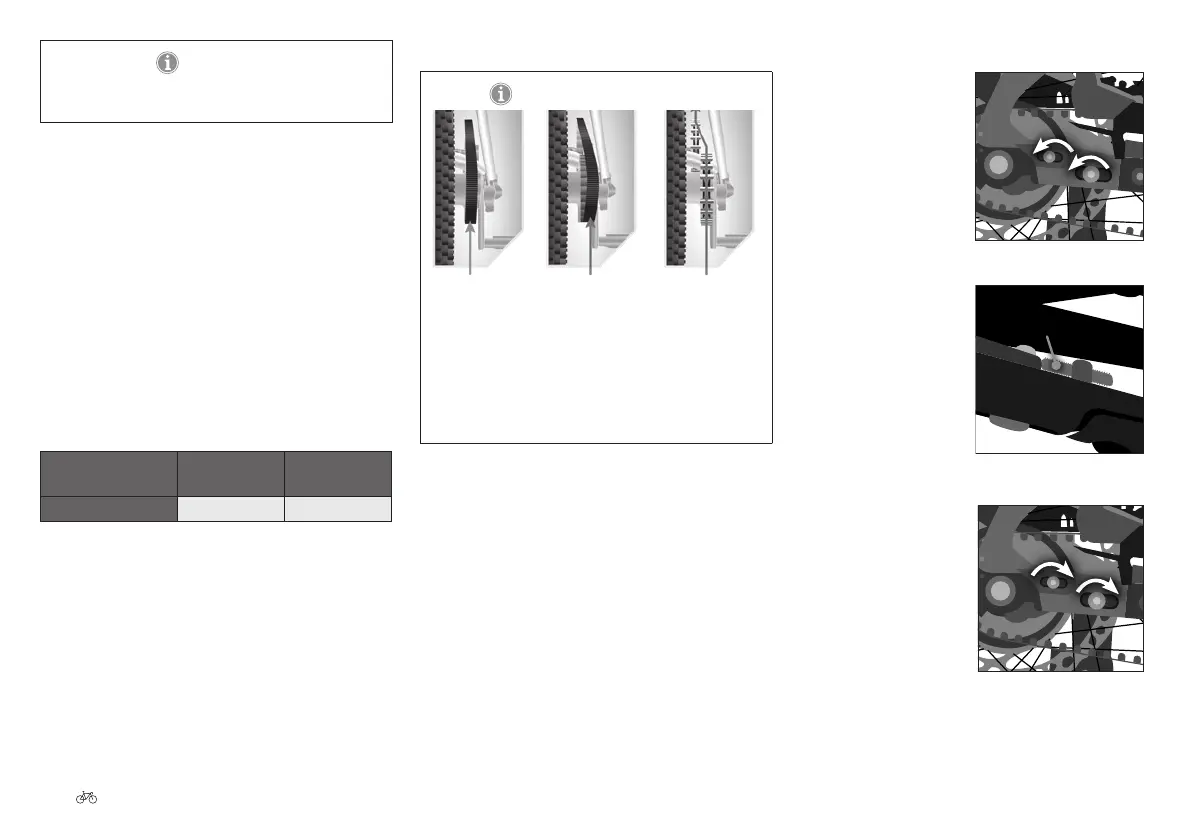
Correct
alignment
Sprockets are not
aligned correctly
Sprockets are not
aligned correctly
Fig. 108 Aligning the belt ©Gates
When adjusting the tension, the correct alignment of
the belt must be maintained. Otherwise it can cause
noise, premature wear of the belt or sprocket, and the
belt to come o the drive.
26.2.1 Drop-out I: adjusting the belt tension
1. Pedelec/S-Pedelec:
Remove the battery.
2. Undo the bolts from
the drop-out by turning
these anticlockwise. Do
not remove the bolts
completely.
3. Increase or reduce the
tension with the set
screw.
4. Tighten the drop-out
screws clockwise to a
torque setting of
16 - 20 Nm .
Fig. 109 Loosening the screws
Setting screw
Fig. 110 Turning the setting
screw
Fig. 111 Tightening the screws











 To Next Page