40
S
2M
Connector Module
S
2M
Connector Module
The S
2M
connector module allows
you to operate an OpenCom 120 on
a primary rate access. This access
provides up to 30 voice channels.
You can also use the S
2M
port to net-
work two systems, e.g. in order to
use the OpenCom 120 as a subsidi-
ary system or DECT server.
Note: The maximum cable attenu-
ation between the OpenCom 120 and
the other system (NT or telephone ex-
change) must not exceed 6 dB. This
corresponds to a length of approx.
150 to 200 m, depending on the type
of cable used.
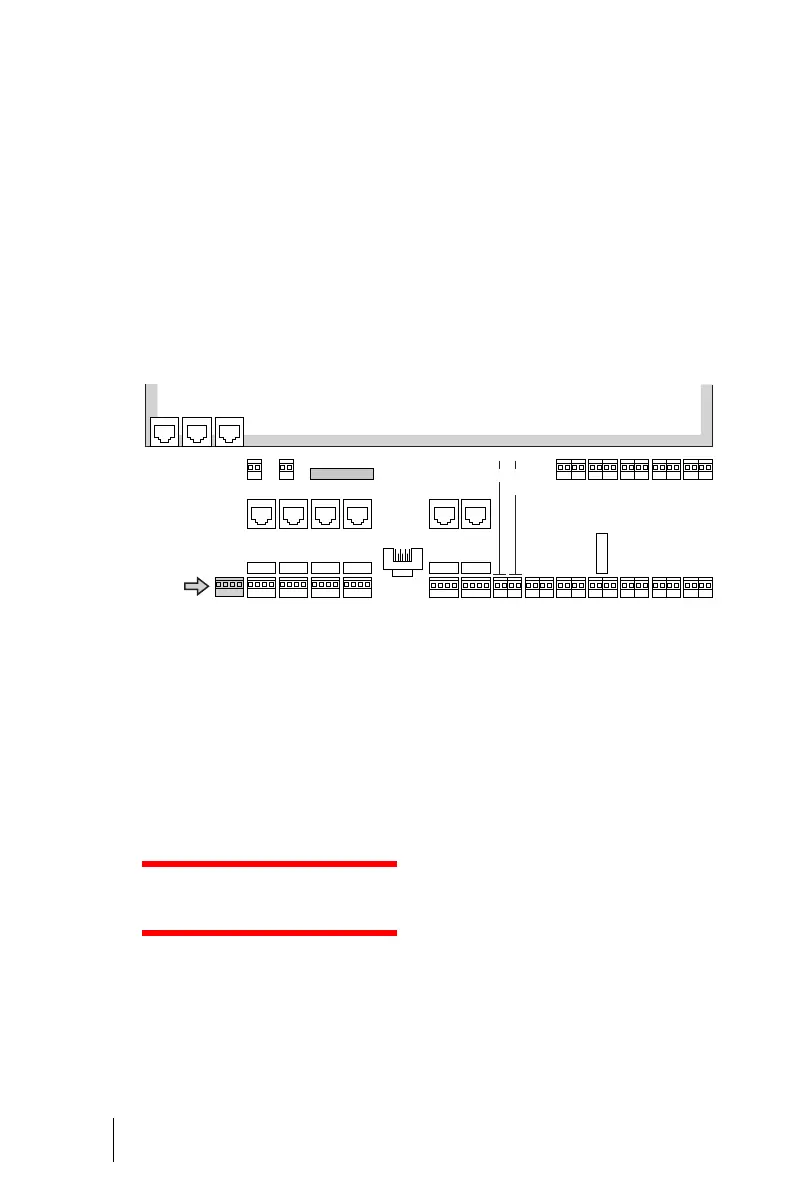
Location of the S
2M
port on the connector module of the OpenCom 120
Installation
Please note: The module should
only be installed by trained person-
nel.
DANGER! The device con-
tains hazardous voltages.
1. Pull out the mains plug of the
OpenCom 120.
2. Open the housing of the
OpenCom 120.
3. For some models of the
OpenCom 120 a separate mod-
ule cover exists. Remove the
cover of the module. To do this,
push back the two locking le-
vers, (1) and (2), and lift off the
cover.
LAN 1PCM
R R
R R
R R
LAN 2
U
pn
9/10
U
pn
11/12
U
pn
13/14
U
pn
15/16
U
pn
17/18
U
pn
1/2
U
pn
3/4
U
pn
5/6
U
pn
7/8
a/b
1/2
a/b
3/4
S
0
5
int
S
0
6
int
S
0
1
int
S
0
2
int
S
0
3
int
S
0
4
int
S
2M
COM
S
0
5
ext
S
0
6
ext
S
0
1
ext
S
0
2
ext
S
0
3
ext
S
0
4
ext
Sync Sensor
Default setting
Intercom/Door opener
Intercom/
Relay
E
Actuator
1 + 2



 To Next Page