Dexcom G5 Mobile CGM System Quick Start Guide • 31
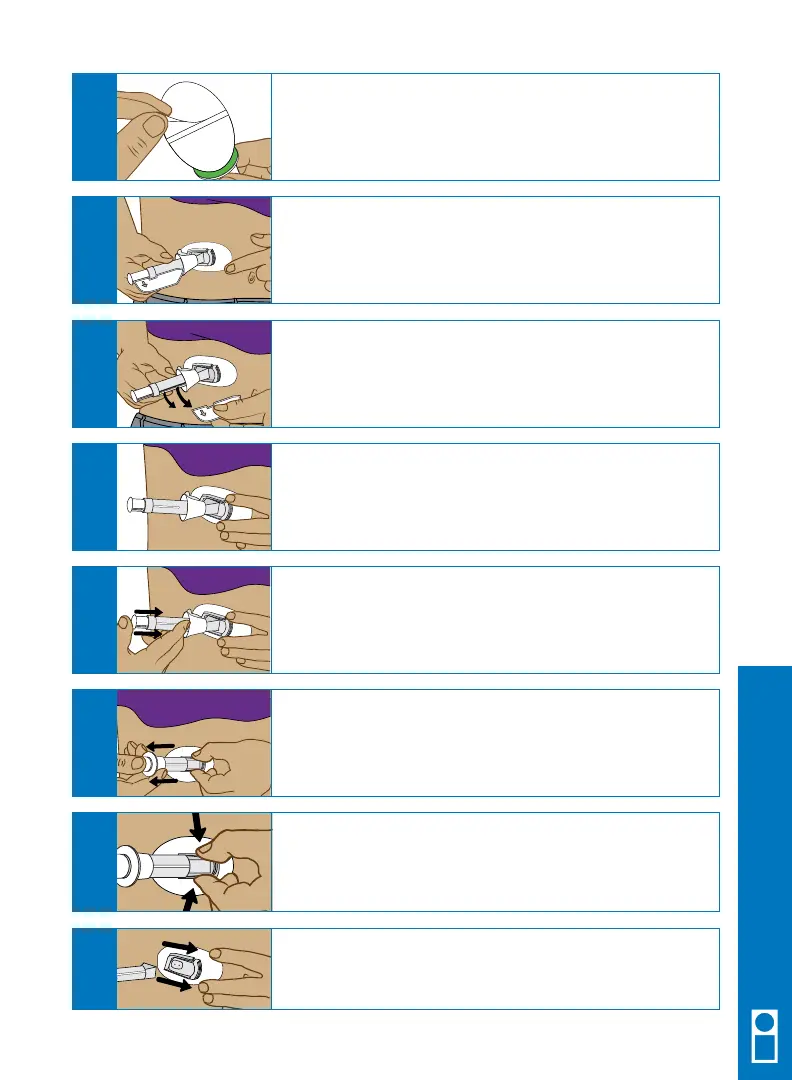
Place the sensor pod horizontally on your skin.
Move your fingers around the adhesive patch to secure
the tape to your skin.
D
Hold the applicator, and pull the safety lock straight out.
E
Place the fingers of one hand at the edge of the
white adhesive.
You may pinch up on your skin using this hand.
F
Place two fingers ABOVE the collar and your thumb on
the white plunger. Push down the plunger. You should
hear 2 clicks.
G
Move your two fingers from above the collar to below
the collar. Pull the collar back towards your thumb until
you hear 2 clicks or cannot pull back any more.
2 “clicks”
H
While squeezing the tabs, rock the applicator
barrel forward and away from your body.
J
Squeeze the ribbed tabs on the sides of the
sensor pod.
I
Remove the adhesive backing from the sensor pod
one half at a time.
C
Receiver Setup & Operation



 To Next Page