30 • Dexcom G5 Mobile CGM System Quick Start Guide
Before you begin, make sure you have alcohol wipes, a sensor, and a transmitter.
Skin preparation or adhesive products (Mastisol
®
, Skin Tac™) are optional. Wash
and dry your hands.
Choose a site at least 3 inches from your insulin pump infusion set or injection site
and out of the way of your waistband. Avoid areas likely to be bumped, pushed, with
scarring, tattoos or irritation.
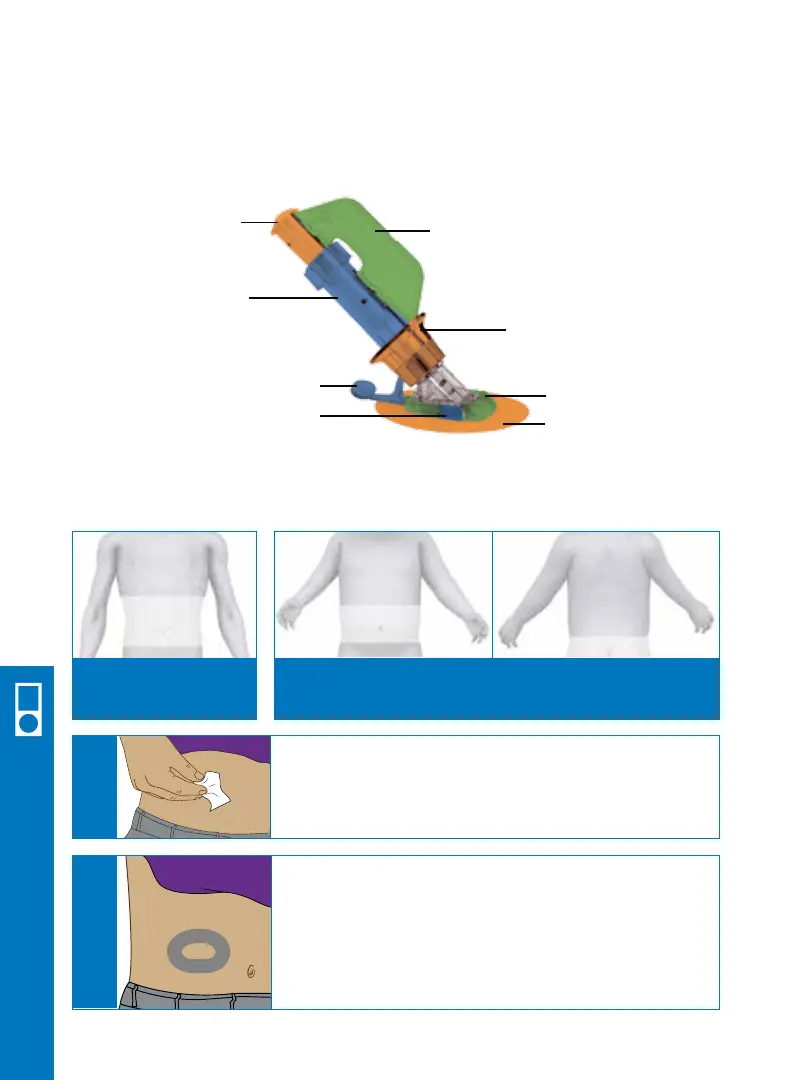
Plunger
Applicator barrel
(Contains small
introducer needle
and sensor)
Transmitter Latch
Safety Lock
Collar
Sensor Pod
Release Tab
Adhesive
Ages 18 years or older:
Insert in the belly
Ages 2 to 17 years:
Insert in the belly or the upper buttocks
Clean your skin at the sensor placement site with an
alcohol wipe.
Let dry.
A
If you use an optional skin prep or adhesive product,
place it on the skin in a “doughnut” shape where you
will place the sensor adhesive patch. Let dry (skin may
feel slightly sticky). Insert the sensor through the clean
skin at the center of the doughnut where it is free of
skin preparation or adhesive products.
B
6.3 Insert Sensor
Receiver Setup & Operation



 To Next Page